Design for Performance
Chapter Info
Calculating... Writing Progress: 90%
Performance is about how effectively a system turns time and resources into useful work. It may mean answering a request in milliseconds, processing millions of events per second, completing a computation within a deadline, or sustaining a workload without saturation. What “fast enough” means depends on the system, but it must always be defined against a workload and a measurable objective.
Designing for performance means understanding where time and resources are spent, identifying what limits the system, and improving the parts that actually matter. This chapter develops that discipline: define the performance target, measure the system under realistic conditions, eliminate unnecessary work, optimize the bottleneck, and validate the result as load grows.
Performance Foundations [Foundations]
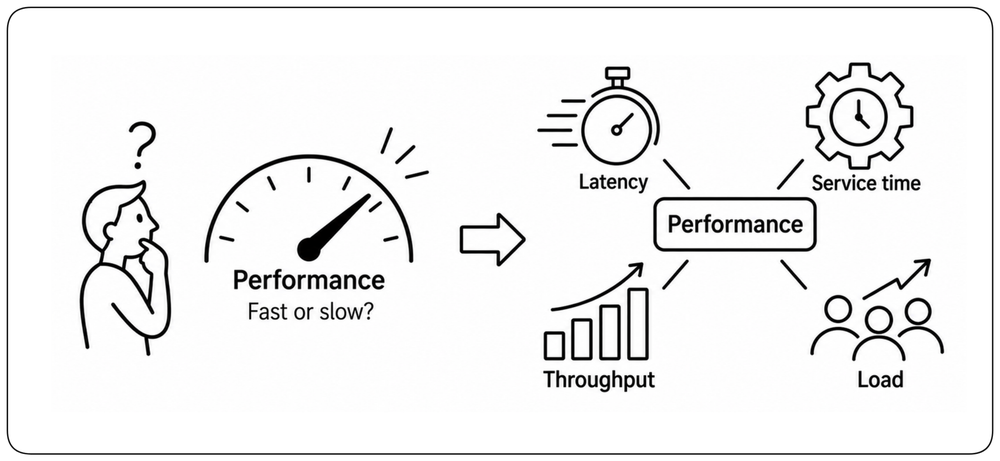
Performance sounds like a single metric — fast or slow — but the reality is a constellation of attributes. Latency, service time, throughput, and load interact, and the right target depends entirely on what the system must accomplish.
What Performance Promises [Definition] {1}
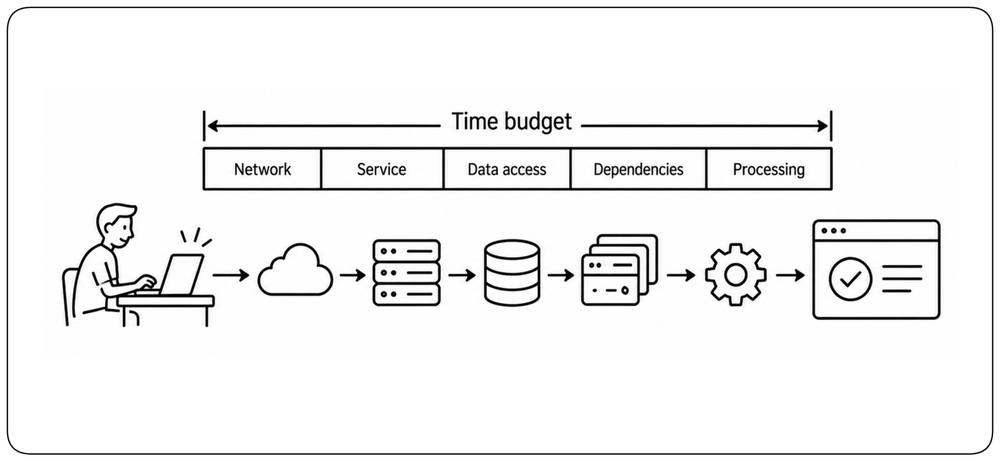
The system responds fast enough for the people and processes that depend on it. !!Performance is not one number — it is a budget on time, distributed across every layer the request touches.!! A well-performing system feels invisible: users click, results appear, and nothing in between announces itself. Every architectural decision either spends from that time budget or protects it.
Latency, Processing Time, and Throughput [Metrics] {1}
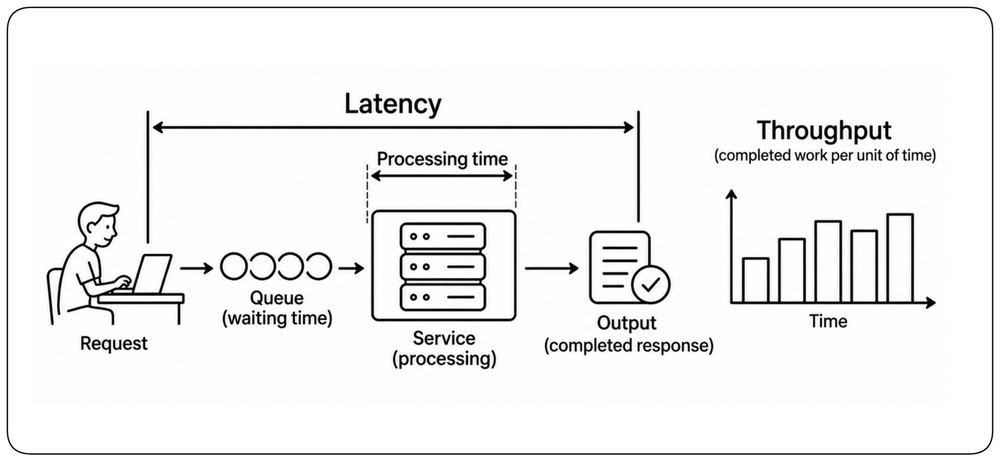
Latency is how long one unit of work takes from start to finish. Processing time is the part of that time spent actually doing the work. Throughput is how many units of work the system completes per unit of time. Under load, waiting time can grow even when processing time stays almost constant. Good performance means meeting the required latency while sustaining the required throughput.
Percentiles, not Averages [Percentiles] {1}
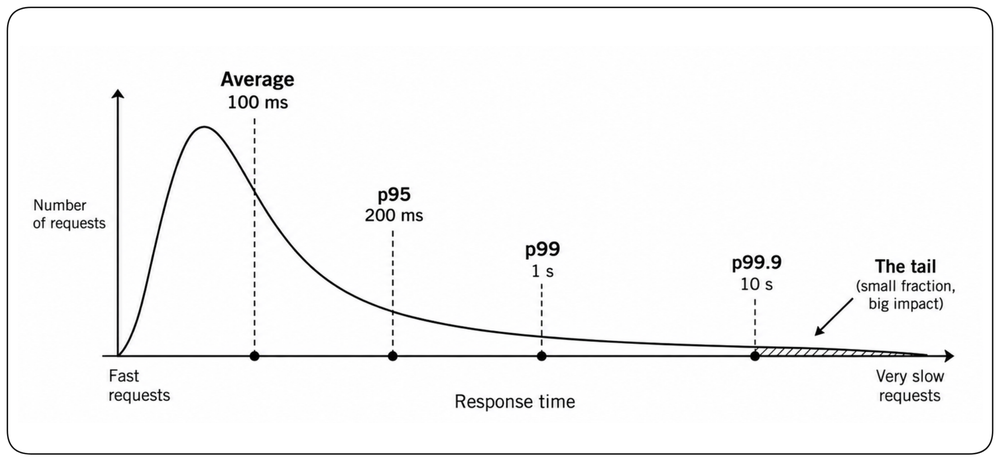
Averages hide the tail. A service with a 100 ms average can still have a small fraction of requests taking several seconds. Percentiles such as p95, p99, and p999 expose those slow experiences and reveal slow paths, retries, and contention that the mean can hide. Design for the tail when the tail matters to the user experience.
Define Performance SLOs [SLOs] {1}
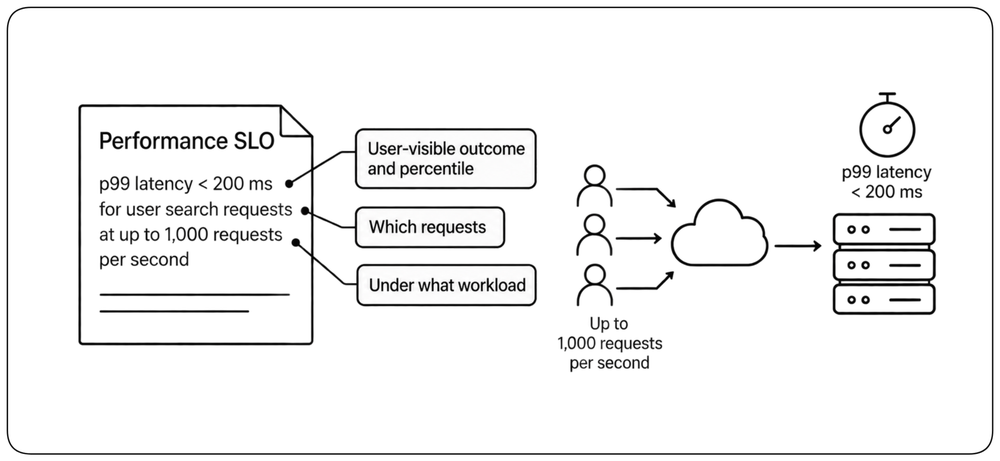
A performance requirement should state what is measured, for which requests, and under what workload. “p99 latency below 200 ms” is meaningful only when the request population and expected traffic are defined. A good performance SLO combines a user-visible outcome, a percentile, and an operating condition. It defines the performance the architecture must preserve, not merely the speed observed in an isolated benchmark.
Performance Depends on Load [Load] {1}
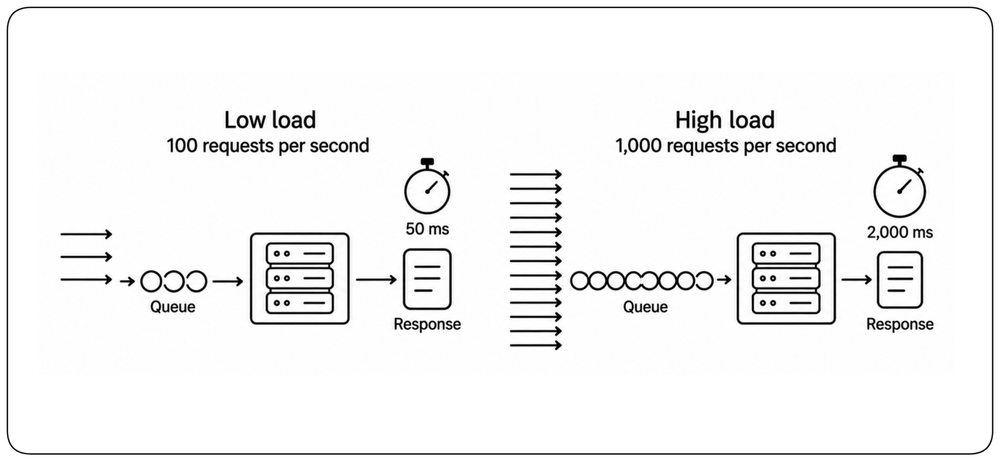
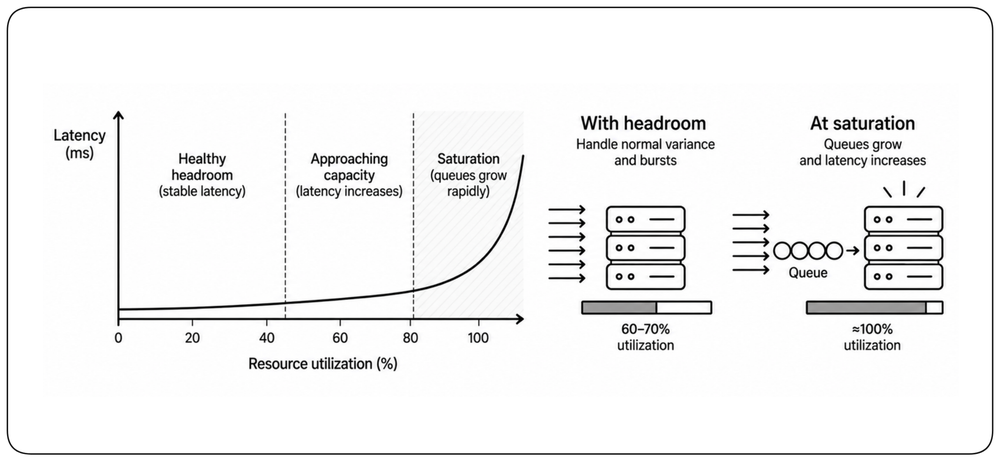
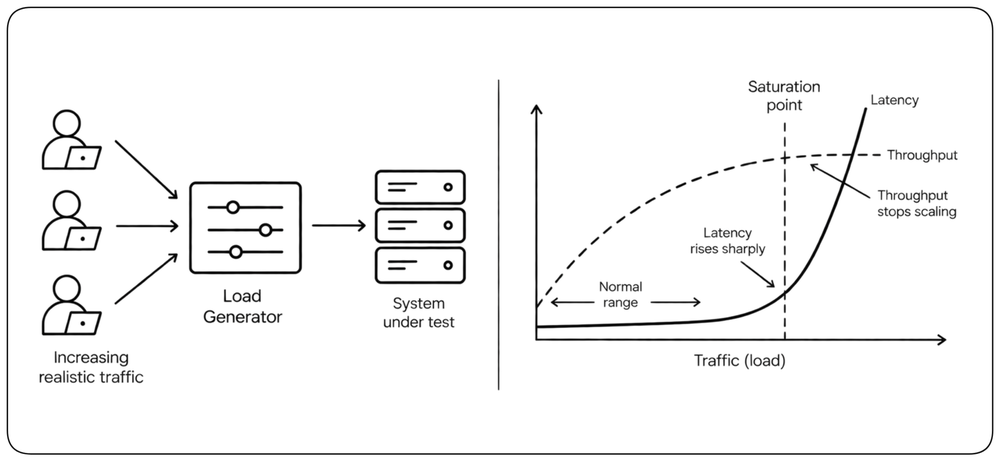
Performance is meaningful only at a stated load. A system may respond in 50 ms at 100 requests per second and in 2 seconds at 1,000. As utilization approaches the capacity of a constrained resource, queues grow and tail latency can rise dramatically. A latency target without a throughput or concurrency target is incomplete. Define the workload the system must sustain, not only how fast an isolated request should be.
Design for Headroom [Headroom] {1}
Systems should not be designed to operate permanently at their saturation point. Traffic varies, requests differ in cost, dependencies slow down, and failures reduce available capacity. Keep enough headroom to absorb normal variance and bursts without entering the region where queues and latency grow rapidly. Capacity planning is not only about handling the expected load, but about preserving acceptable performance when conditions are less favorable.
Performance is a Business Concern [Business]
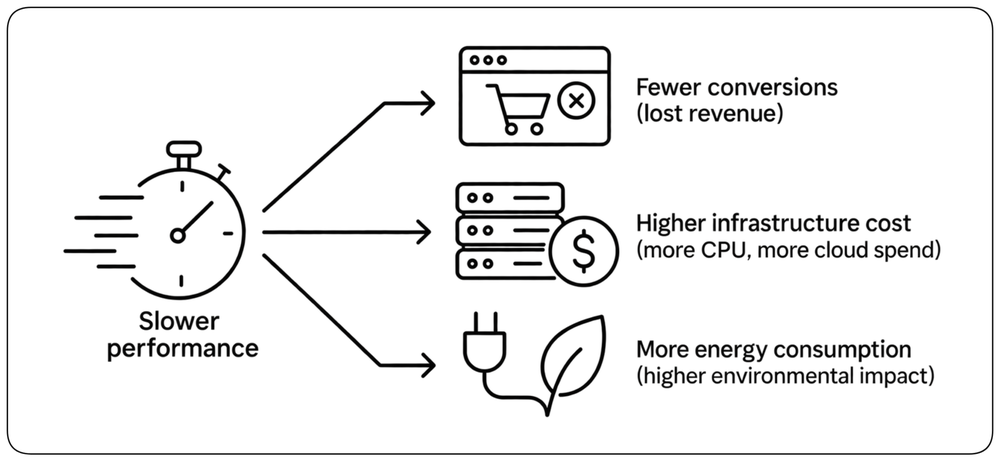
Slow systems affect more than user experience. They can reduce conversion, increase infrastructure cost, consume more energy, and limit how much useful work the system can sustain. Performance therefore has direct product and business consequences, not just technical ones.
Performance vs Efficiency [Performance vs Efficiency] {1}
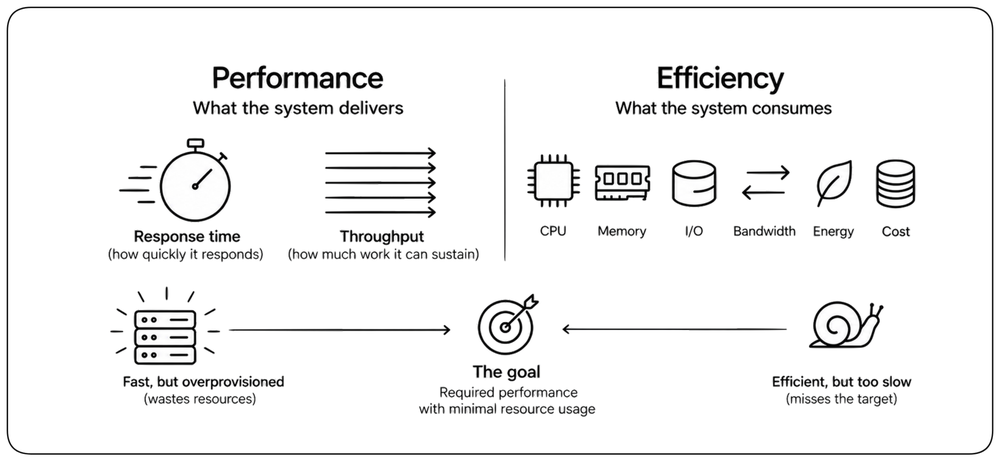
Performance measures what a system delivers: how quickly it responds and how much work it can sustain. Efficiency measures what the system consumes to deliver it: CPU, memory, I/O, bandwidth, energy, and cost. A system can be fast because it is massively overprovisioned, or efficient but still too slow. Good design aims to meet the required performance while consuming no more resources than necessary.
Core Performance Principles [Principles]
Performance describes what a system delivers; efficiency describes the resources it consumes to deliver it. The techniques in this section are general ways to improve one or both without tying the chapter to a particular runtime or workload.
Reduce Work Before Making Work Faster [Reduce Work] {1}
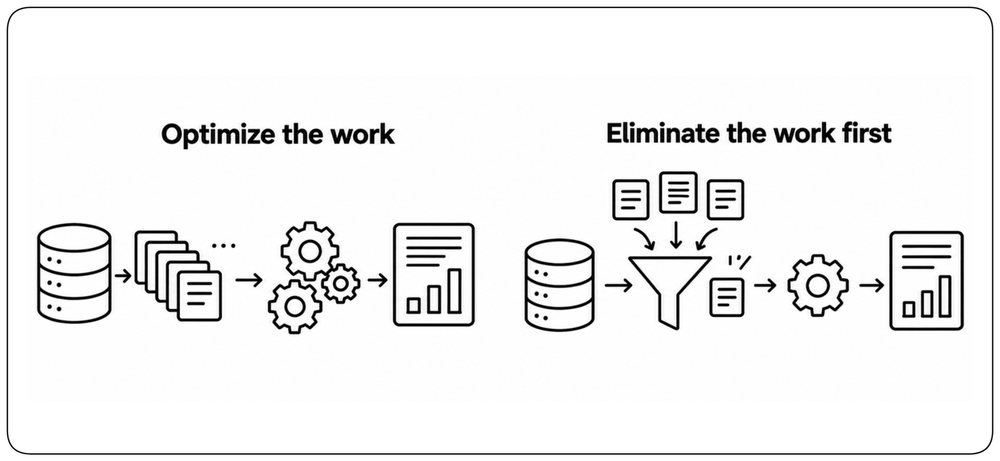
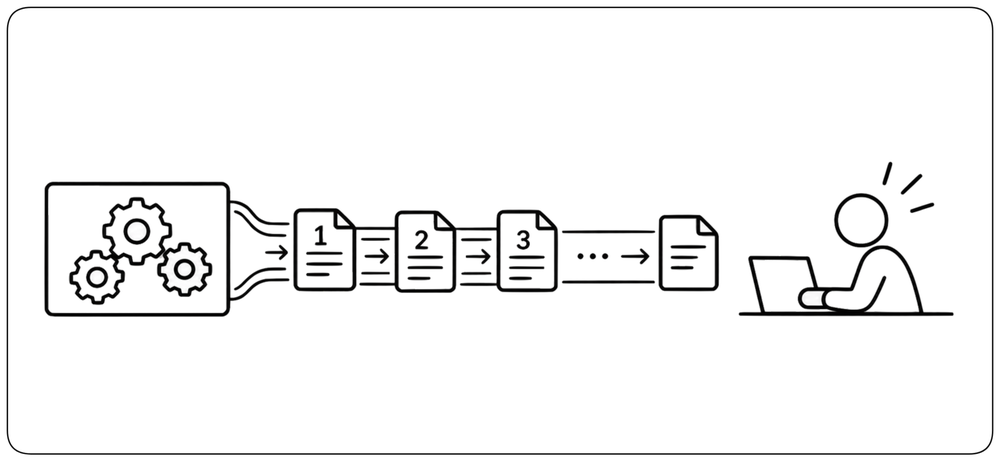
The cheapest operation is the one the system does not perform. Before making code faster, ask whether the work is necessary at all. Eliminate redundant queries, repeated computation, unnecessary serialization, excessive data transfer, and work whose result is never consumed. Reducing the amount of work often produces larger and simpler gains than optimizing the same work.
Amortize Fixed Costs [Amortization] {1}
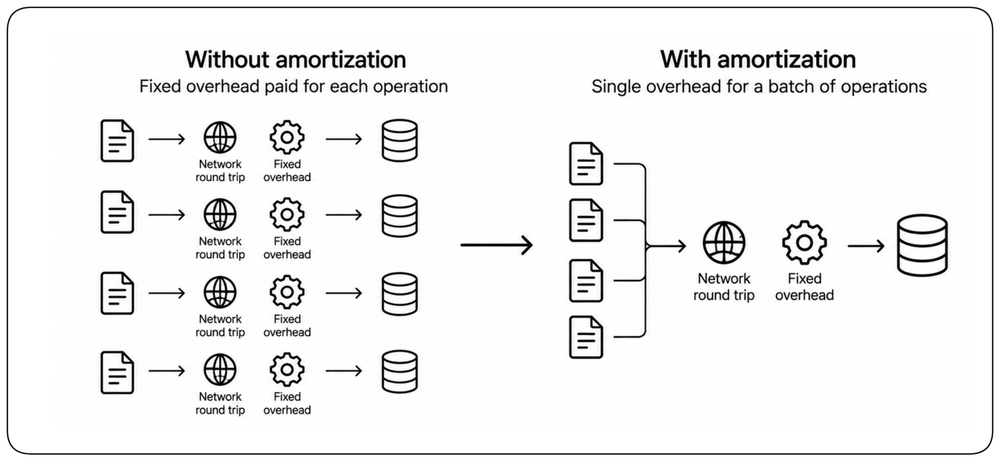
Many operations carry a fixed overhead regardless of how much useful work they perform: a network round trip, transaction, lock acquisition, system call, or protocol exchange. Batching, pooling, connection reuse, and vectorized operations spread that overhead across more useful work. The goal is not maximum batching, but enough amortization to improve efficiency without violating latency requirements.
Reuse Work [Reuse]
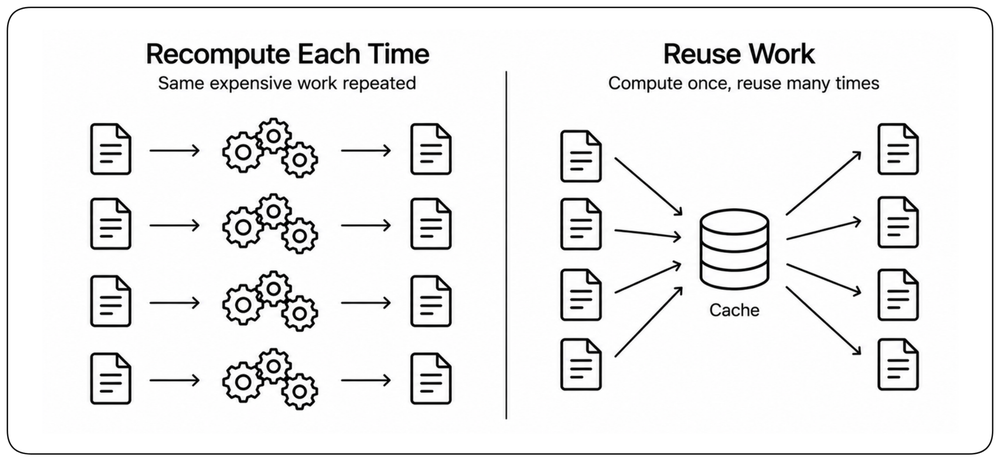
Do not recompute what the system already knows. Caching, memoization, shared intermediate results, precomputed data, compiled artifacts, and reusable connections avoid repeating expensive work. Reuse can improve latency, throughput, and resource efficiency at the same time. The price is state: freshness, invalidation, memory consumption, and lifecycle management must remain explicit.
Use the Cheapest Representation That Works [Representation]
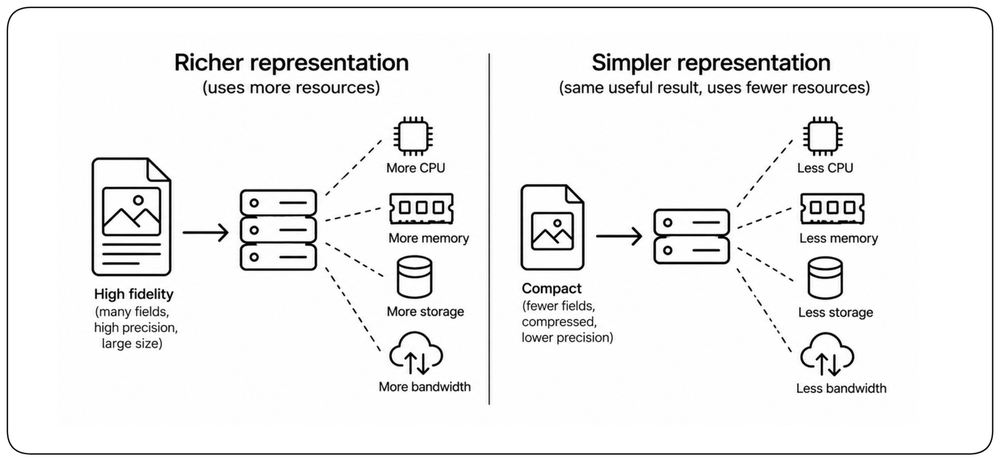
More precision and richer representations usually require more compute, memory, storage, or bandwidth. When the requirement allows it, use the smallest and simplest representation that preserves the needed result: fewer fields, compact serialization, compressed data, smaller indexes, or lower numerical precision. Do not pay for precision, fidelity, or information the workload does not need.
Overlap Work Instead of Waiting [Overlap]
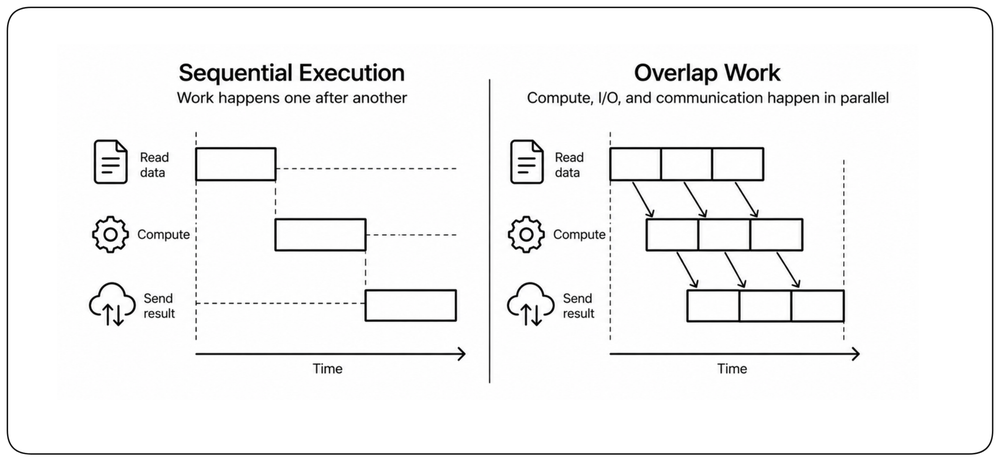
Independent work does not always need to happen sequentially. Pipelining, streaming, asynchronous I/O, and concurrent execution can overlap computation, communication, and waiting. The total amount of work may remain the same, but less time is spent with resources idle and less work remains on the critical path. Parallelism helps only when the work is genuinely independent and the additional concurrency does not create a new bottleneck.
Stream Results as They Become Available [Streaming]
A result does not always need to be complete before useful work can begin. Streaming lets a system deliver data incrementally as it is produced, reducing time to first result and avoiding the latency of waiting for the entire response. It is especially valuable for large responses, long-running computations, and generated content. Streaming may not reduce total processing time, but it can significantly reduce the latency users actually perceive.
Fix Performance Before You Scale [Fix Before Scaling]
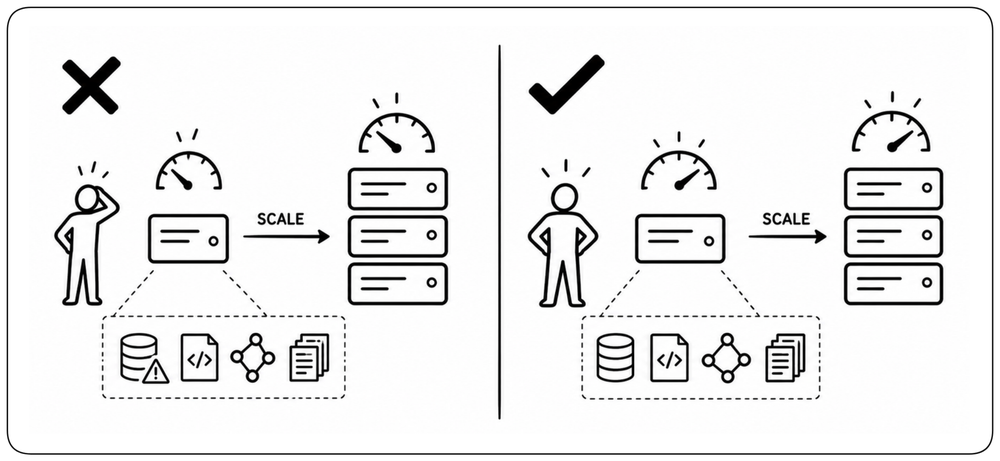
When a system struggles under load, the first instinct is often to add more resources. But scaling can hide inefficient queries, unnecessary work, excessive network calls, contention, or poor data access without fixing them. Measure and improve performance first, then scale when the workload genuinely exceeds the capacity of an efficient system. Scaling should multiply good performance, not compensate for bad performance.
Finding the Bottleneck [Bottlenecks]
Performance problems are rarely uniform — a constrained component dictates the speed of the whole. Finding that bottleneck, and watching it move as you fix each one, is the daily work of performance engineering.
Follow the Critical Path [Follow the Critical Path] {1}
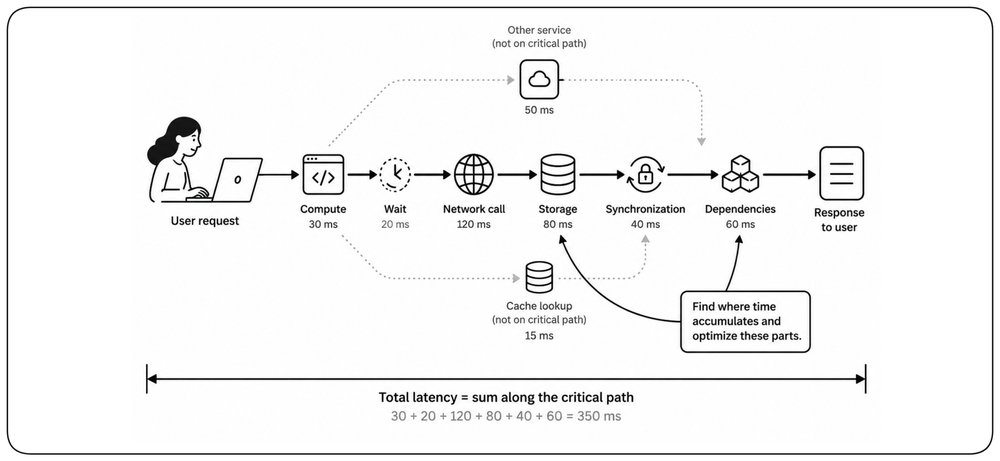
A request spends its latency budget across computation, waiting, network calls, storage, synchronization, and dependencies. End-to-end performance emerges from the entire path, not from any single component. Trace the path the user actually waits for, identify where time accumulates, and optimize the parts that dominate the budget.
Fix the Bottleneck, Not the Layer [Fix the Bottleneck] {1}
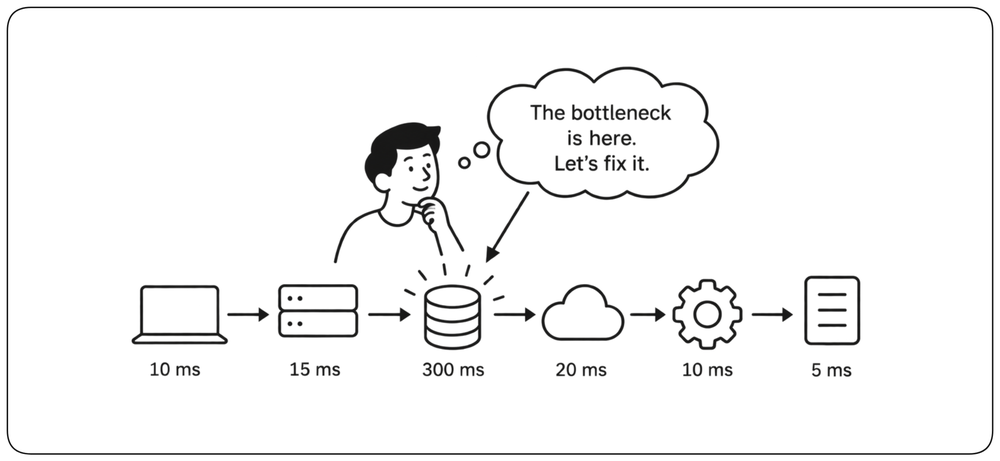
Do not assume where the performance problem is. It may be application code, a database query, a network hop, a lock, a quota, a dependency, or the architecture itself. Measure the request path, identify the resource or operation that constrains performance, and optimize there. Improving a component that is not limiting the system changes complexity, not performance.
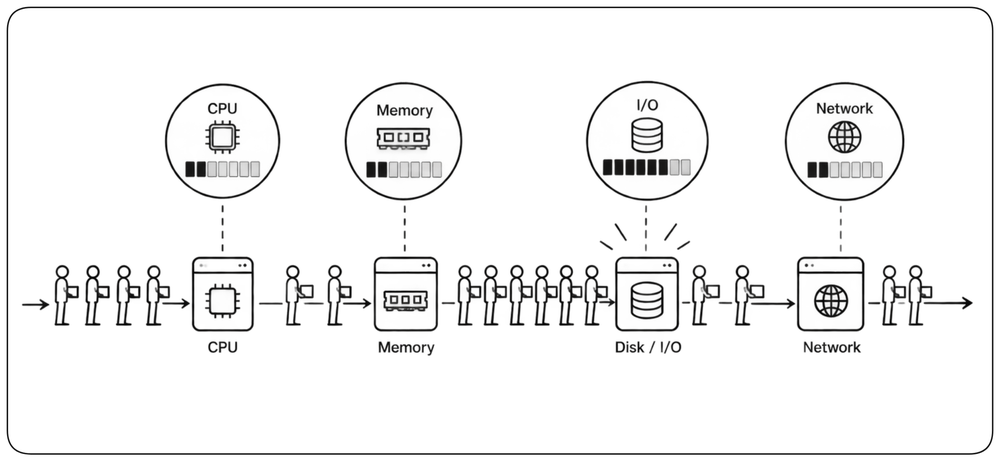
The Anatomy of a Bottleneck [Anatomy] {1}
A bottleneck is any point where flow is constrained, causing every upstream operation to queue behind it. !!The four classic families are CPU, memory, I/O, and network — but the actual culprit can also be a chatty API, a synchronous call holding a thread, or a lock under contention.!! Bottlenecks should be identified from measurements rather than intuition, because fixing one often causes the constraint to move somewhere else.
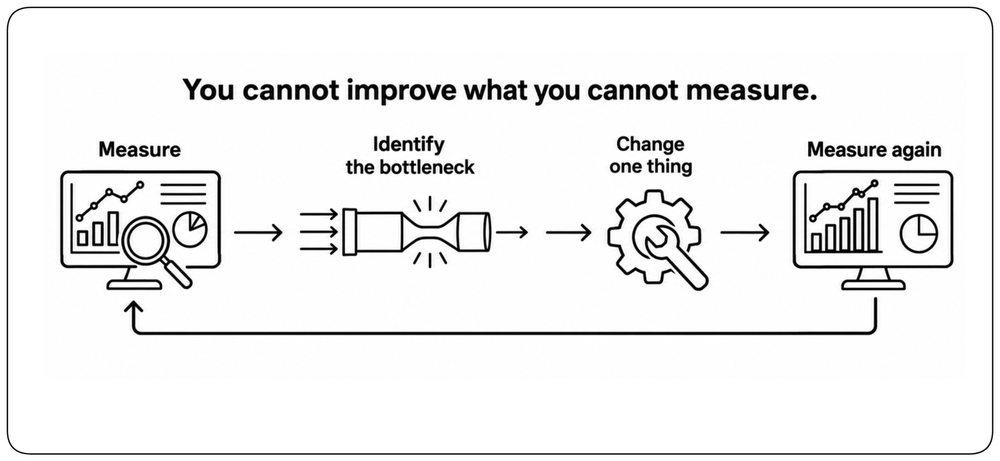
Measure Before You Optimize [Measure First] {1}
Performance work follows a disciplined loop: measure, identify the limiting operation or resource, change one thing, then measure again. Profilers, traces, and APM tools reveal where time is actually spent and whether the change improved the relevant latency, throughput, or capacity metric. Without this loop, optimization becomes guesswork.
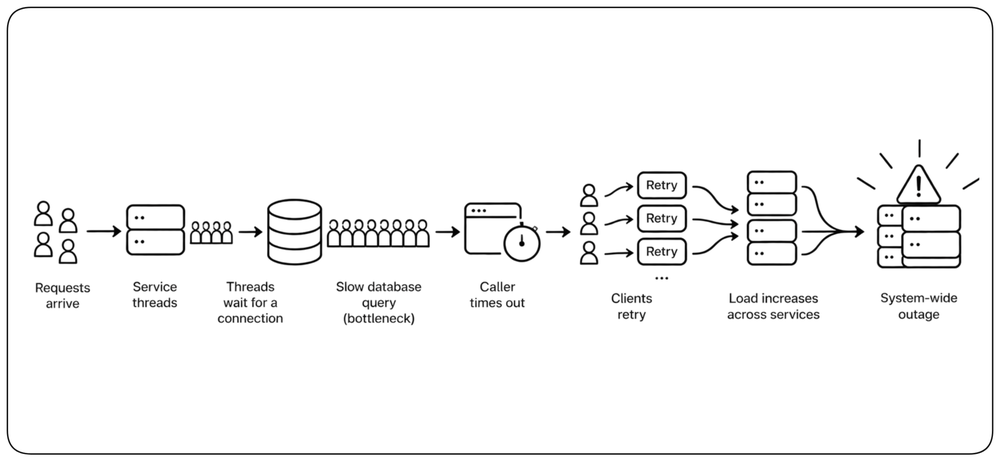
The Cascade Effect [Cascade]
Bottlenecks rarely stay local. A slow database query holds a connection, which blocks a thread, which times out a caller, which retries — and a small hiccup can cascade into a system-wide failure. Tracing the flow of a request across services reveals which delays compound and which ones the system absorbs without noticing.
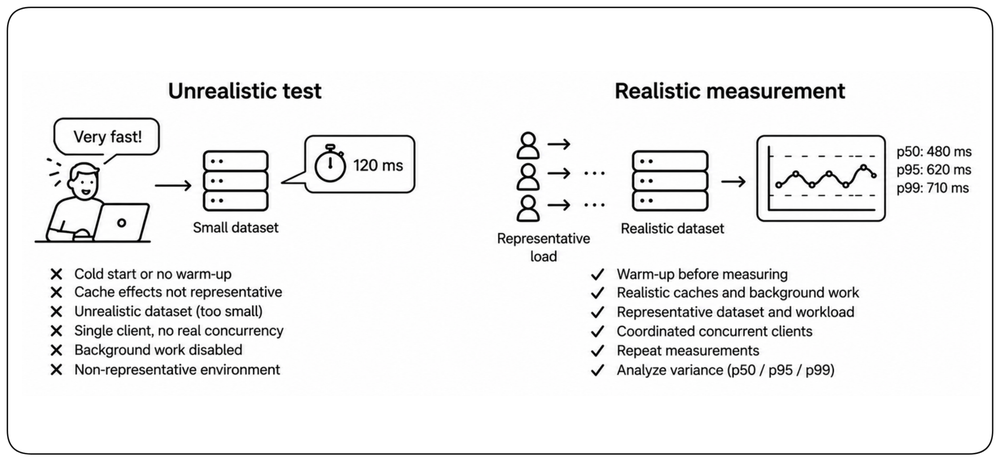
Measure Carefully [Measurement]
Performance measurements are only useful when the experiment reflects reality. Warm-up effects, caches, garbage collection, allocation pressure, background work, unrealistic datasets, coordinated clients, and noisy environments can distort results. Compare equivalent workloads, repeat measurements, and separate signal from variance. A precise benchmark of an unrealistic workload produces a precise but useless answer.
Code-Level Optimization [Code Optimization]
The biggest performance wins almost never come from clever tricks. They come from doing less work, choosing the right algorithm, and optimizing only the code that measurement shows matters.
Algorithmic Thinking [Algorithms] {1}
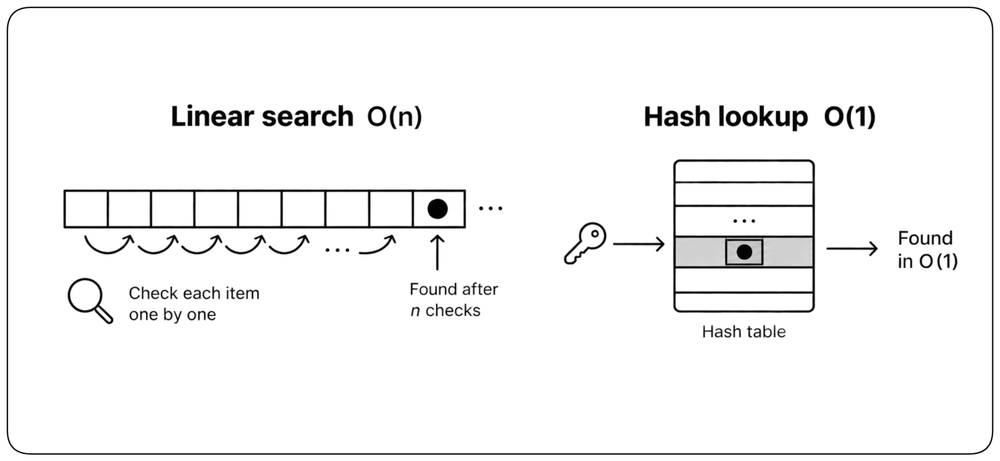
The most impactful optimization is choosing the right algorithm. !!The difference between O(n) and O(n²) is not a percentage — it is the difference between a system that scales and one that collapses.!! A linear scan over ten items is invisible; the same scan over a million items becomes the outage. Pick the data structure that matches the access pattern: hash lookups are O(1) on average, while balanced-tree lookups are O(log n).
The Hidden Cost of Abstractions [Hidden Costs]
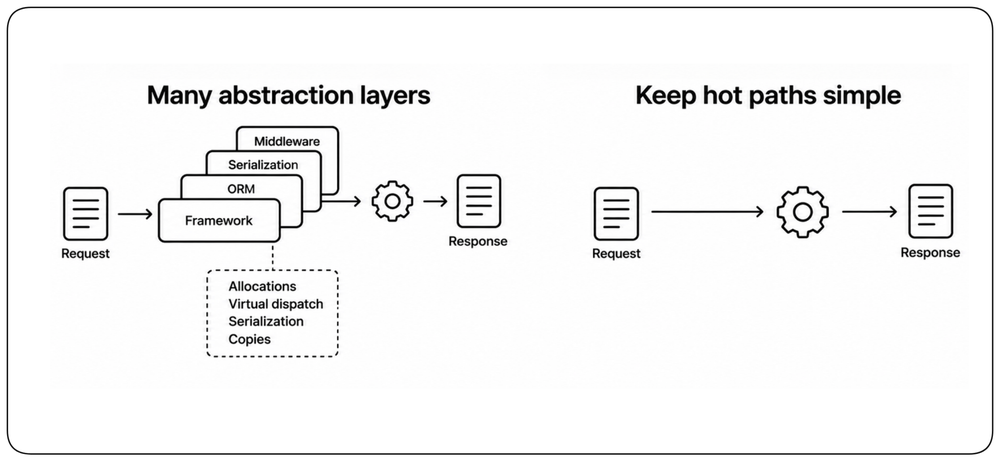
Frameworks and abstractions make development fast and can add allocations, virtual dispatch, serialization, and copies on hot paths. The lesson is not to abandon abstractions; it is to know which ones execute frequently and to keep those paths simple, direct, and measured.
Lazy Evaluation [Lazy]
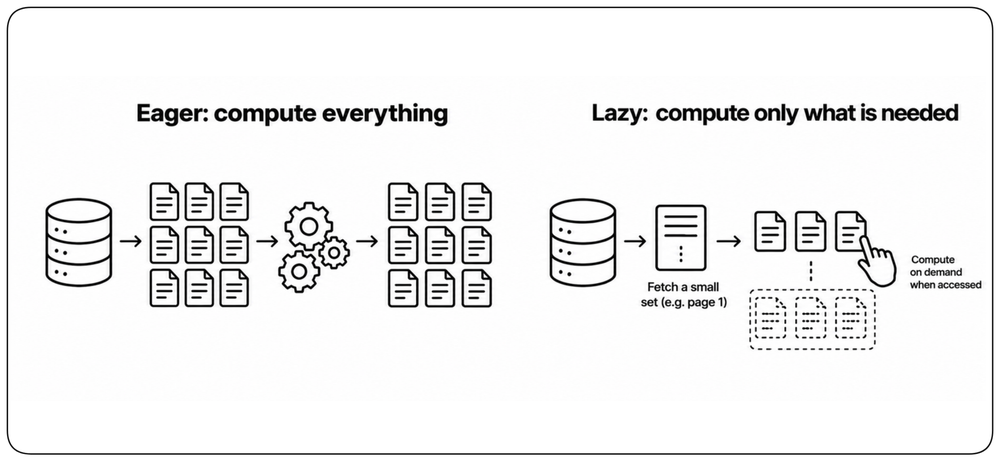
Lazy patterns defer computation until the result is actually needed: pagination, lazy loading, on-demand fields, and derived values computed only when read happens. They are a practical expression of reducing unnecessary work, especially when many possible results will never be consumed.
Optimize Proven Hot Paths [Hot Paths]
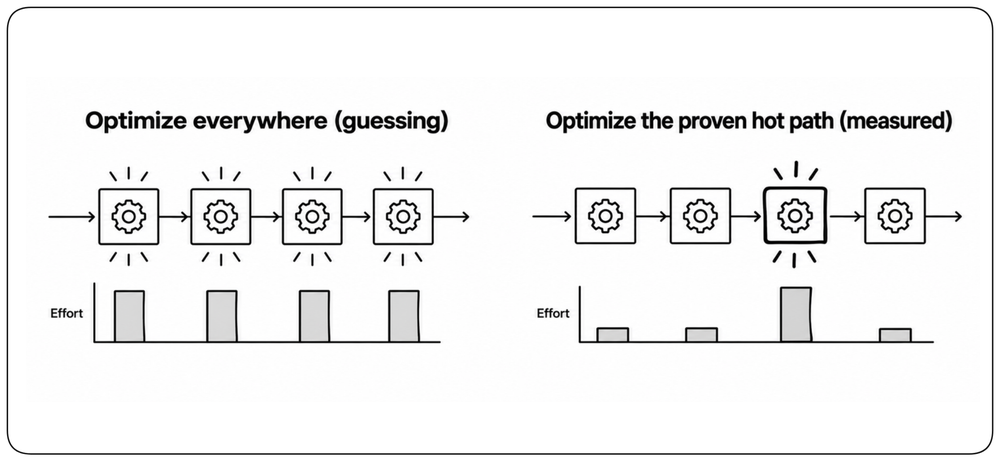
Optimization should follow evidence, not anticipation. Most code needs to be correct, clear, and easy to change before it needs to be exceptionally fast. Measure first, optimize the proven hot path, then measure again. When an optimization adds complexity, isolate it behind a clean interface and document the bottleneck or benchmark that justified it.
Data and Storage Performance [Data Performance]
Data access often dominates the request budget. The useful question is not which storage technique is fashionable, but how the workload reads and writes data.
Design Data Access Around the Workload [Access Patterns] {1}
Data structures, indexes, partitions, replicas, and caches should follow the access patterns the system actually serves. Read-heavy and write-heavy workloads need different designs, and a schema optimized for one query shape may perform poorly for another. Performance starts by understanding how data is read and written, not by applying storage techniques generically.
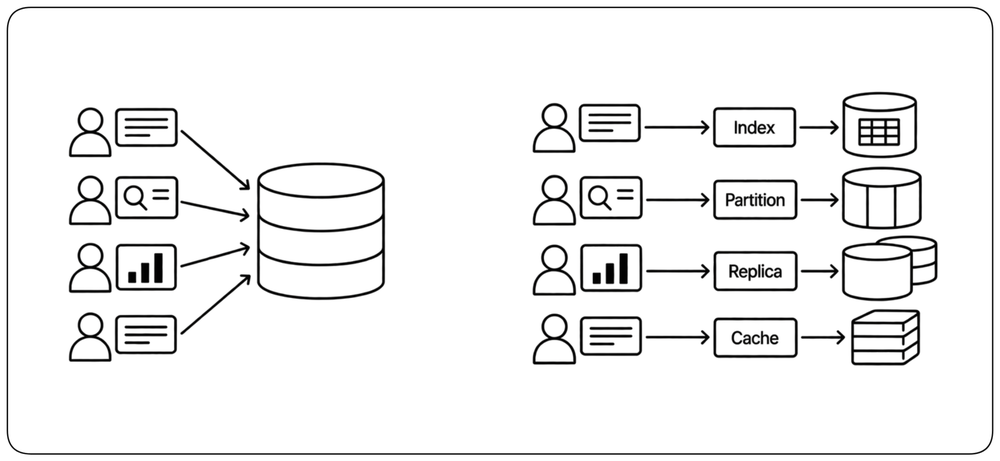
The Database: Friend and Foe [Database] {1}
Databases provide durability and powerful queries, and they are a common bottleneck in real systems. !!Database access can involve network round trips, synchronization, storage I/O, serialization, and contention. At scale, repeated or poorly shaped queries can dominate the request budget.!! Index the access patterns you actually have, kill N+1 queries, and read execution plans like code.
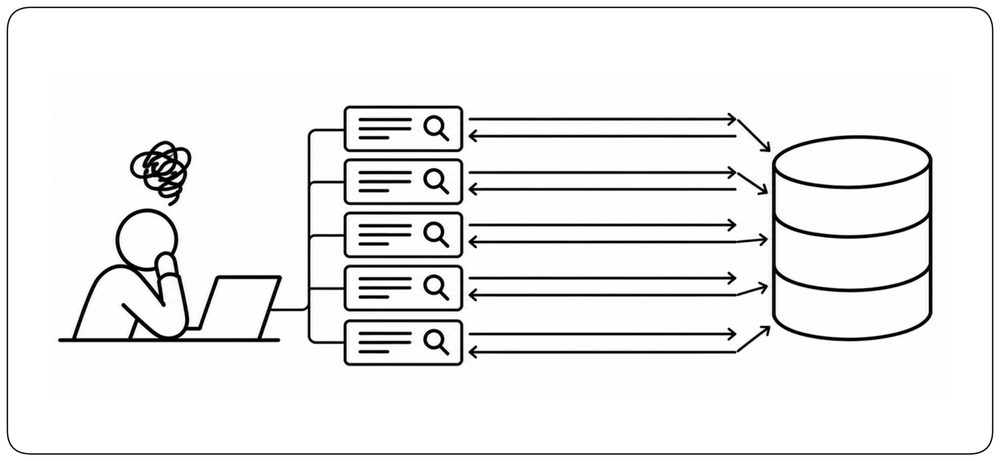
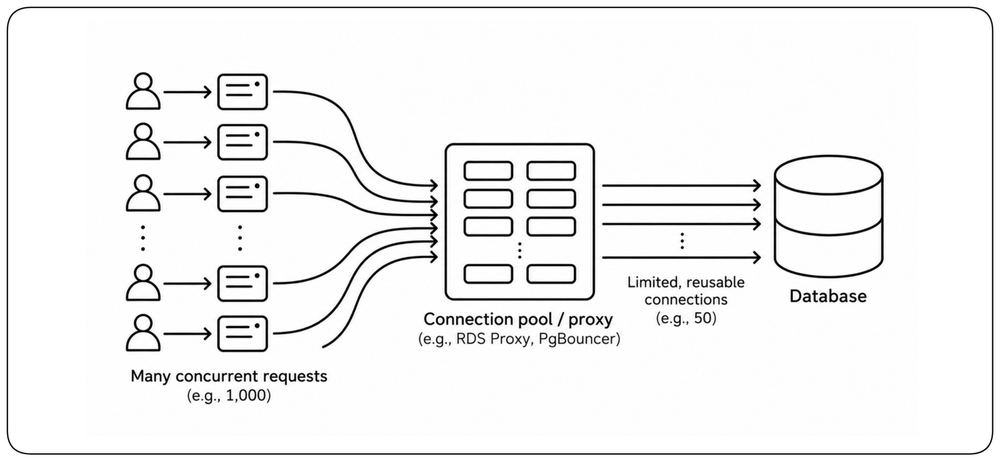
Protect the Database with Connection Pooling [DB Connection Pooling]
Applications may handle thousands of concurrent requests, but a database can sustain only a limited number of connections efficiently. Connection pools and database proxies decouple application concurrency from database connections: requests borrow a bounded set of reusable connections instead of creating one connection per request. This reduces connection overhead, protects the database from connection storms, and provides a natural place to control pressure on the database.
Caching: Trading Space for Time [Caching] {1}
Caching is the fundamental performance trade — spend memory to skip computation or I/O. !!Caching can avoid repeated computation or slower I/O and can remove expensive work from the critical path.!! The hard part is never the read; it is invalidation, staleness, and stampedes when a popular key expires. Cache the right thing at the right layer, and own the rules for when it goes away.
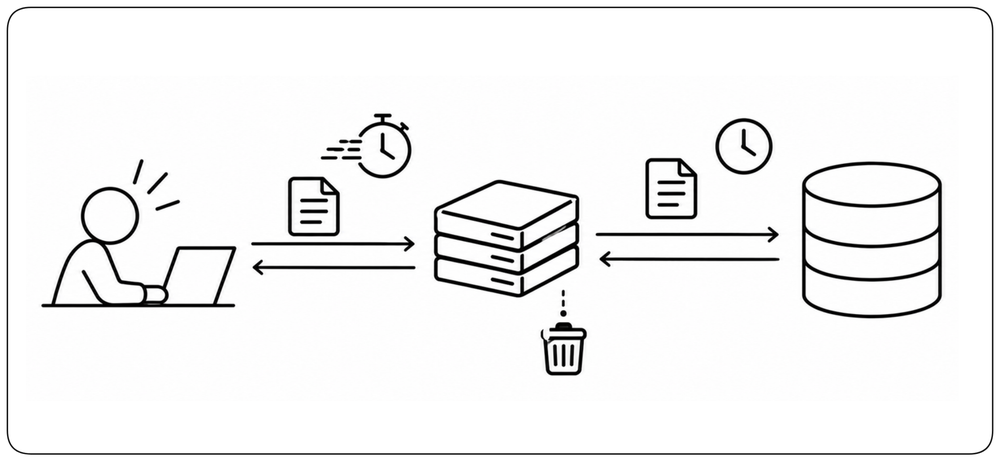
Caching may also trade freshness for speed: when cached state can lag behind its source, the acceptable staleness must be explicit.
The Memory Hierarchy [Memory]
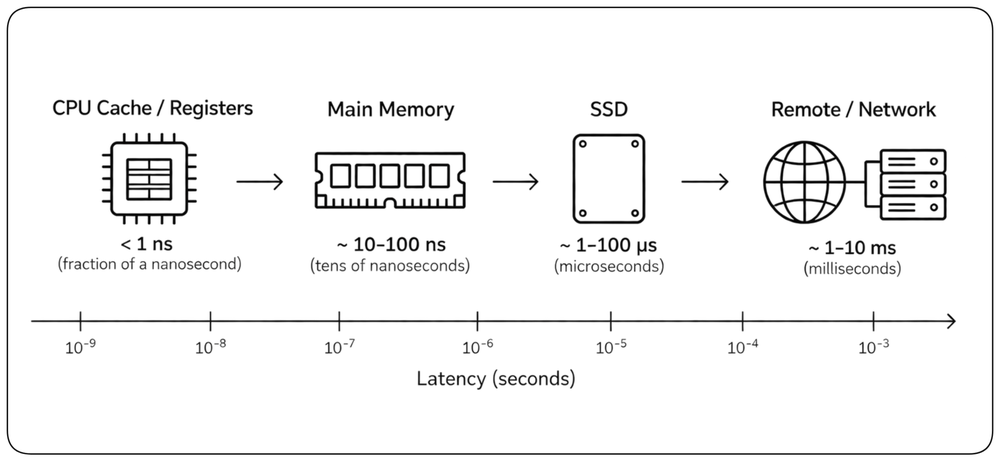
CPU-local data is dramatically faster to access than main memory; main memory is dramatically faster than storage; remote storage and networks are slower again. These gaps span orders of magnitude. Code that respects locality, batches access, and avoids unnecessary allocations can be responsive on modest hardware; code that ignores those costs can crawl even on premium machines.
Read Replicas [Read Replicas]
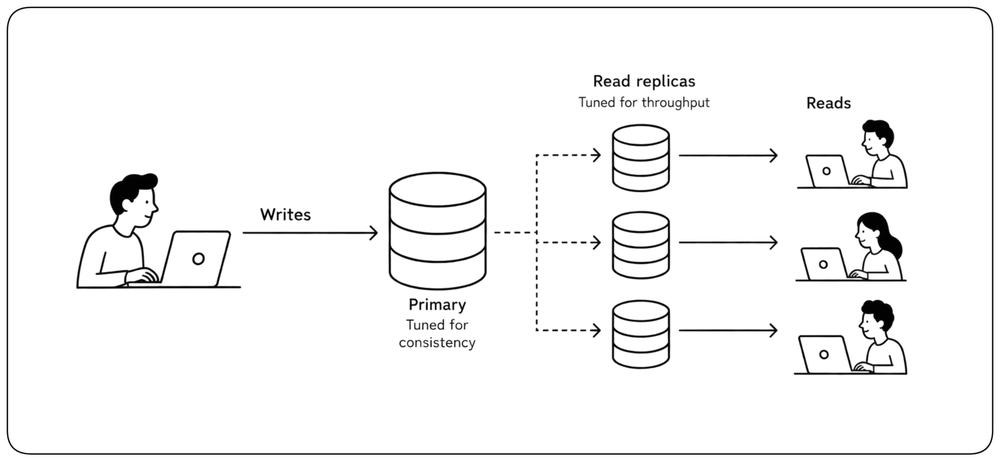
Most applications read far more than they write. Separate the paths: writes hit a primary tuned for consistency, while reads can spread across replicas tuned for throughput. Asynchronous replicas can improve read capacity and locality, but applications must tolerate the possibility that a replica temporarily returns older data.
I/O Performance [I/O Performance]
Many systems spend more time waiting for data than computing it. I/O performance depends on how often data is accessed, how much data moves, and the access pattern used. Good I/O design reduces unnecessary operations before trying to make individual operations faster.
Keep the Hot Path Off Disk [Keep the Hot Path Off Disk] {1}
Disk and remote storage are much slower than memory. When latency matters and the same data is accessed repeatedly, keep the hot working set in memory, a cache, or an appropriate buffer rather than returning to storage on every request. Persistent storage remains essential for durability and large datasets, but it should not sit unnecessarily on a latency-sensitive path.
Reduce I/O Before Making I/O Faster [Reduce I/O] {1}
Every read or write can involve storage latency, system calls, serialization, copying, and data transfer. Before optimizing the storage layer, reduce the amount of I/O the workload requires. Read only the data you need, avoid unnecessary writes, reuse data already available, and eliminate repeated access. The fastest I/O operation is the one you do not perform.
Prefer Sequential and Localized I/O [Sequential I/O] {1}
Storage performance depends heavily on access patterns. Sequential and localized access lets storage, operating systems, and hardware move data efficiently, while scattered random access can turn the same amount of data into many expensive operations. Organize data around the common access path, preserve locality when possible, and use buffering or prefetching when future access is predictable.
Concurrency and Queues [Concurrency]
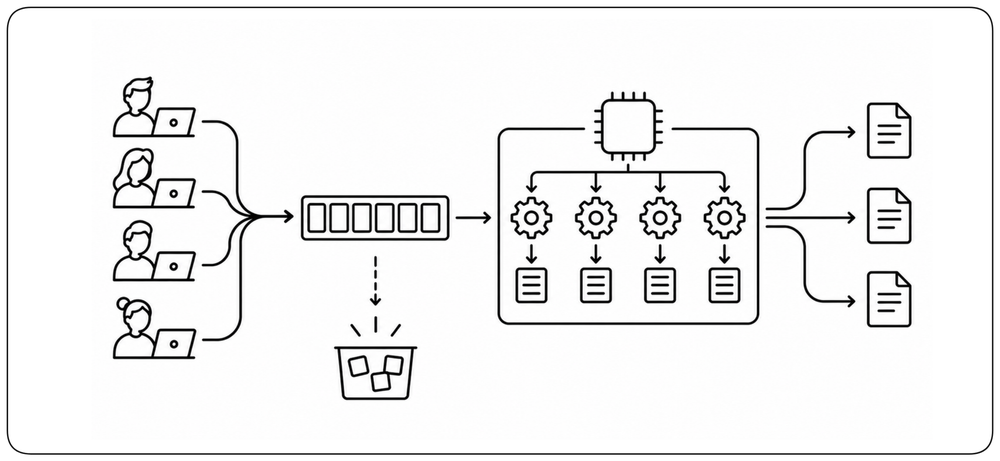
Modern hardware has many cores and modern systems serve many users at once. Turning that potential into actual capacity requires concurrent execution, bounded resources, and explicit handling of overload.
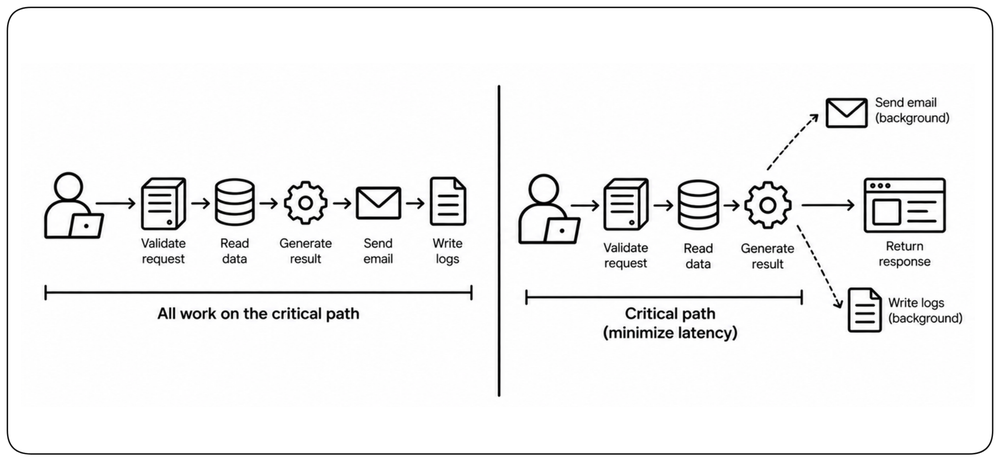
Decide What Must Be Synchronous [Synchronous Work] {1}
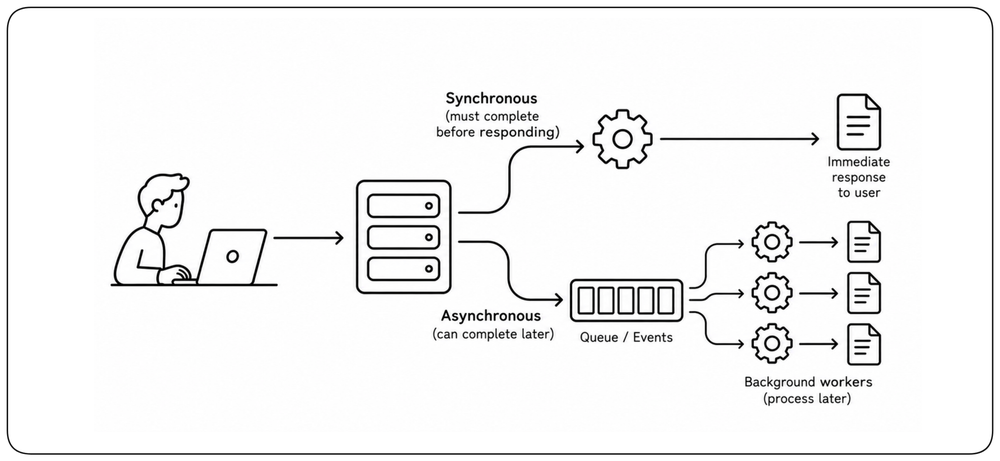
Not every operation belongs on the user’s critical path. Work whose result is required immediately must complete synchronously; work that can finish later can be acknowledged and processed asynchronously. Moving non-critical work to queues, events, or background workers can dramatically reduce user-visible latency and isolate slow operations. The architectural decision is not “sync or async,” but which work the user must actually wait for.
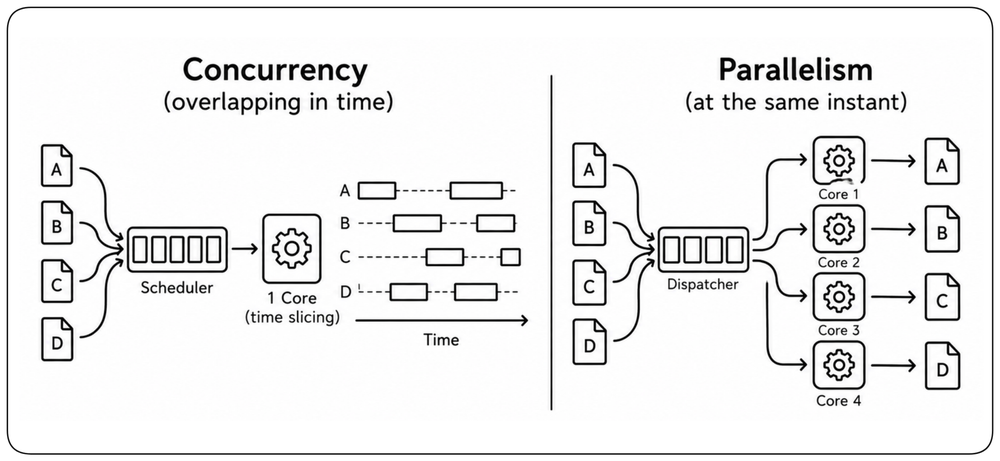
Concurrency vs Parallelism [Concurrency]
Concurrency is structure — a system that can handle multiple tasks overlapping in time. Parallelism is execution — actually running multiple tasks at the same instant on multiple cores. A well-designed concurrent system unlocks parallelism when the hardware allows it and still behaves correctly when forced to run on a single core.
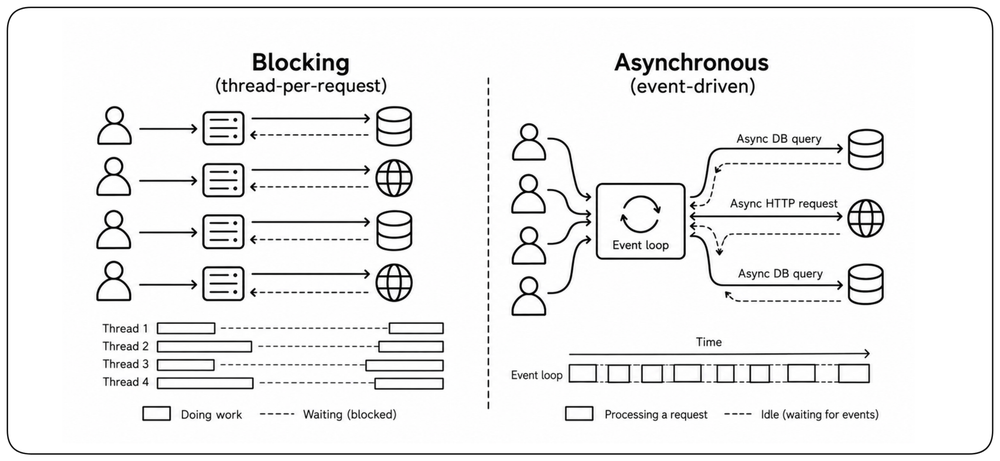
Asynchronous Patterns [Async] {1}
Blocking is the enemy of throughput. !!A thread waiting for a database query or a network response is doing nothing while consuming resources — asynchronous code lets that thread serve other requests instead.!! The shift from thread-per-request to event-driven pipelines can allow a small number of cores to serve many concurrent connections, provided downstream dependencies can sustain the work.
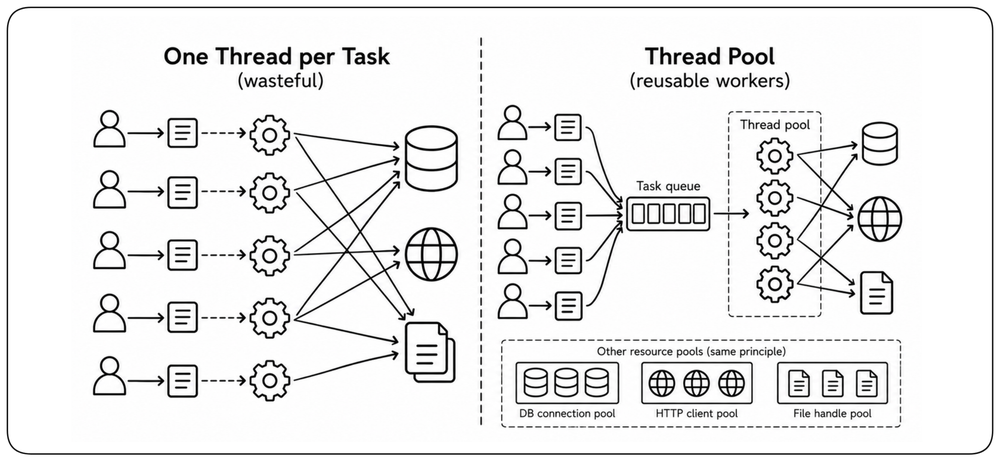
Thread Pools and Resource Pools [Pools]
Creating a thread for every task is wasteful; creating none and serializing is slow. Thread pools maintain a reusable set of workers, and the same principle applies to database connections, HTTP clients, and file handles. Pool sizes should reflect resource capacity, service time, concurrency, and downstream limits, and should be validated under load.
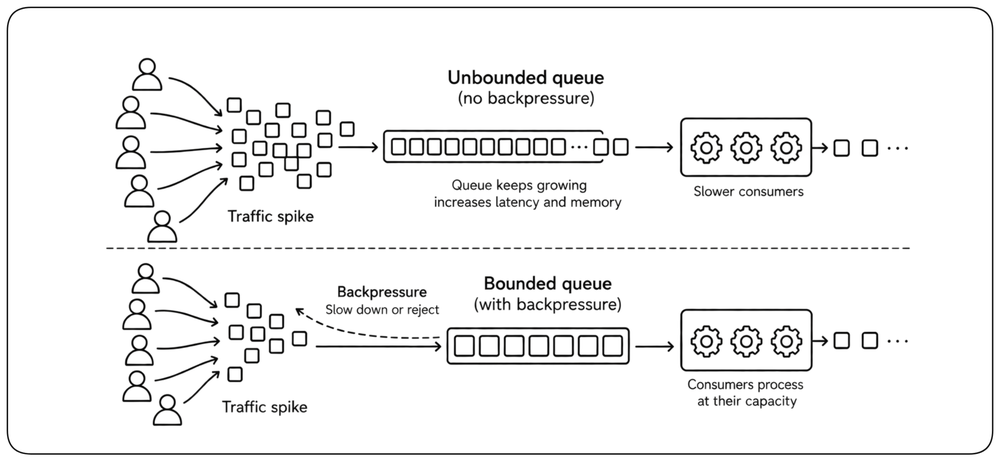
Queues and Backpressure [Queues]
Queues absorb bursts so the system does not immediately collapse under traffic spikes, but they also add latency. A queue does not create capacity; it moves waiting time from a caller or worker into the queue. Bounded queues with backpressure tell producers to slow down when consumers lag, so the system can degrade deliberately instead of hiding overload until memory fills and everything fails at once.
Hedged Requests: Fight Tail Latency [Hedged Requests]
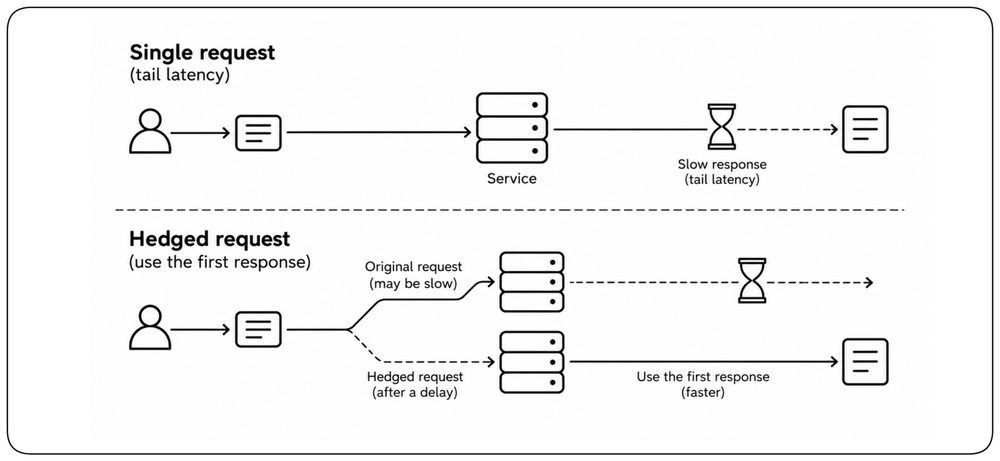
For latency-sensitive idempotent reads, a hedged request sends a second copy when the first exceeds a carefully chosen delay and uses whichever response arrives first. It addresses tail latency caused by request-time variability, not queueing under high load. Hedging can reduce p99 latency when a small fraction of requests stall, but it spends extra capacity and can amplify load if used aggressively. Hedge the tail, not every request.
Network Performance [Network Performance]
In distributed systems, the network is often the slowest link. Every hop adds latency, every byte costs time, and every protocol choice shapes the performance envelope of everything built on top.
Latency: The Silent Killer [Latency] {1}
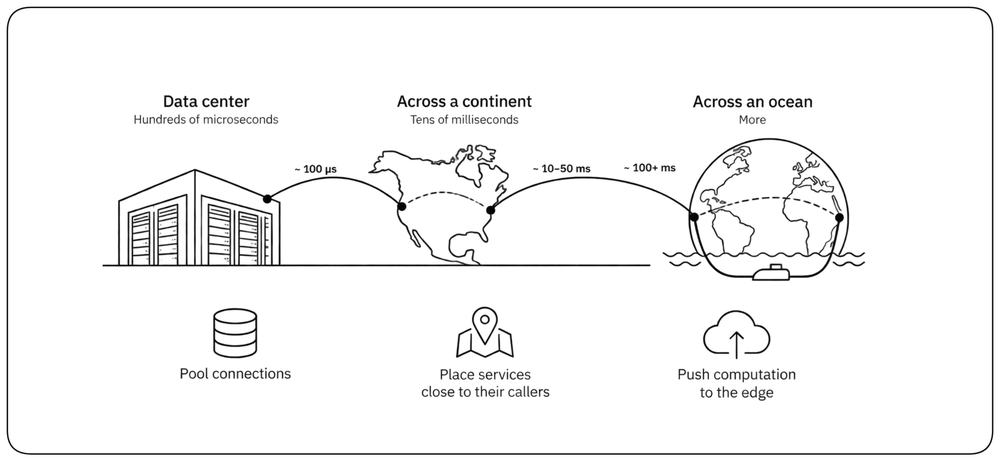
A packet across a data center takes hundreds of microseconds; across a continent, tens of milliseconds; across an ocean, more. !!In distributed systems, sequential network dependencies can consume a latency budget quickly even when each dependency appears individually fast.!! Pool connections, place services close to their callers, and push computation to the edge when it serves the workload.
Reduce Round-Trips with Batching [Batching] {1}
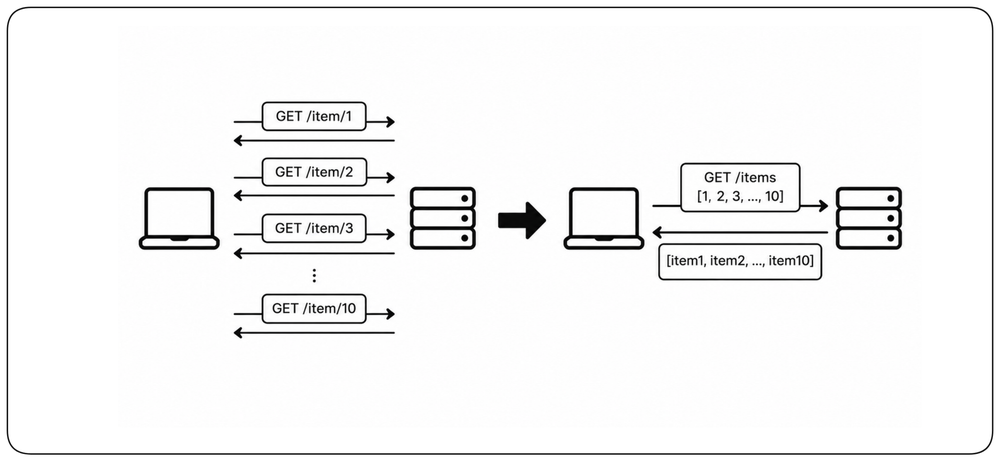
Network optimization is not only about making each request faster — it is also about making fewer requests. !!Ten small sequential calls can cost far more than one larger call because every round-trip pays network latency again.!! Batch related operations when they can be processed together, especially across high-latency links.
Keep Dependencies Close [Colocation]
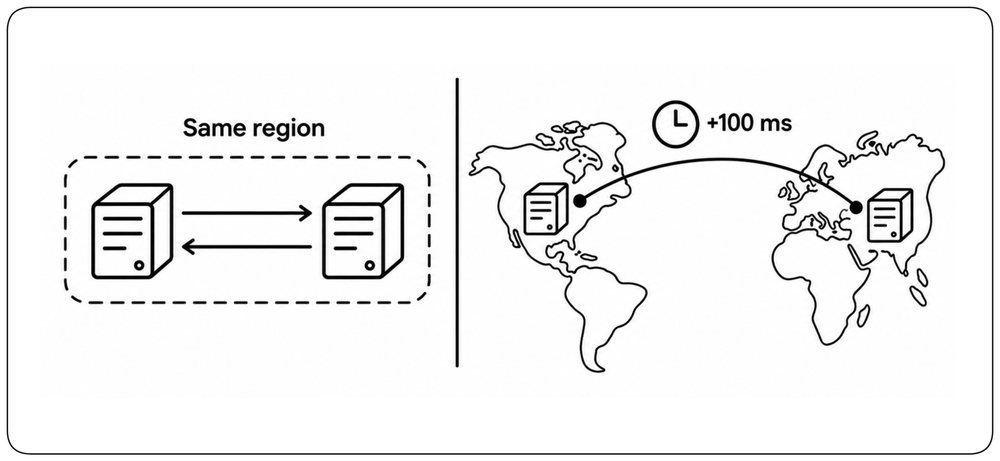
Distance between services becomes part of every request. A dependency in another region can add tens or hundreds of milliseconds before it does any useful work. !!Services that communicate frequently should live close to each other — ideally in the same region — because architecture cannot optimize away the speed of light.!! Cross-region calls should be deliberate, asynchronous where possible, and kept off latency-sensitive paths.
Payload Optimization [Payload]
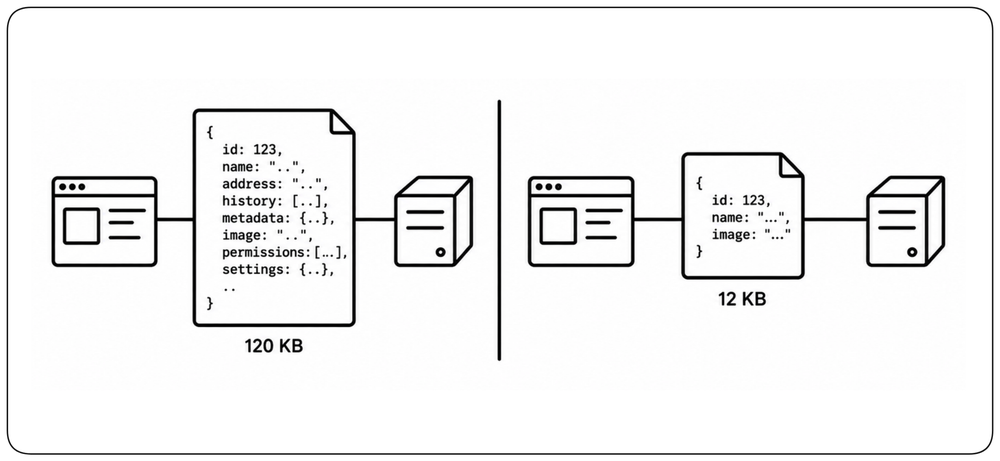
Every byte on the wire costs time, bandwidth, and battery on the client. Compress, pick efficient serialization formats, and return only the fields the caller actually needs. The right trade depends on payload size, caller needs, and whether humans or machines are the primary consumer.
Design APIs to Minimize Network Work [API Design] {1}
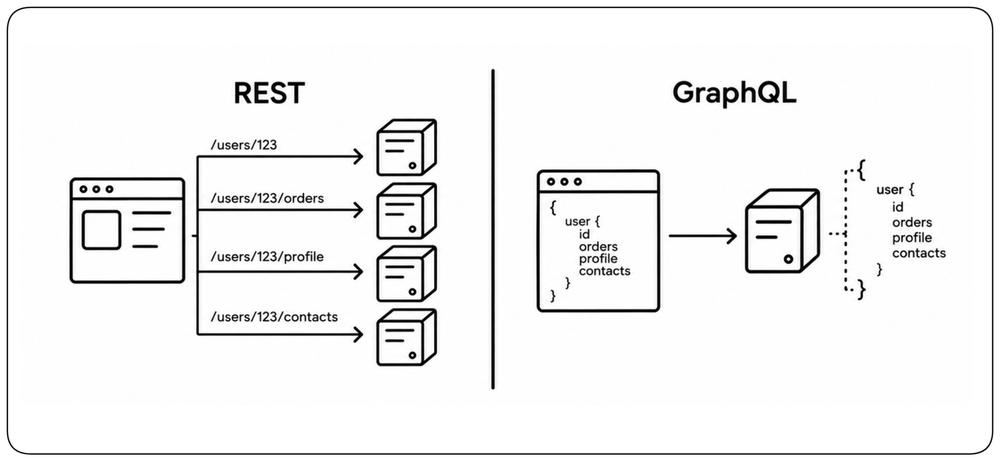
API design directly affects network cost. A REST API with coarse or poorly aligned endpoints can force clients to make multiple calls or download data they do not need, while GraphQL can let clients request several related fields in one operation. But GraphQL is not inherently faster: complex queries can create expensive backend work, large responses, or N+1 access patterns. Choose the API shape that minimizes total work across the client, network, and backend.
Protocol Selection [Protocols]
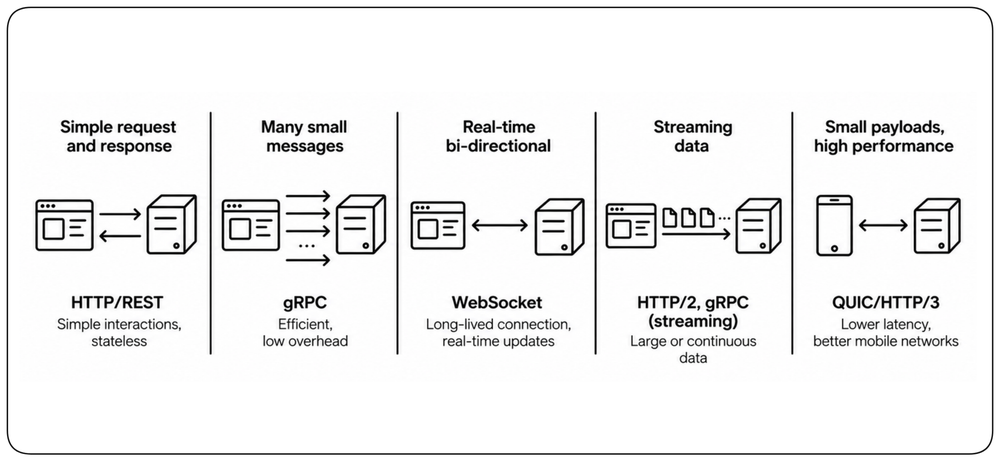
Choose protocols according to interaction pattern, payload size, streaming needs, connection lifetime, and latency sensitivity. Protocol choice matters, but reducing unnecessary calls and dependencies usually matters more.
Keep Serving Close to Users [Edge] {1}
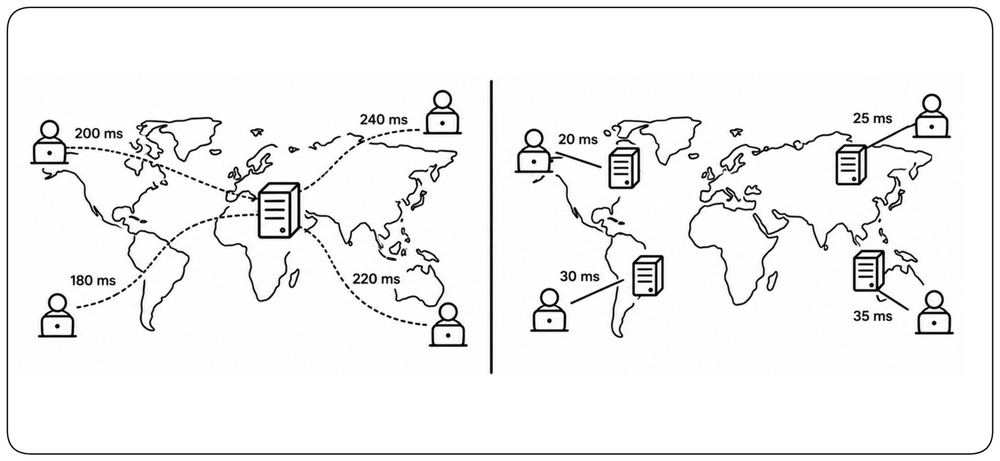
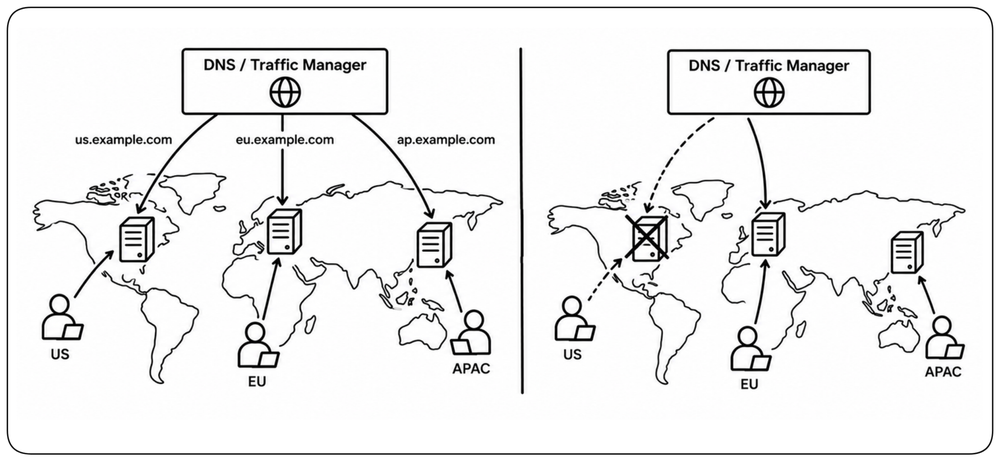
Physical distance is part of latency. When users are geographically distributed, serve latency-sensitive traffic from infrastructure close to them whenever the workload allows it. CDNs bring cached content closer to users, while edge computing can move computation there as well. No backend optimization can eliminate the network latency created by unnecessary distance.
Route Users to the Right Location [Geo Routing] {1}
Deploying close to users only helps when traffic reaches the right location. Geo-aware DNS can return different endpoints based on the origin of a DNS query, while global traffic managers and anycast networks can steer traffic toward nearby infrastructure. Routing should consider availability as well as proximity: when the nearest location is unavailable, traffic must be directed elsewhere. Placement and routing work together — put capacity close to users, then route users to it.
Critical Paths and Architecture [Architecture]
At a certain scale, no amount of code-level tuning can save a poorly-shaped architecture. The way services are split, where work happens, and what runs in the foreground versus the background dominate the system's performance ceiling.
Keep Work off the Critical Path [Critical Path] {1}
Not all code is equal. !!The critical path is the sequence of operations between user action and visible result — every millisecond on that path is felt.!! Work outside the critical path may not affect user-visible latency directly, but it still consumes resources and can affect throughput and capacity. Map the critical path, parallelize what can be parallelized, and push nonessential work into background processing.
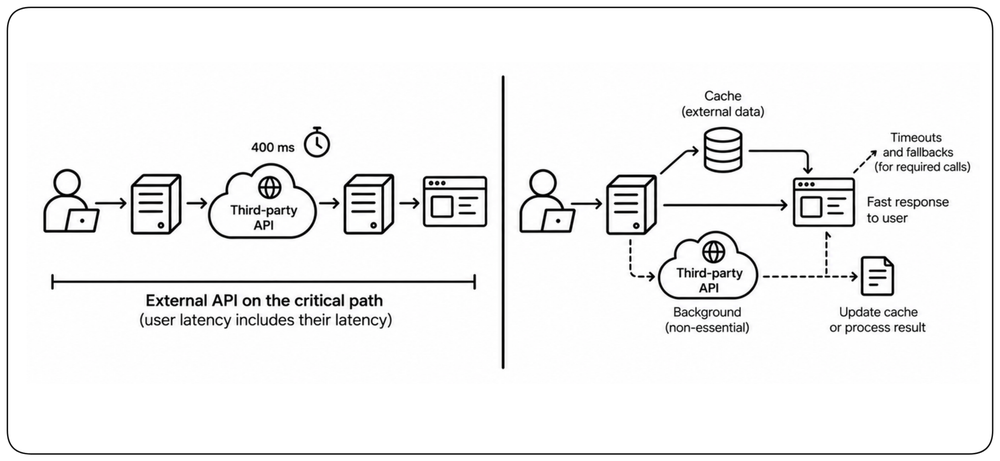
Keep External Dependencies off the Critical Path [External Dependencies] {1}
Every synchronous external dependency transfers part of your latency budget to a system you do not control. !!If the user cannot receive a response until a third-party API answers, that provider's latency and tail behavior become part of your own SLO.!! Cache external data when possible, move non-essential calls to background processing, and define strict timeouts and fallbacks for dependencies that must remain synchronous.
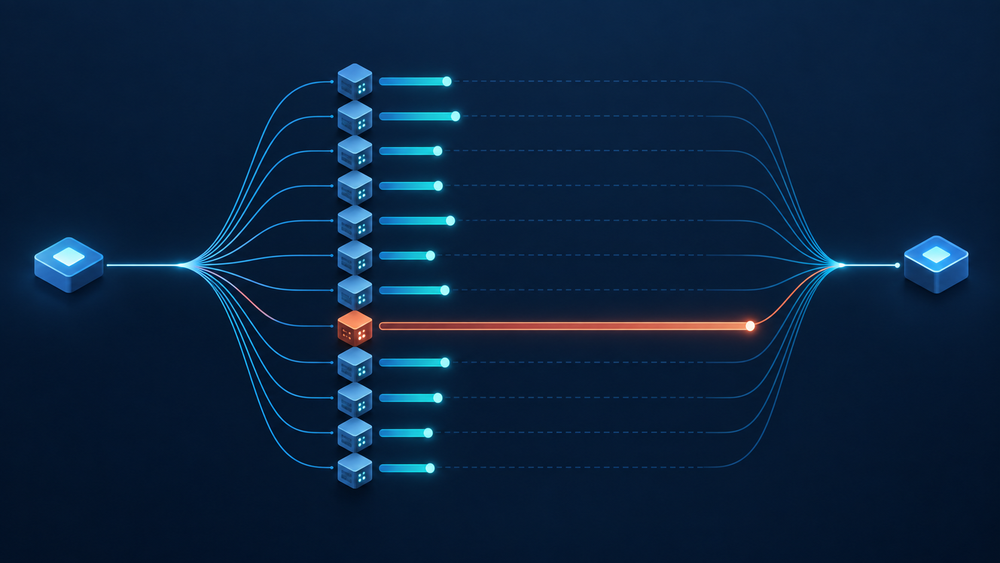
Fan-Out Amplifies Tail Latency [Fan-Out] {1}
A request that depends on many downstream calls inherits the slowest one. Even when each dependency is usually fast, fan-out makes encountering a slow response increasingly likely. If 100 independent calls each have a 1% chance of being slow, the probability that at least one is slow is about 63%. Tail latency compounds across distributed request paths. Reduce unnecessary fan-out, bound concurrency, and design latency-sensitive paths around the tail rather than the average.
Monolith vs Microservices [Monolith vs Micro]
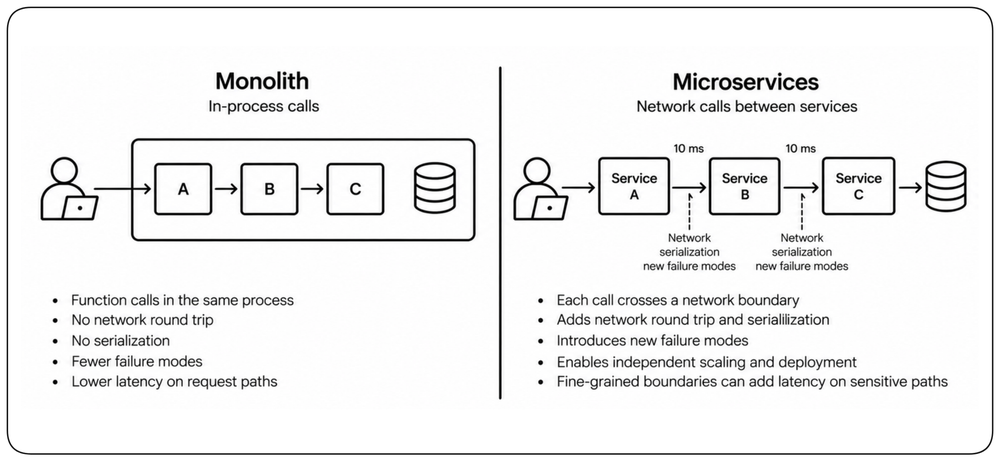
A monolith calls functions in-process; a service boundary adds a network round trip, serialization, and new failure modes. Microservices can buy independent scaling and deployment, but fine-grained boundaries add latency to sensitive request paths. Choose boundaries that match ownership and scaling needs, and avoid unnecessary remote calls on paths with tight latency budgets.
Horizontal vs Vertical Scaling [Scaling]
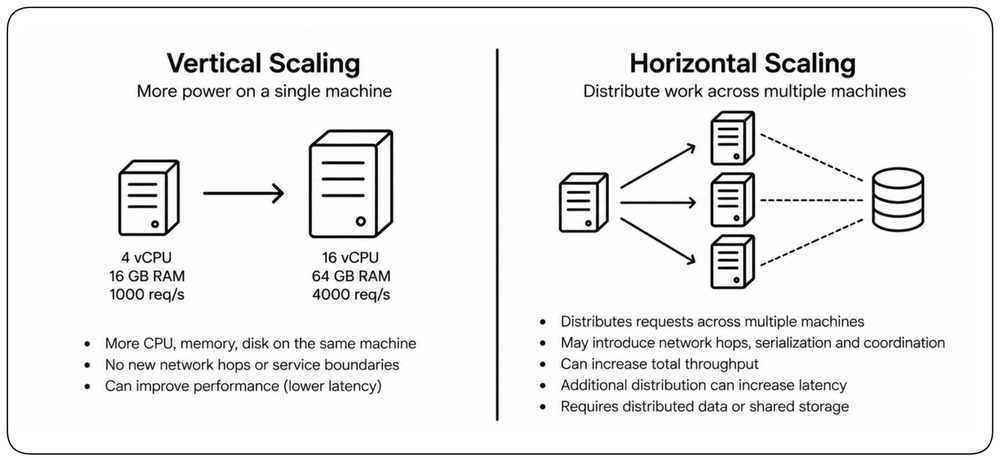
Scaling changes the performance characteristics of a system, not just its capacity. Vertical scaling can improve performance without adding communication boundaries, while horizontal scaling distributes work but may introduce network hops, serialization, coordination, and distributed-data costs. Scale-out is valuable when the workload requires it, but additional distribution can increase latency even while increasing total throughput.
Learn More
Chapter: Design for Scalability.
LLM Performance [LLM Performance]
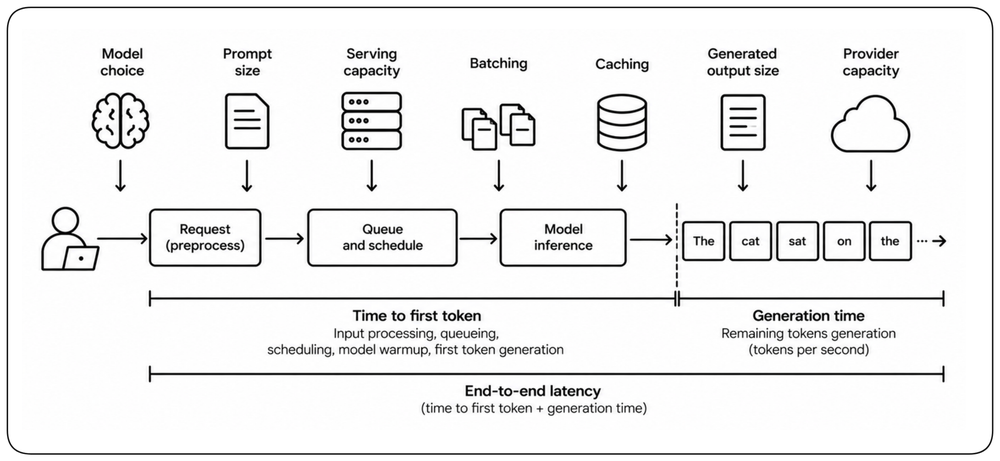
LLM performance is shaped by more than model speed. Model choice, prompt size, generated output, serving capacity, batching, caching, and provider capacity all affect the latency users experience. Unlike conventional request processing, inference often has a distinct time to first token and generation phase, so both must be designed and measured explicitly.
Measure Time to First Token and Generation Speed [TTFT and Generation] {1}
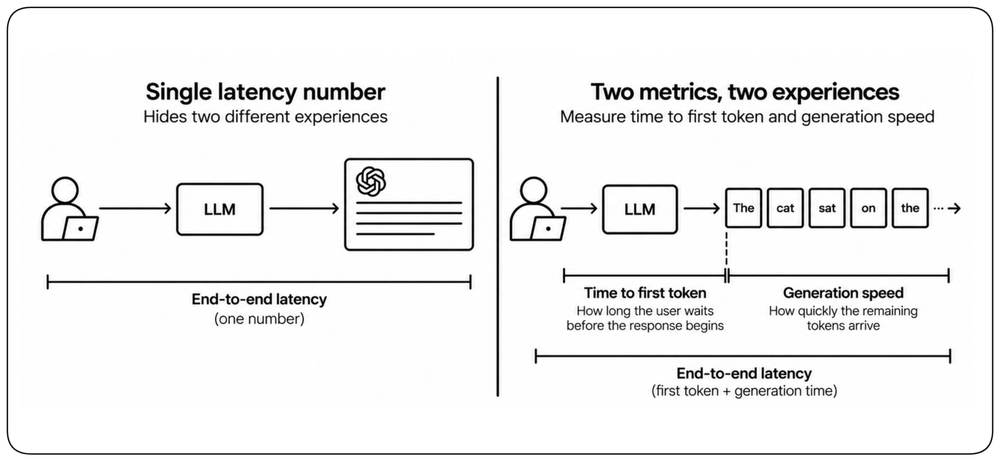
A single end-to-end latency number hides two different experiences. Time to first token measures how long the user waits before the response begins; generation speed measures how quickly the remaining tokens arrive. Interactive applications may care more about a fast first token and steady streaming than about the time required to generate the complete response. Stream tokens as they are generated so the user can begin consuming the response immediately instead of waiting for the complete generation. Measure both separately, together with end-to-end latency.
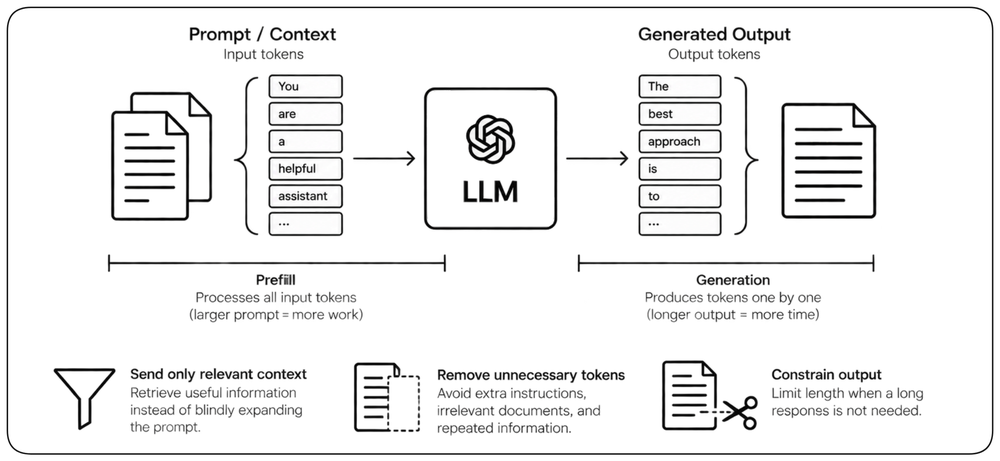
Tokens Are the Unit of LLM Work [Tokens] {1}
LLM inference cost and latency grow with the amount of context processed and output generated. Large prompts increase prefill work, while long answers extend generation time token by token. Send only context that contributes to the result, retrieve relevant information instead of blindly expanding prompts, and constrain output when the application does not need a long response. Reducing unnecessary tokens improves latency, throughput, and cost at the same time.
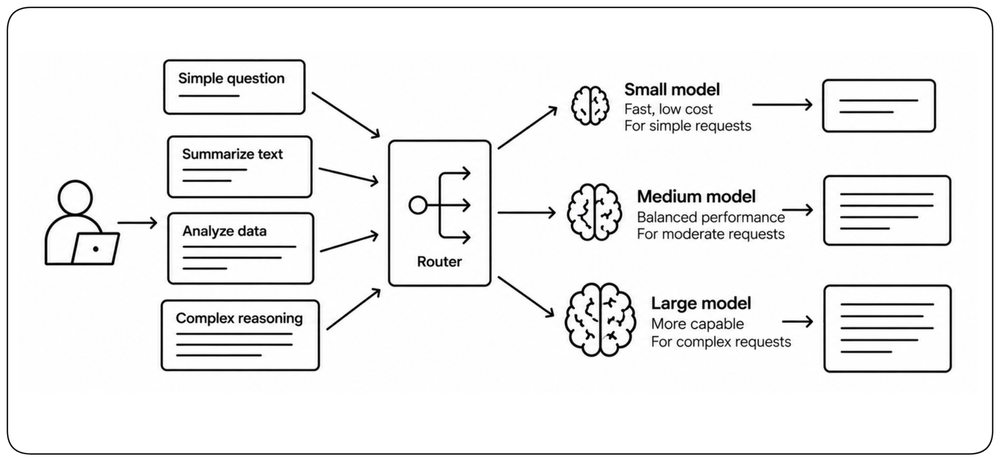
Choose the Smallest Model That Meets the Requirement [Model Selection]
Larger models generally require more computation and can deliver capabilities the workload does not always need. Route work according to its actual difficulty: simpler requests may use smaller, faster models while harder requests use more capable ones. Model selection is therefore a performance decision as well as a quality decision. Benchmark against the application’s real prompts and required output quality rather than assuming that one model should serve every request.
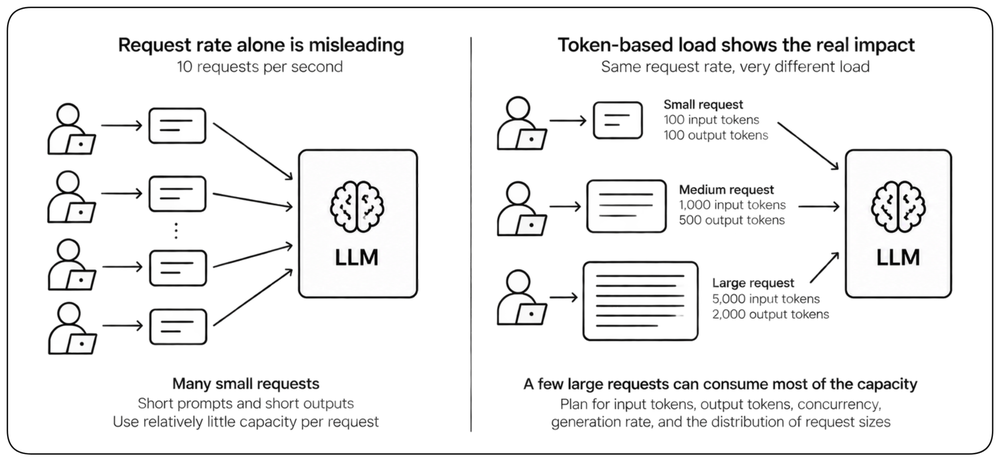
Design for LLM Throughput, Not Only Request Rate [LLM Throughput] {1}
Two requests can consume radically different amounts of inference capacity because their prompts and generated outputs differ in length. Requests per second alone therefore describe LLM load poorly. Capacity planning should include input tokens, output tokens, concurrency, generation rate, and the distribution of request sizes. A few large generations can consume capacity that would otherwise serve many small requests.
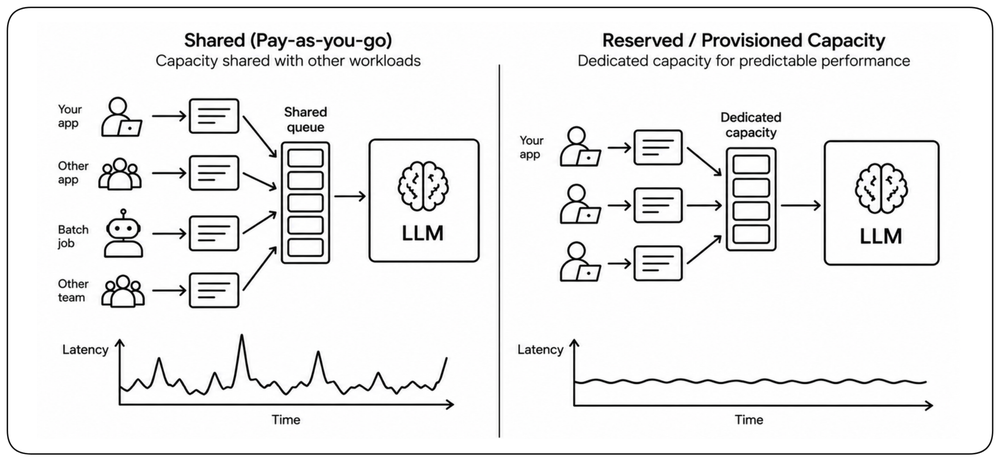
Predictable Latency Requires Reserved Capacity [Reserved Capacity]
Shared pay-as-you-go inference is convenient for variable demand, but latency depends on capacity shared with other workloads and may not come with a performance commitment. If an application requires predictable latency under sustained load, dedicated or provisioned serving capacity can reduce the variability introduced by shared capacity. Provisioned or reserved capacity trades flexibility and higher commitment for more predictable throughput and latency. Treat the serving tier as part of the performance architecture: use shared capacity where variability is acceptable and reserve capacity where the latency SLO requires it.
Performance Trade-offs [Trade-offs]
Every performance choice is paid for somewhere else — in security, reliability, cost, or maintainability. The discipline is owning each trade explicitly.
Performance vs Security [Security]
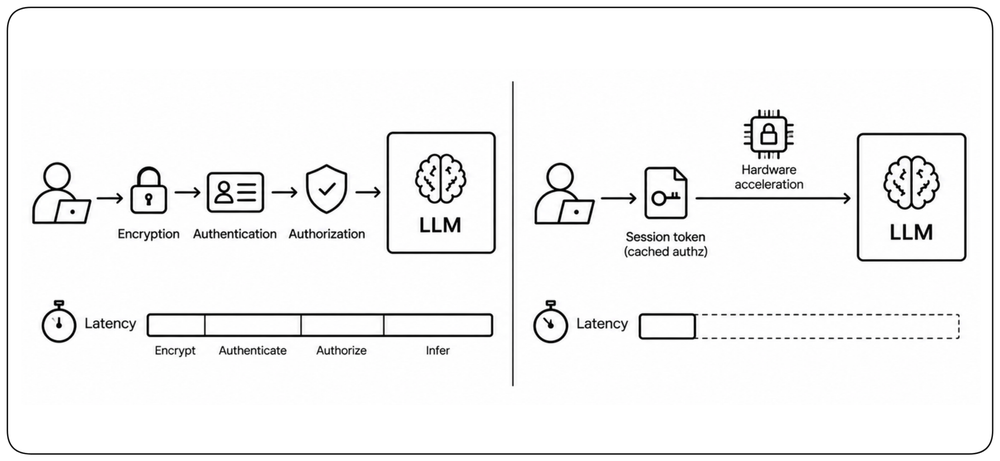
Encryption, authentication, and authorization all add cost on every request. Modern hardware acceleration has shrunk that cost dramatically, and patterns like session tokens or cached authorization can reduce it further. Security and performance are joint requirements to engineer, not opposing forces to casually trade away.
Performance vs Reliability [Reliability]
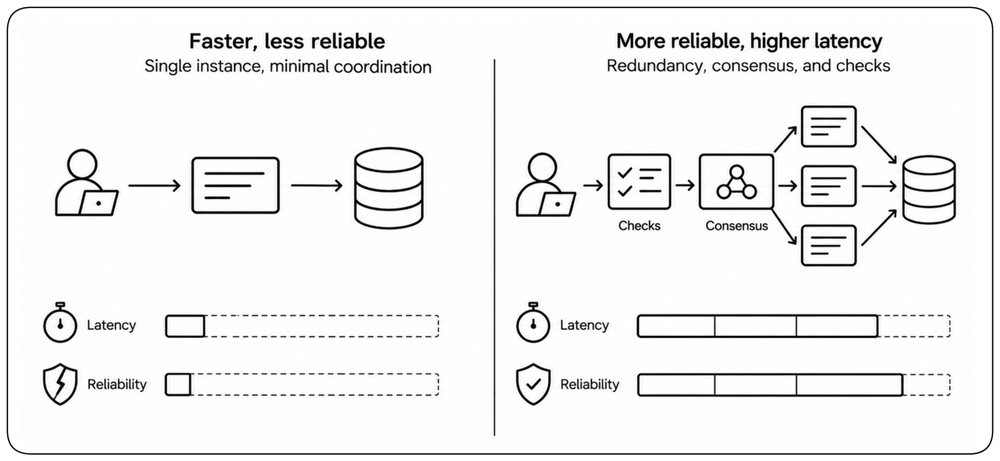
Redundancy improves reliability and can impair raw latency — writing to multiple replicas takes longer than writing to one, consensus protocols add coordination, and circuit breakers add a check on every call. The trade is asymmetric: a fast system that loses data or crashes under load delivers no value. Performance lives within the envelope reliability sets.
Learn More
Chapter: Design for Resiliency.
Performance vs Cost [Cost]
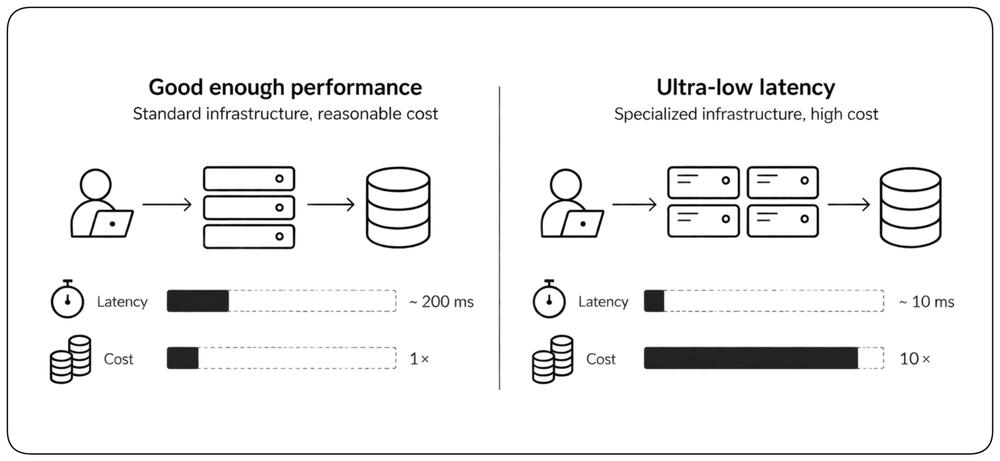
The last millisecond — and the last percentile — can be disproportionately expensive. Driving p99 latency lower may require additional capacity, dedicated instances, premium network paths, in-memory infrastructure, and significant engineering effort. Set the latency SLO where performance creates real value, then stop spending when further improvement no longer justifies its cost.
Learn More
Chapter: Design for Cost.
Proving Performance [Monitoring]
A system you cannot see is a system you cannot improve. Define the performance contract first, observe its behavior in production, and deliberately test the limits of its operating envelope.
Shift Performance Left [Shift Left]
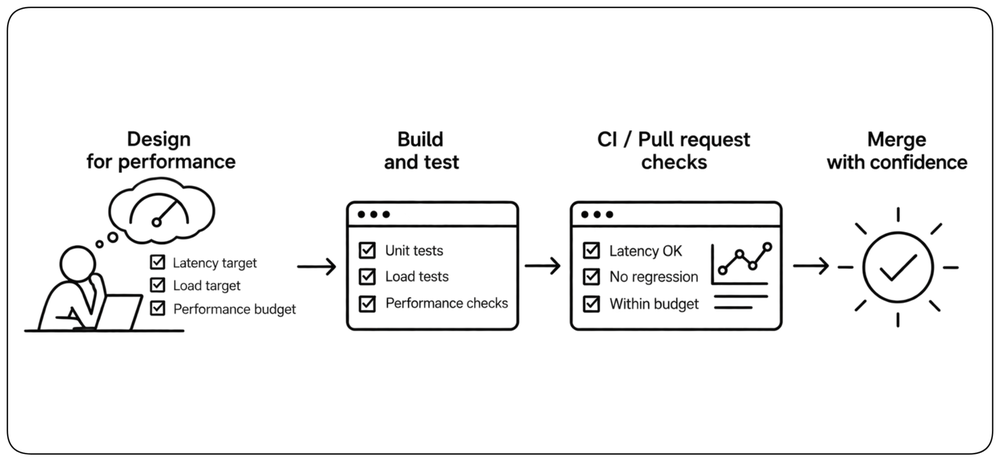
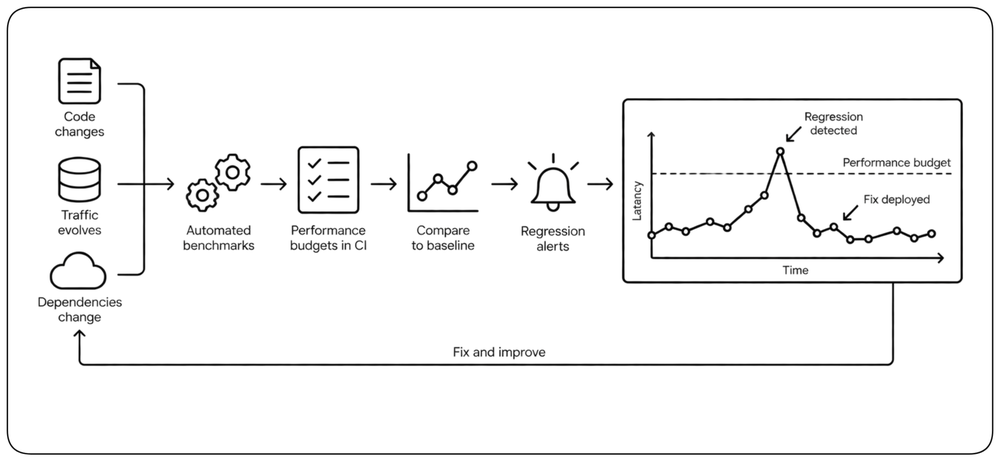
Performance problems are cheaper and easier to address before they are embedded in production architecture. Bake latency targets, load tests, and budget checks into the design phase and CI — not the post-incident review. A regression caught on a pull request takes minutes; the same regression in production takes a war room.
Performance Observability [Observability] {1}
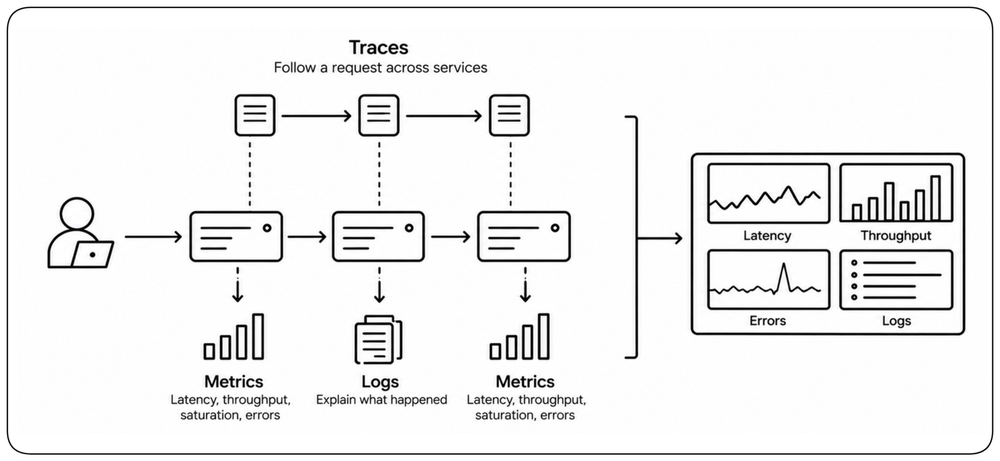
Observability is the ability to understand a system's internal state from its external outputs. !!Metrics carry numbers such as latency, throughput, saturation, and errors; traces follow individual requests across services; logs explain what happened when the numbers go bad.!! In production, these signals reveal how real traffic uses the system and where time and capacity are spent.
Load Testing [Load Testing]
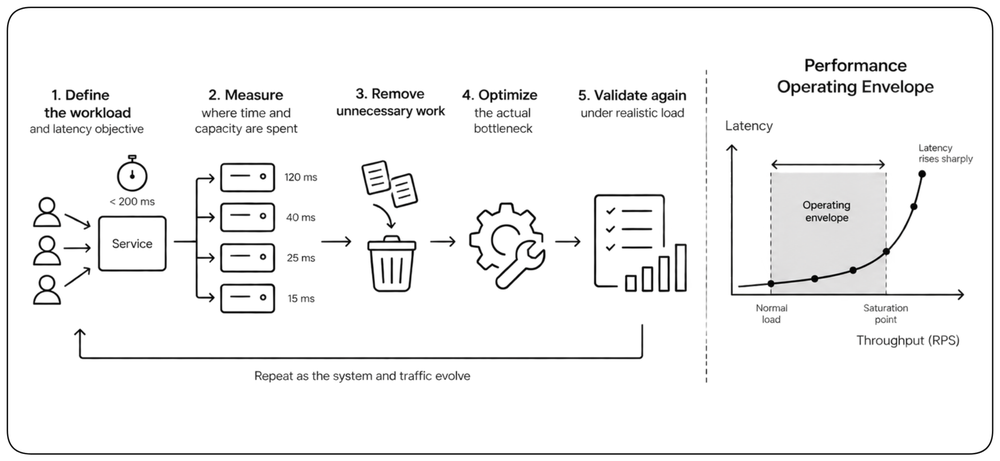
Load testing connects performance targets to capacity. Increase realistic traffic until queues form, latency rises sharply, throughput stops scaling, or errors appear. The goal is to discover the system’s saturation point and usable operating envelope, not merely to prove that expected traffic works.
Continuous Performance Improvement [Continuous]
Performance regresses as systems, traffic, and dependencies evolve. Automated benchmarks, performance budgets in CI, and regression alerts make those changes visible early and turn improvement into a routine discipline.
Closing
Performance is a Measurable Operating Envelope [Synthesis] {1}
Define the workload and the latency objective. Measure where time and capacity are spent. Remove unnecessary work, optimize the actual bottleneck, and validate again under realistic load. Performance is not maximum speed; it is predictable behavior within a defined operating envelope.