Design for High Availability
Chapter Info
Calculating... Writing Progress: 30%
Availability is the silent currency of modern software. Users do not notice it when it works; they remember it when it does not. The architectural question is precise: how should a system be designed so that expected failures and planned transitions do not make the service unavailable?
This chapter moves from the availability requirement to the failure domains the system must survive, then to independent redundancy, data and serving-capacity failover, geographic distribution, planned changes, AI dependencies, and validation. Operability owns the operational practices, resiliency owns application-level failure handling, and release management owns deployment techniques; availability uses their outcomes as architectural inputs.
Fundamental Concepts [Fundamental Concepts]
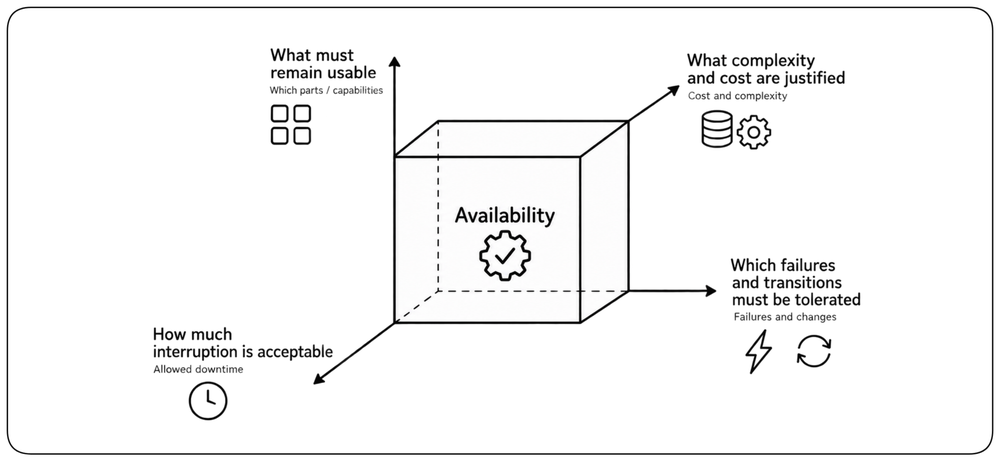
Availability is the ability of a system to remain usable when failures occur or while planned changes are taking place. As a design property, it has several dimensions: what must remain usable, which failures and transitions must be tolerated, how much interruption is acceptable, and what complexity and cost are justified to achieve it.
What High Availability Promises [Definition] {1}
Expected failures and planned changes should not make the service unavailable beyond the defined availability requirement. High availability (HA) preserves useful service through the failures and transitions the architecture is designed to tolerate. Some interruption may still occur, but it remains within the acceptable limit.
Failure Frequency & Recovery [Frequency & Recovery] {1}
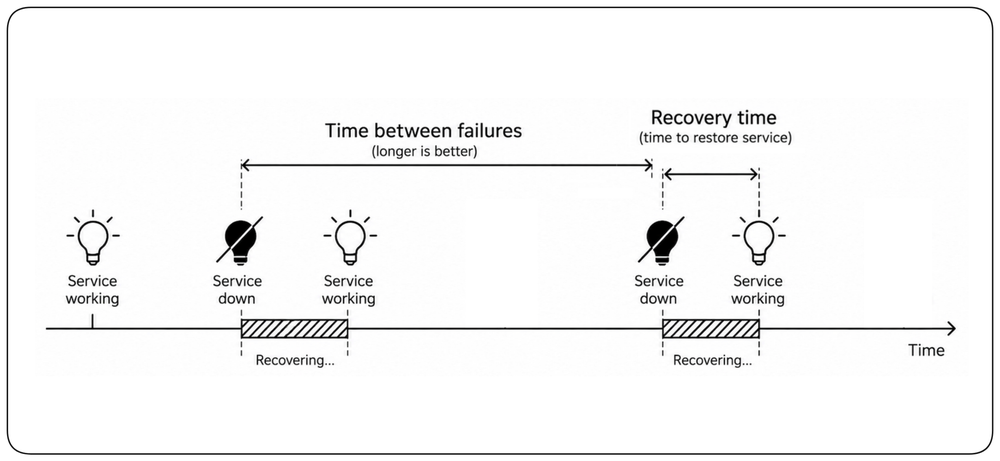
Two properties have a major impact on availability: !!how often failures affect the service and how quickly the system recovers when they do.!! Since failures cannot be eliminated entirely, architecture must address both: reduce their frequency and recover quickly when they occur.
Availability Is Not Binary [Capability Availability] {1}
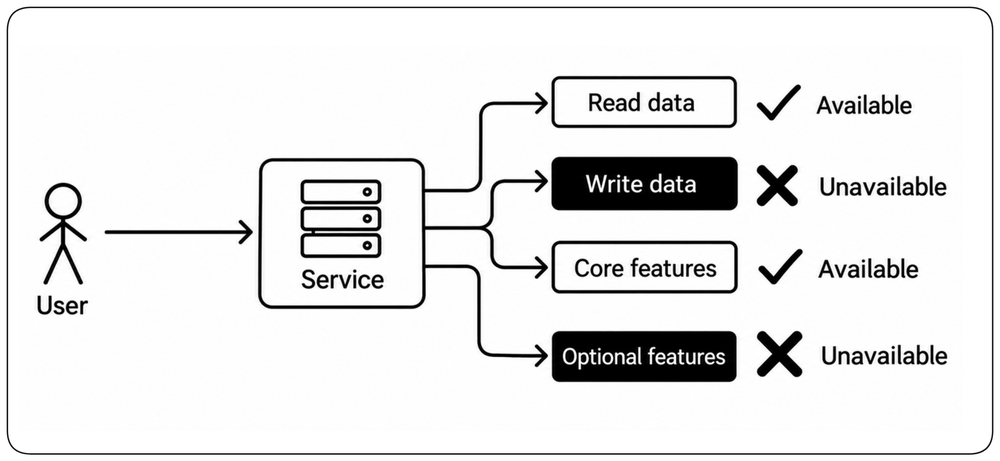
A system does not have to be completely up or completely down. !!The architecture should define which capabilities must remain available when specific failures occur.!! Reads may continue while writes stop, or core functionality may remain available while optional features disappear. Availability should therefore be designed and evaluated per user capability, not only for the system as a whole.
Availability vs Resiliency [Availability vs Resiliency]
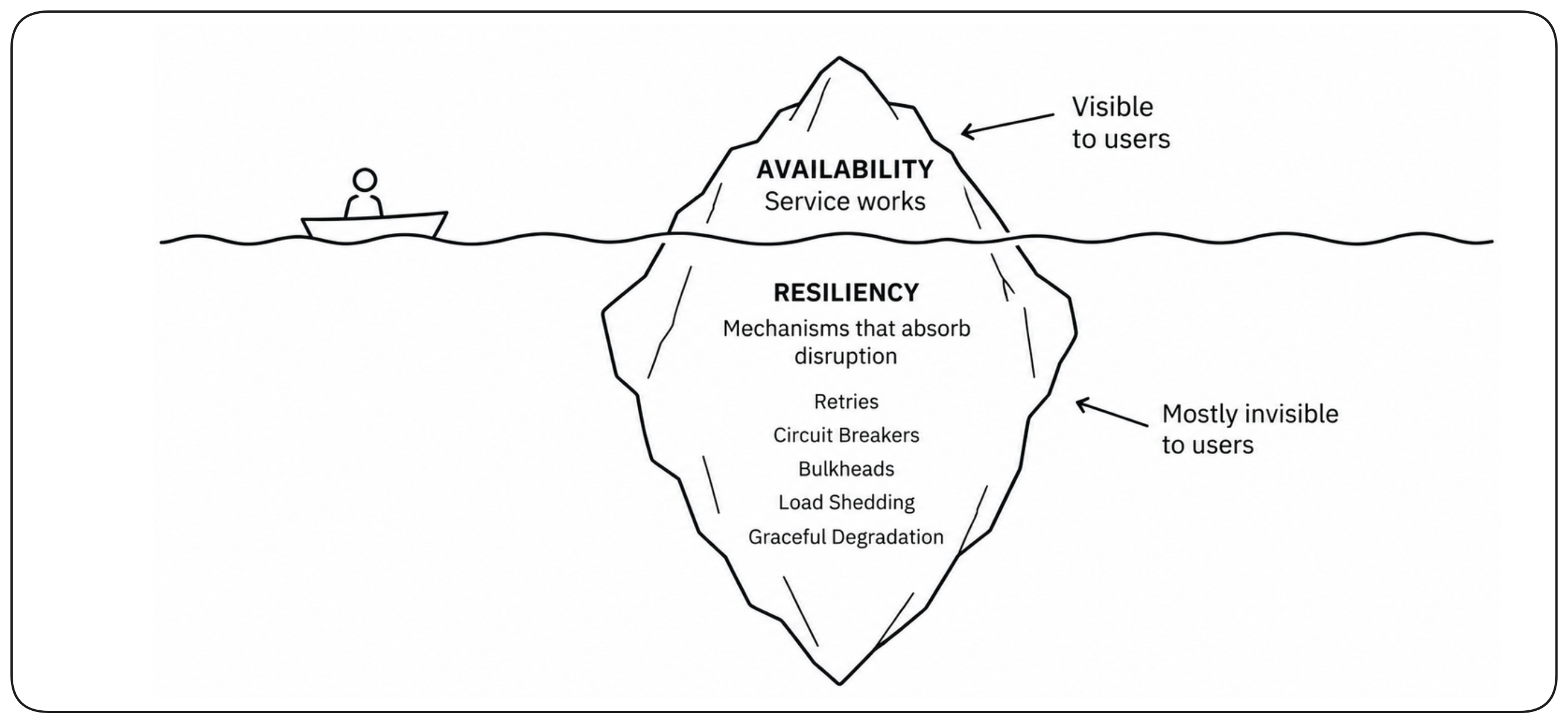
Availability and resiliency address failure from different perspectives. Availability defines whether the required service, compute, and data remain usable through disruption. Resiliency describes how the application absorbs disruption through patterns such as retries, circuit breakers, and graceful degradation. !!Resiliency helps preserve availability, but availability is the user-visible outcome.!! This chapter focuses on availability architecture; application-level failure handling belongs to resiliency.
Learn More
Chapter: Design for Resiliency.
Availability Is an End-to-End Property [End-to-End Availability] {1}
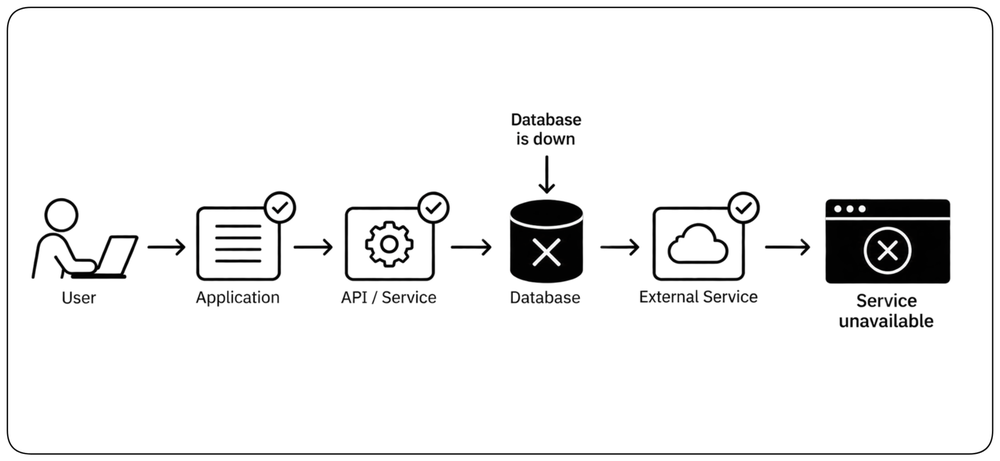
A service is available only when the complete path required to deliver a user capability is available. Highly available components do not guarantee a highly available system if the request still depends on a weaker database, network path, identity service, or external provider. !!Availability must therefore be reasoned about from the user-facing capability through every dependency required to deliver it.!!
Define the Availability Requirement — The Nines [The Nines] {1}
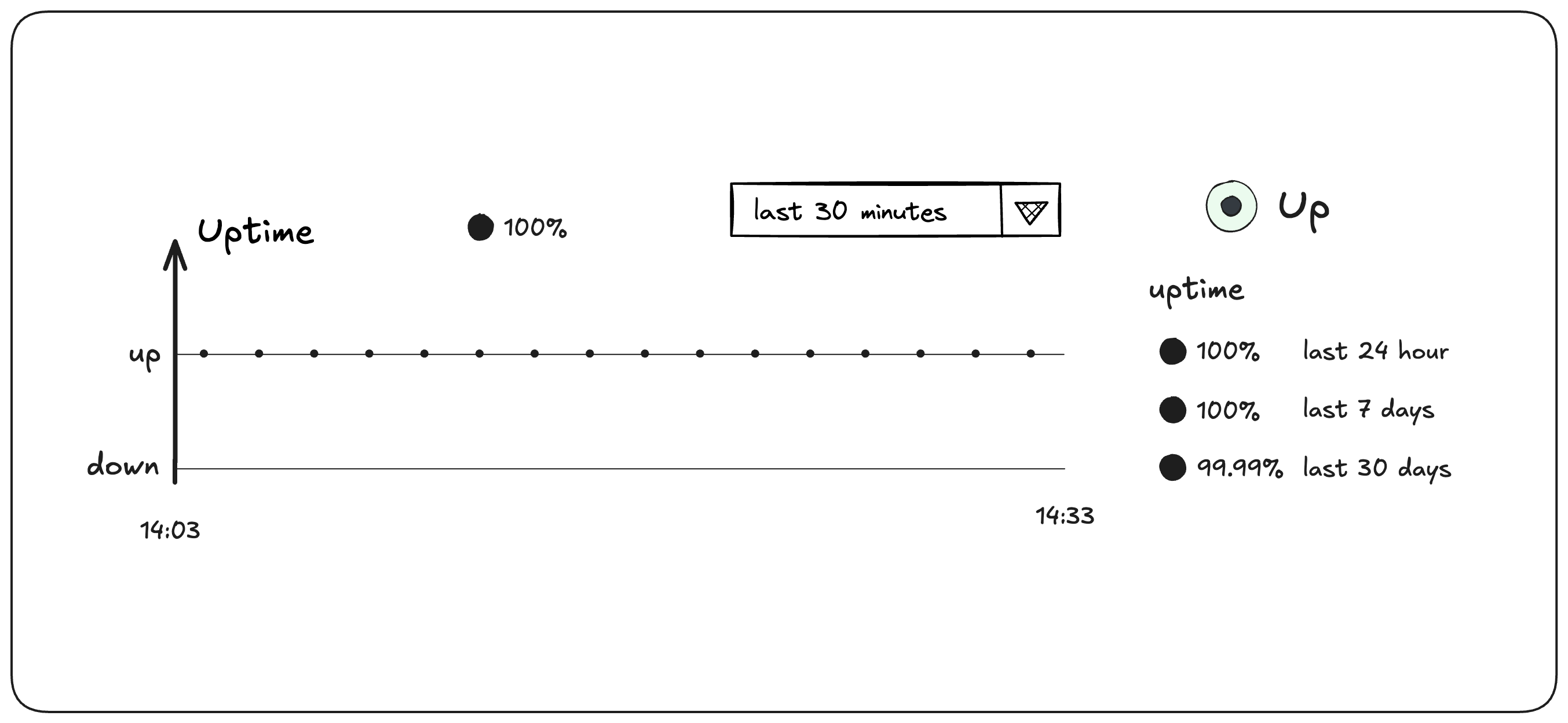
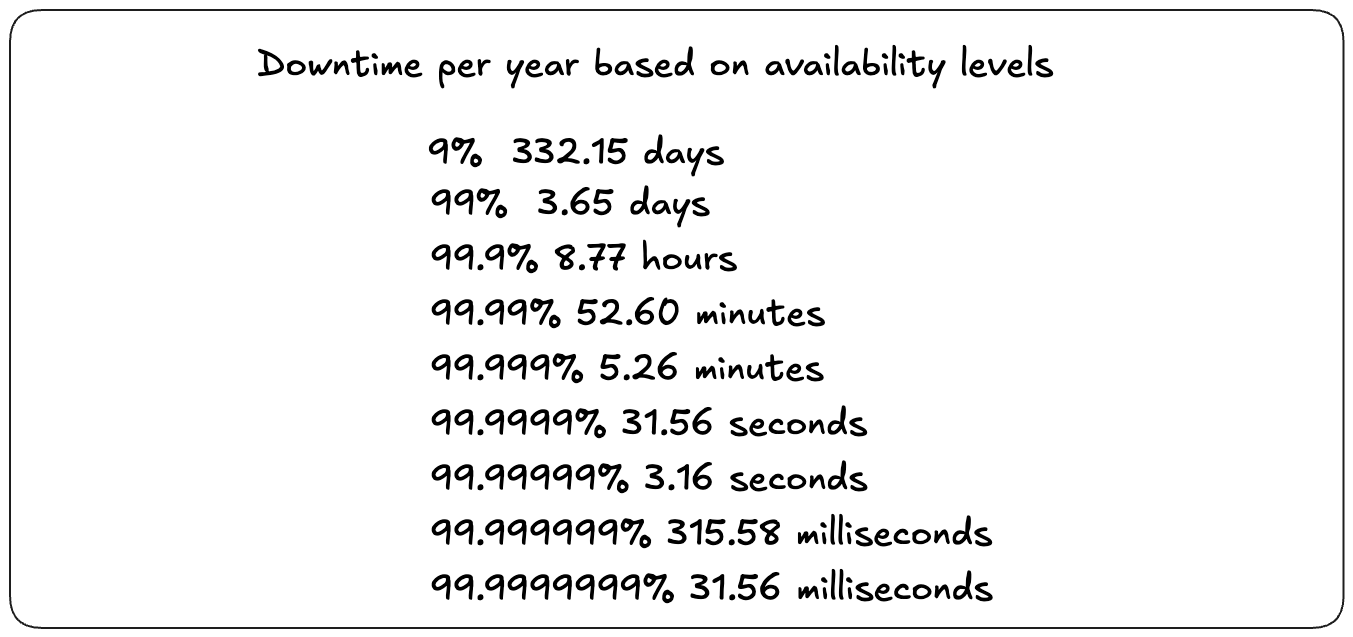
An availability requirement defines !!how much interruption a service is allowed to expose over a given period!!. It is commonly expressed as a percentage of time the service must remain available — the “nines.” 99% allows about 7.3 hours of downtime per month, 99.9% about 44 minutes, 99.99% about 4.4 minutes, and 99.999% about 26 seconds. The appropriate requirement depends on the value and criticality of the service.
Let the Requirement Drive the Architecture [Requirement] {1}
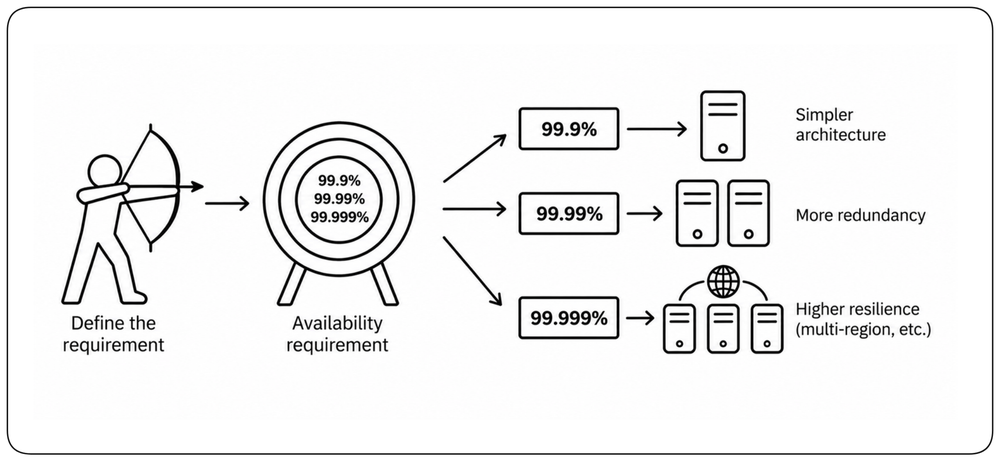
Different availability requirements lead to different architectures. !!The requirement determines which failures must be tolerated, how much redundancy and spare capacity are needed, and how quickly failover must complete.!! A system designed for 99.9% can make very different tradeoffs from one designed for 99.99% or 99.999%. For example, Google Cloud DNS is the only Google Cloud service that guarantees 100% availability.
Learn More
Chapter: Design for Operability.
Higher Availability Adds Complexity [Adding Complexity] {1}
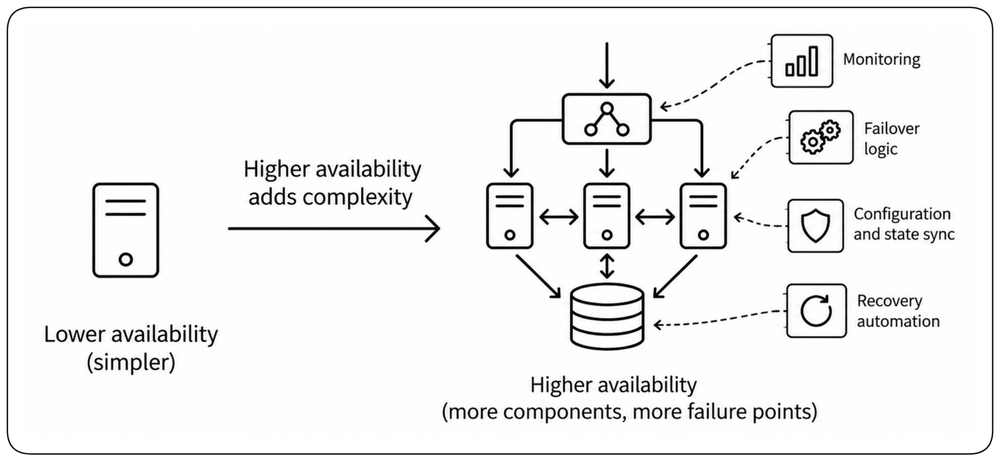
Higher availability usually requires more components, more coordination, more state transitions, and more failure handling. !!The mechanisms introduced to prevent outages can themselves create new failure modes.!! Availability improves only when the protection added by the architecture outweighs the complexity and dependencies it introduces.
Choose the Availability Worth Paying For [Cost]
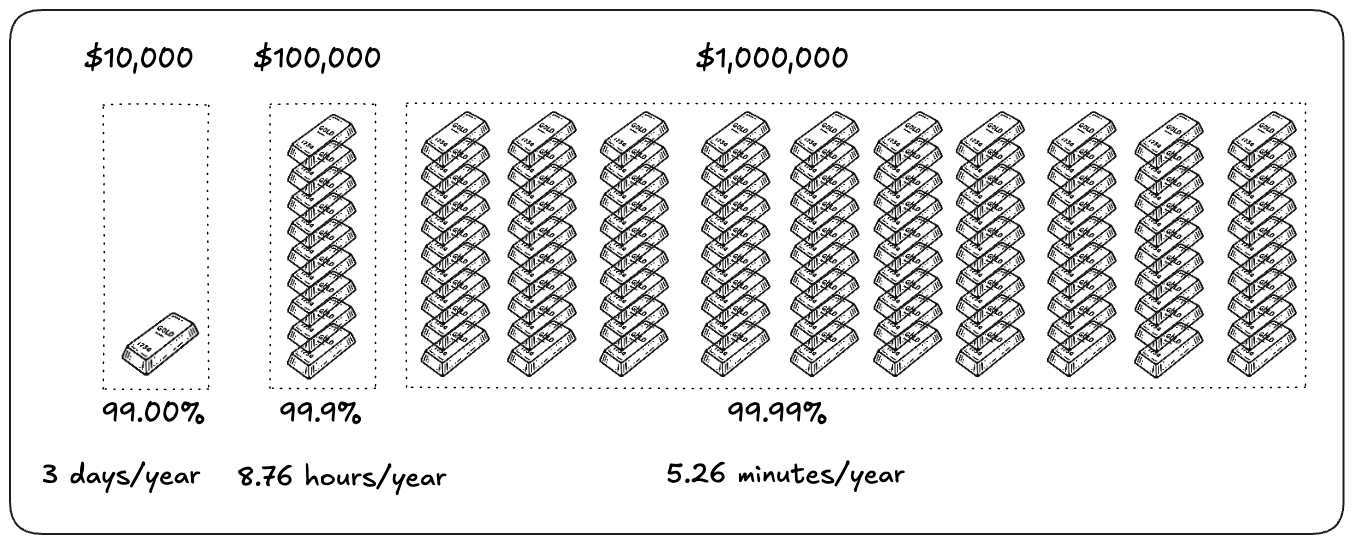
Each additional level of availability protects against more failure scenarios, so its cost rises rapidly — more redundancy, spare capacity, automation, and failure isolation, some of it capacity intentionally kept unused. Because downtime also has a real business cost, the rational availability requirement is the point where preventing more downtime is worth more than the architecture it demands.
Managed Services: Transfer Complexity, Keep Simplicity [Managed Services] {1}
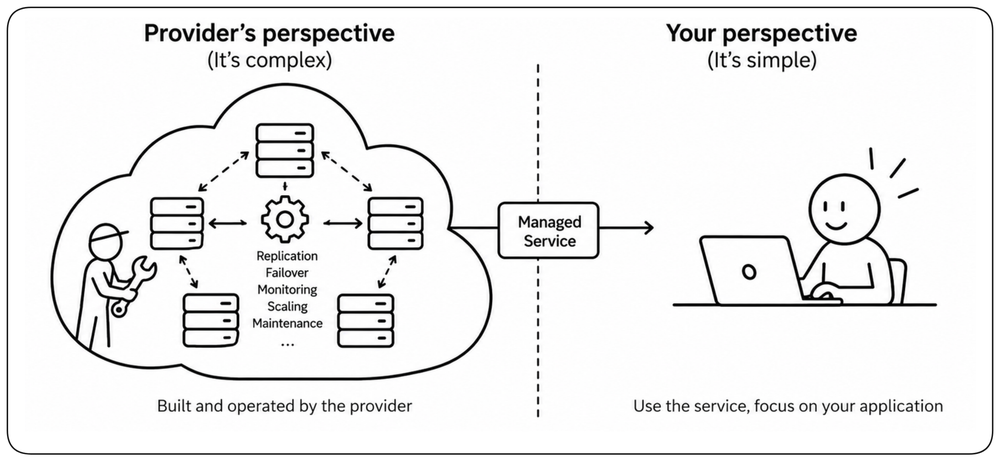
High availability does not always require building and operating every redundancy mechanism yourself. Managed services can hide replication, failover, infrastructure replacement, and coordination behind a simpler service boundary. !!They let your architecture remain simpler by transferring part of the availability complexity to the provider.!! The complexity still exists, so understand the provider’s guarantees and failure domains before depending on them.
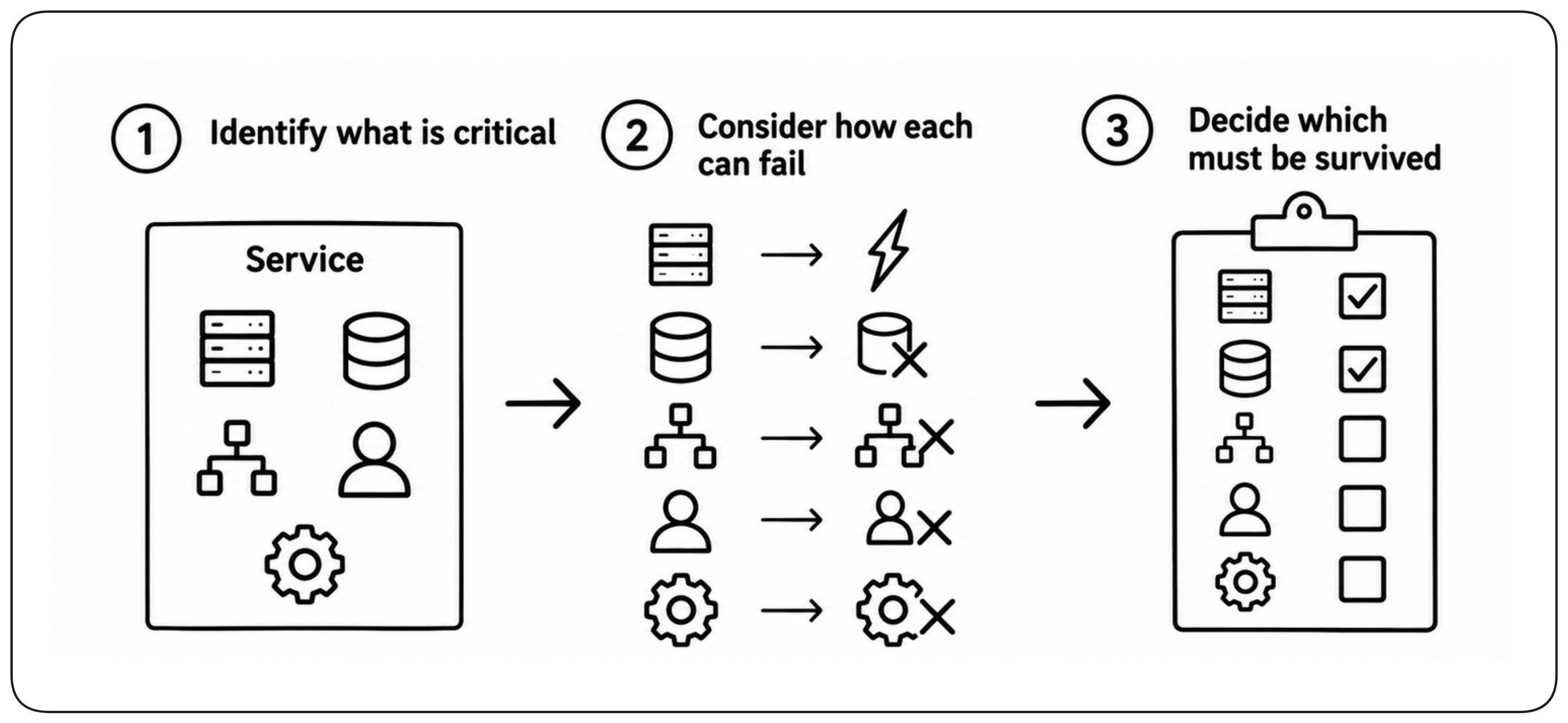
Identify What the System Must Survive [Availability Failures]
Availability design starts by identifying the critical components and dependencies the service needs to remain functional. Compute, data stores, network paths, identity systems, and external services can each become unavailable in different ways. The architecture must understand these dependencies and the failures that can remove them, then determine which failures the service must survive.
Design Around Failure Domains [Failure Domains] {1}
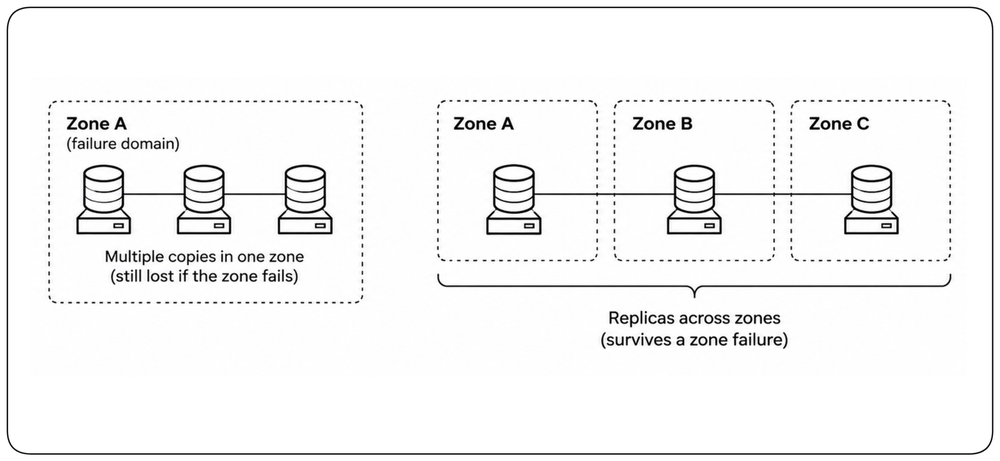
A failure domain is a boundary inside which components can fail together. Two instances on the same host protect against a process failure but not a host failure; two hosts in one zone protect against a host failure but not a zone failure. !!Availability architecture must place the required surviving capacity outside the failure domain it promises to tolerate.!!
Find Single Points of Failure (SPOF) [Find SPOFs] {1}
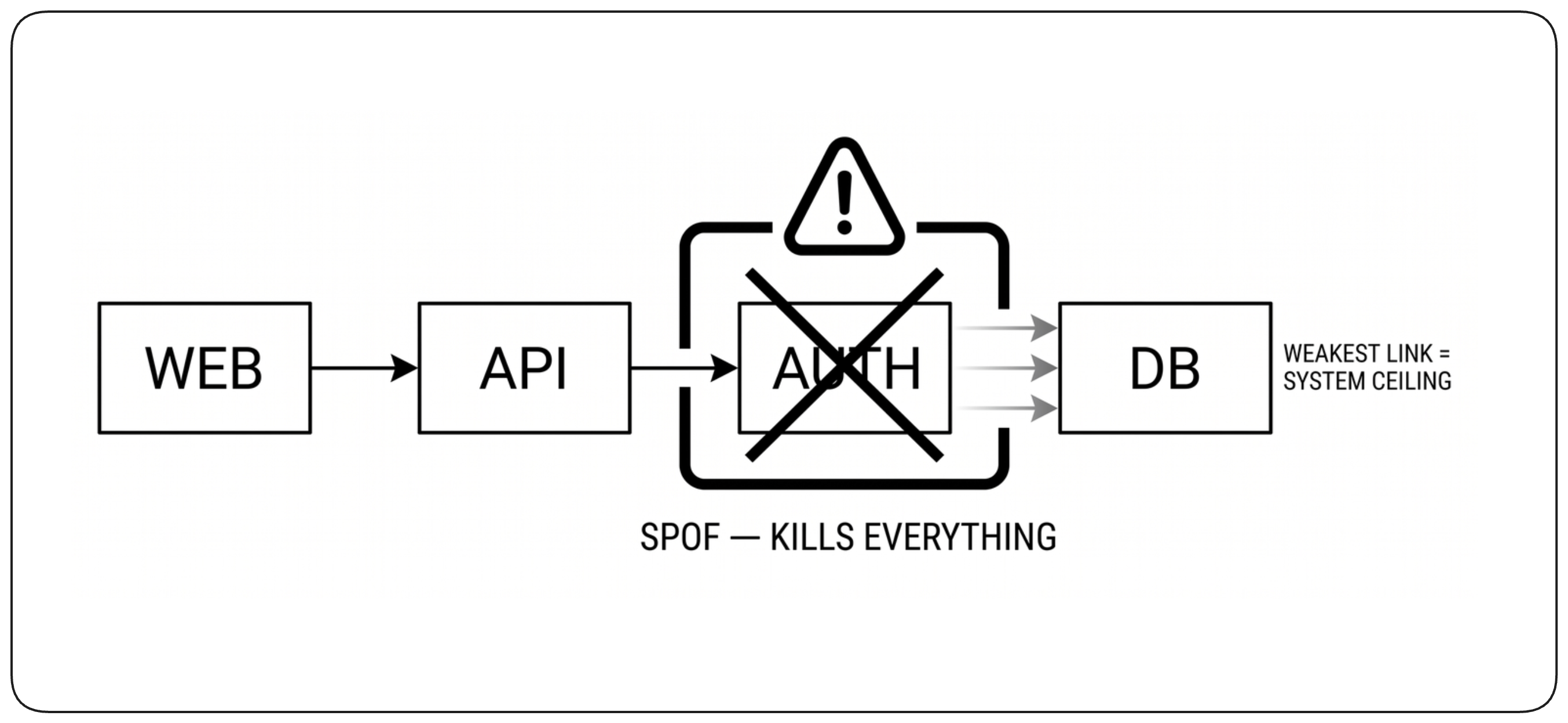
A single point of failure is any component whose loss can remove the entire capability it provides. !!Walk every critical request path and ask at each component, dependency, and control plane: what happens if this disappears now?!! Obvious SPOFs include a lone database or load balancer; hidden ones include shared DNS, identity, network paths, and external services. Replicated data-plane capacity can still depend on one control plane for discovery, certificates, routing, or configuration.
The Dependency Chain Problem [Dependencies]
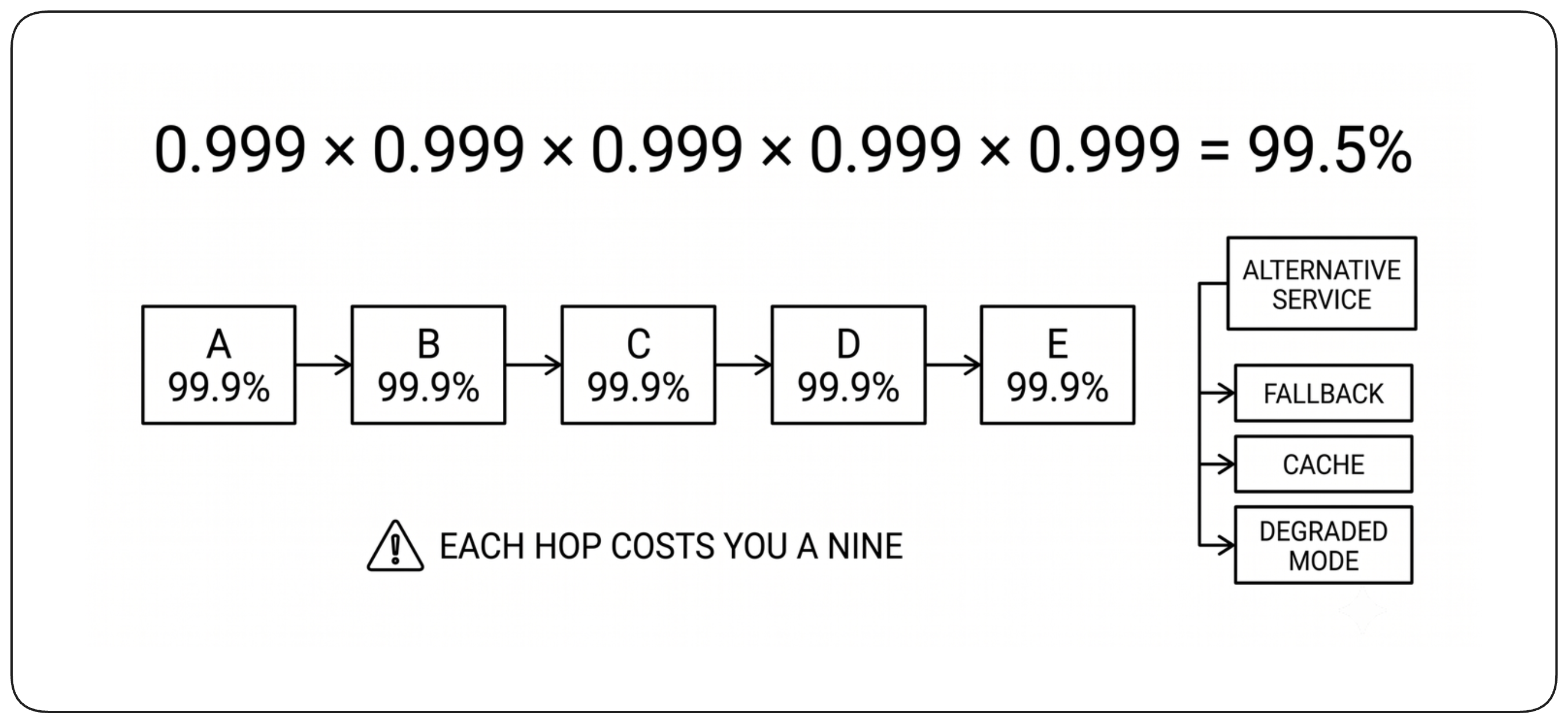
Every required dependency adds failure exposure to the user-facing capability. Because a request needs all required dependencies to be available at the same time, their availability compounds. !!End-to-end availability therefore falls as required dependencies are added, even when each one is highly available.!! Even when each dependency is individually redundant, the service still fails if any required one is unavailable. Treat critical external dependencies as failure domains and reduce unnecessary synchronous links; application-level fallback behavior belongs to resiliency.
External Dependencies Set Your Availability Ceiling [External Dependencies] {1}
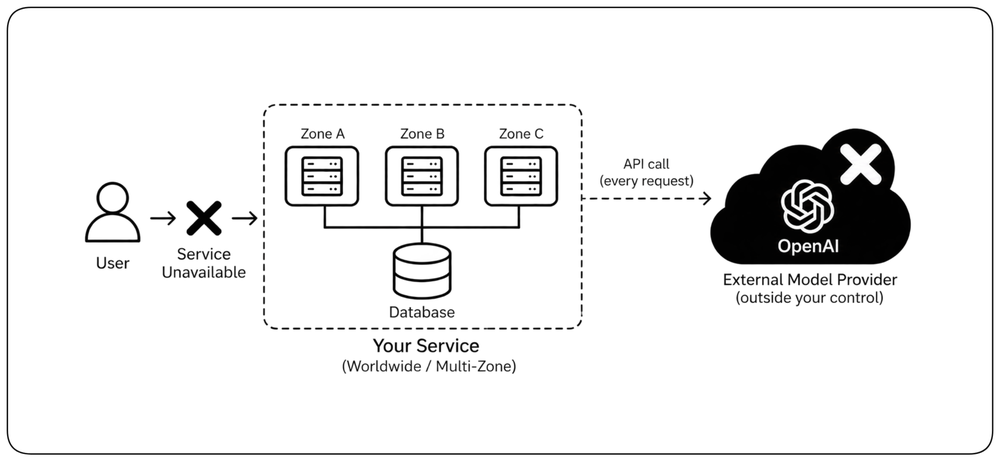
A critical dependency outside your control can limit the availability of your entire service. If every request depends on an external API, model provider, payment service, or identity provider, its outage becomes your outage. !!Either accept that dependency as part of your availability ceiling or provide an independent path that keeps the critical capability working without it.!!
Build Independent Redundancy [Redundancy]
Once the required failure domains are known, the architecture must determine how service continues when one of them is lost. Redundancy is the foundation of that design.
Redundancy Preserves the Capability [Capability Redundancy] {1}
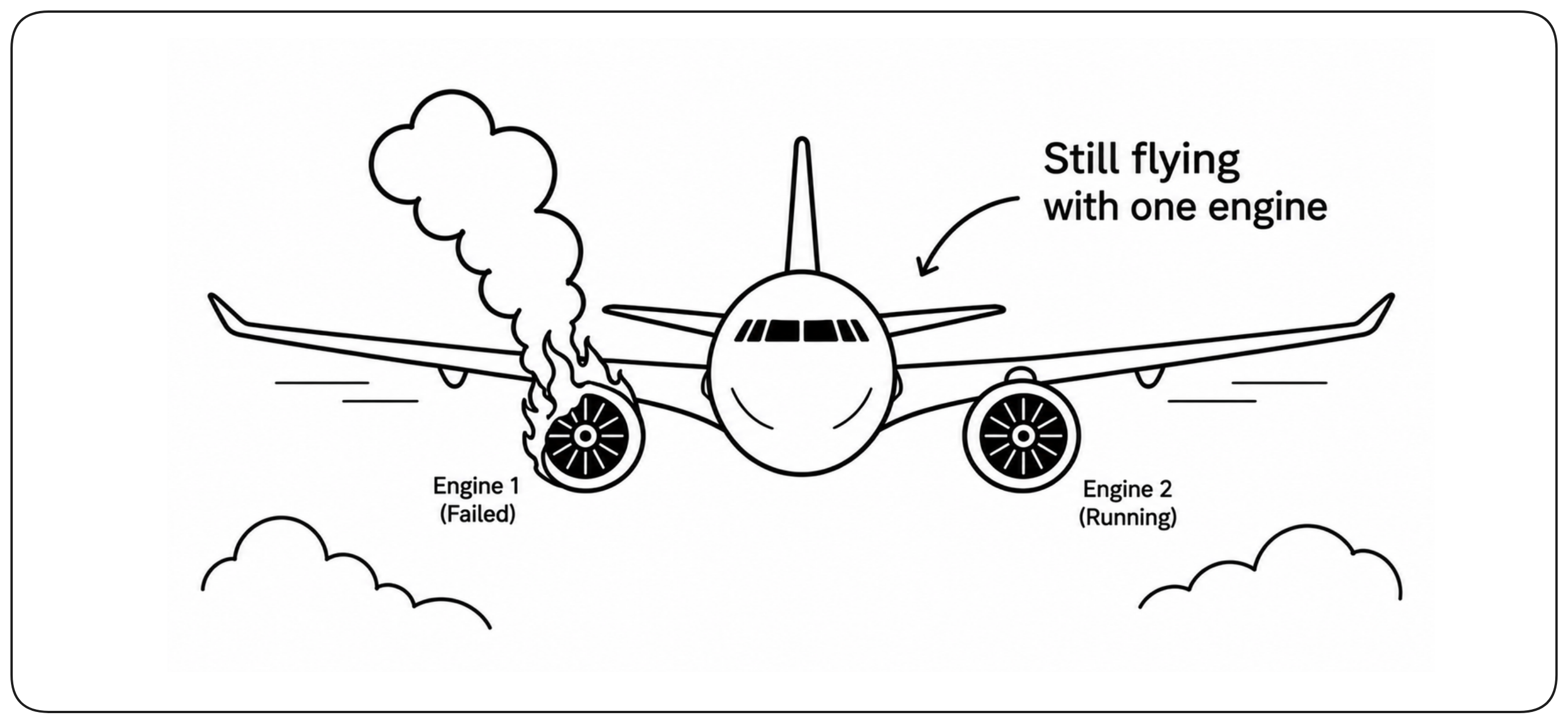
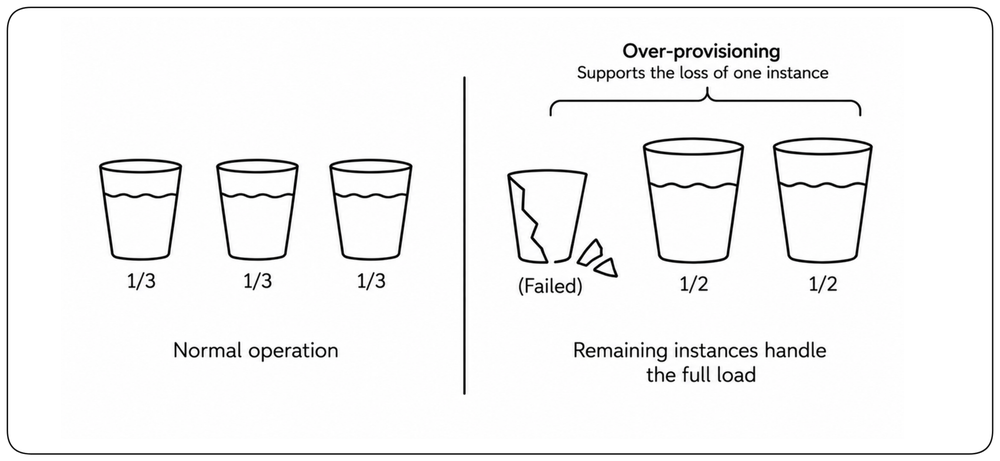
High availability relies on redundancy: when part of the system fails, another path must still provide the critical capability. !!The surviving capacity must be sufficient to carry the required workload.!! Redundancy is therefore not duplication for its own sake; it is what allows the service to continue when part of the system is lost.
Eliminate Single Points of Failure [Eliminate SPOFs] {1}
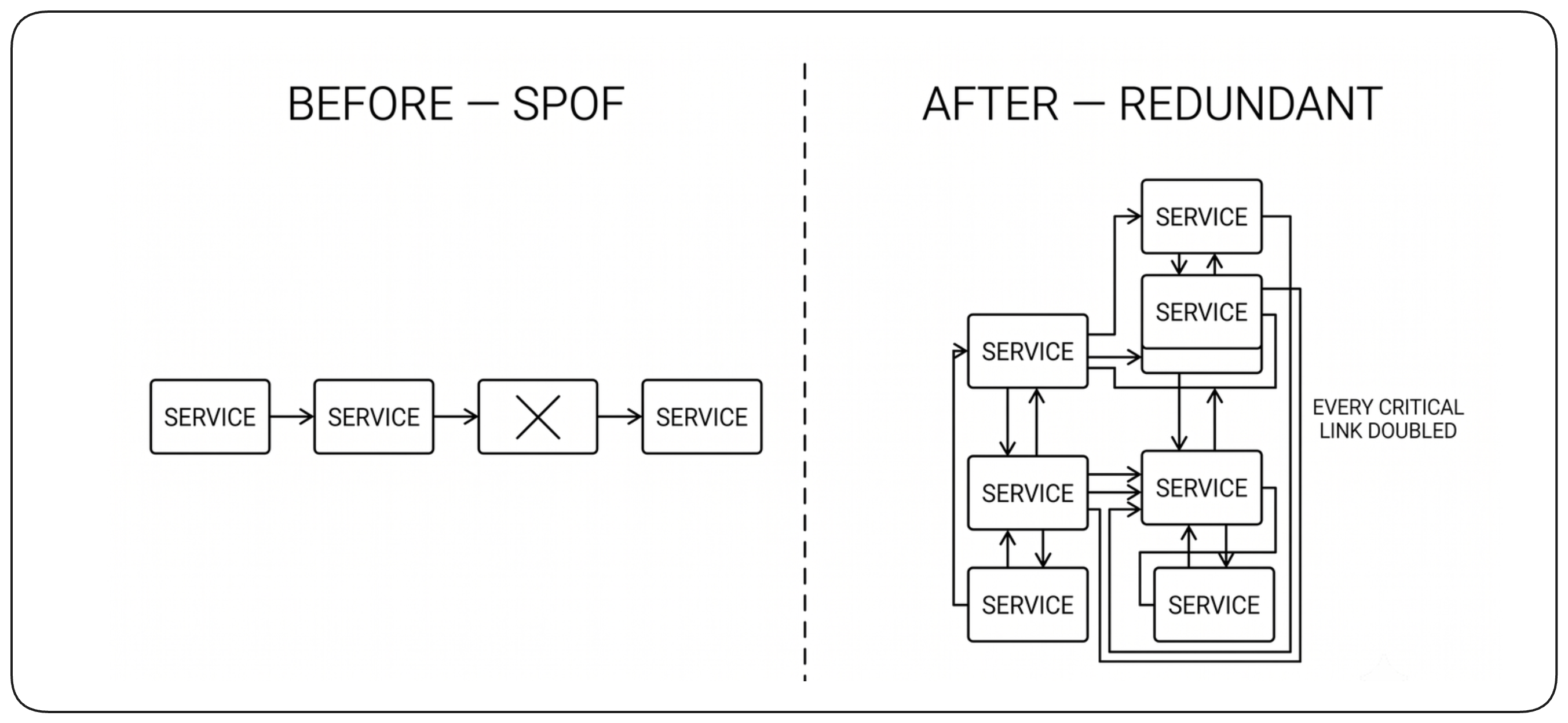
Redundancy must cover every component required to deliver the critical capability. !!No component whose loss can remove the capability should remain as its only provider.!! This applies not only to serving components, but also to data, network paths, and control dependencies.
Make Redundancy Independent [Independent Redundancy] {1}
Redundancy is effective only when the redundant components do not share the dependencies whose failure they are intended to survive. !!Independence must hold across the complete path — compute, data, network, power, and control dependencies.!! Otherwise, multiple copies may still disappear in a single failure. Verify that redundancy is independent in practice, not merely duplicated in topology.
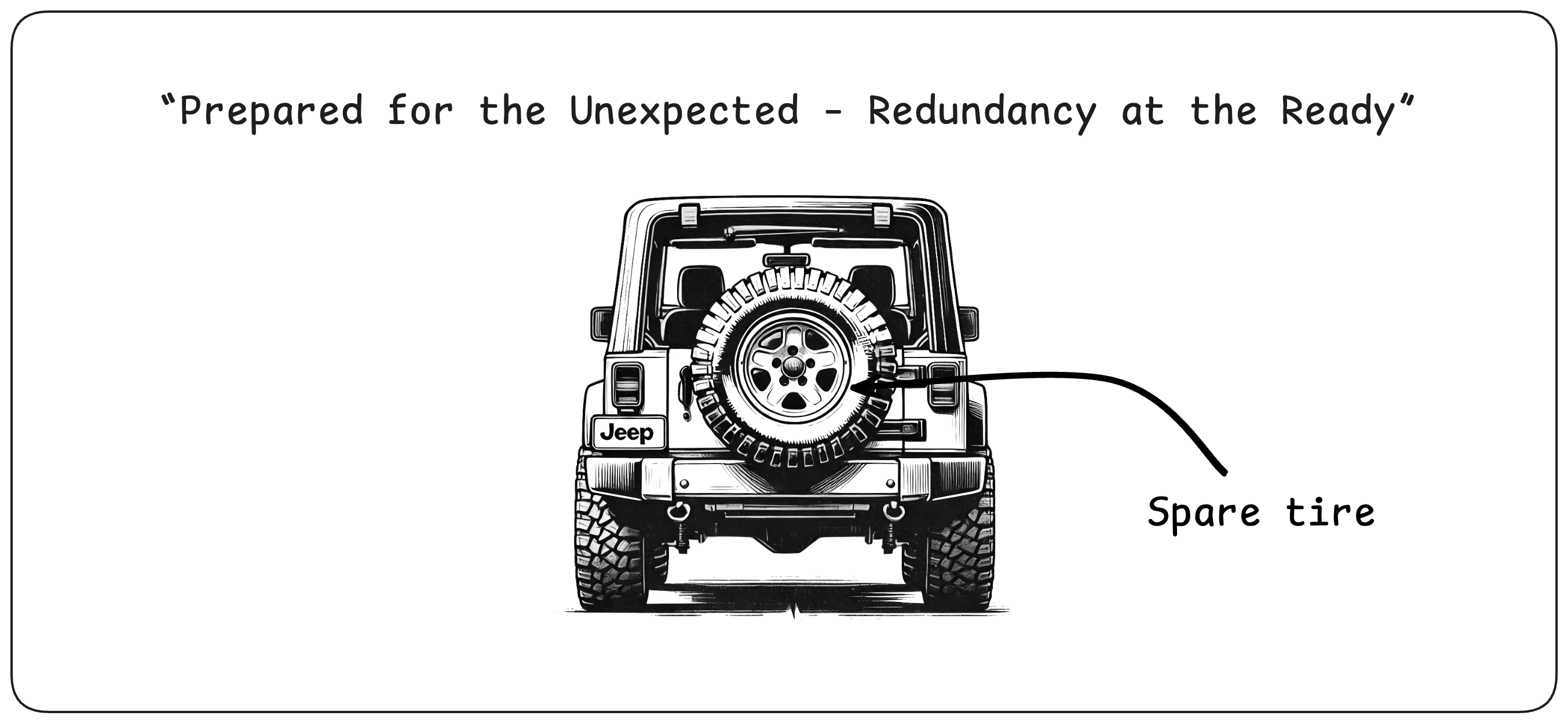
Redundancy Requires Spare Capacity [Spare Capacity] {1}
Redundancy means ensuring enough capacity remains available when part of the system disappears. !!That capacity may be reserved in advance or acquired dynamically, but it must become available fast enough to meet the availability requirement.!! When capacity cannot be created quickly or guaranteed on demand, spare capacity must be provisioned ahead of time, which can have a significant cost impact because part of the capacity may remain unused during normal operation. Its cost should be weighed against the business impact of the downtime it is intended to prevent.
Redundancy Must Fail Safely [Fail Safely]
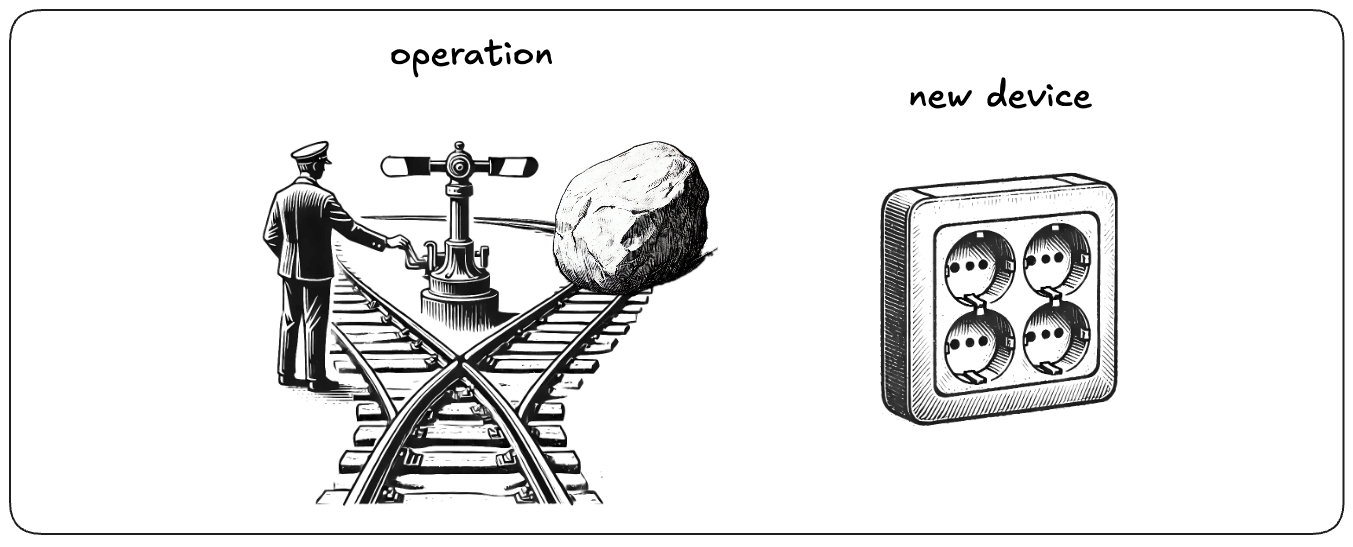
Redundancy depends on mechanisms such as health checks, synchronization, routing, and transition logic. Those mechanisms can fail too, and badly designed protection can cause the outage it was meant to prevent — for example through false health signals, unnecessary failovers, or unstable transitions. !!The protection added by redundancy must outweigh the new failure modes introduced by managing it.!!
Active-Passive: One Serves, One Waits [Active-Passive]
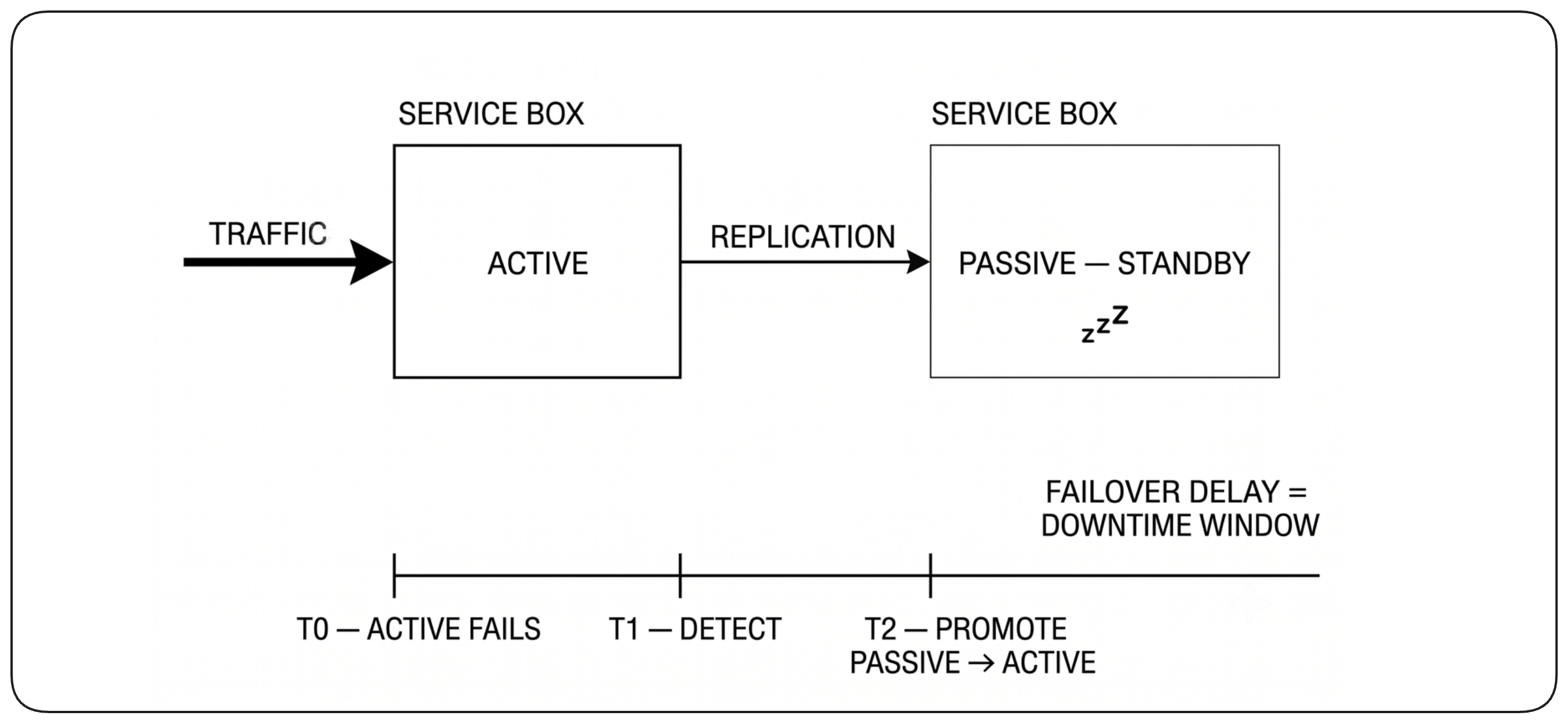
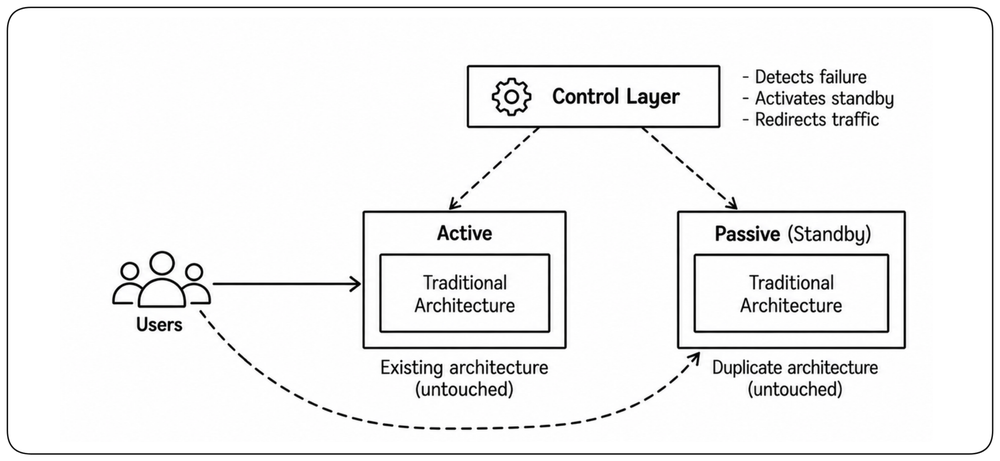
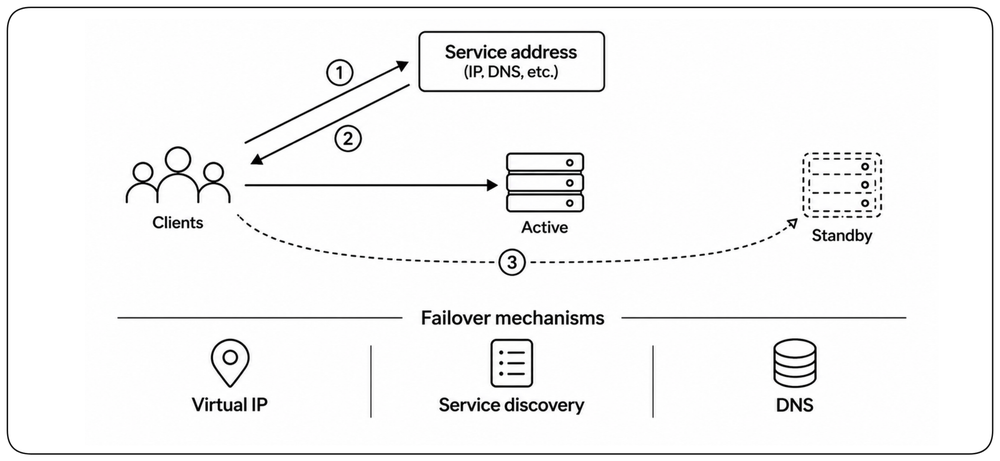
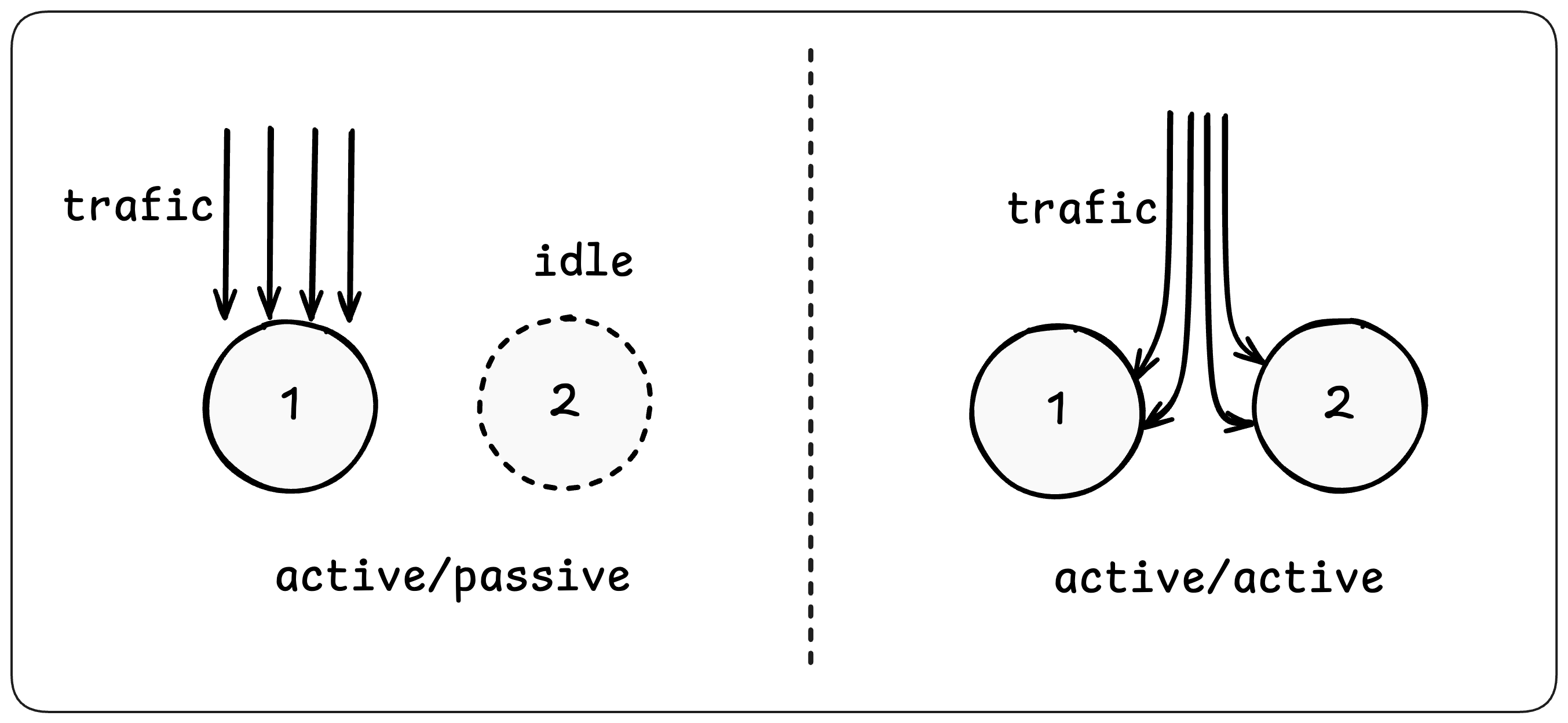
One way to provide redundancy is to keep one instance serving while another waits as a standby. This model is called active-passive. If the active instance fails, the standby takes over. !!This model works well when only one instance should serve at a time. However, there may be a short interruption before the standby takes over.!!
Active-Passive Brought HA to Traditional Architectures [Traditional HA]
In the 1990s, active-passive became a common way to bring high availability to traditional architectures. Instead of redesigning the system, it kept the existing architecture largely intact and added a control layer around it. That layer detected failure, activated a standby copy, and redirected traffic to restore service.
Make Active-Passive Failover Work [Active-Passive Failover]
Active-passive redundancy depends on a transition: the system must detect that the active capacity can no longer serve, determine that the standby is ready, and move service to it. !!The availability of the design therefore depends not only on the standby, but on the reliability and speed of the failover mechanism itself.!!
Detect Failure Reliably [Health Detection] {1}
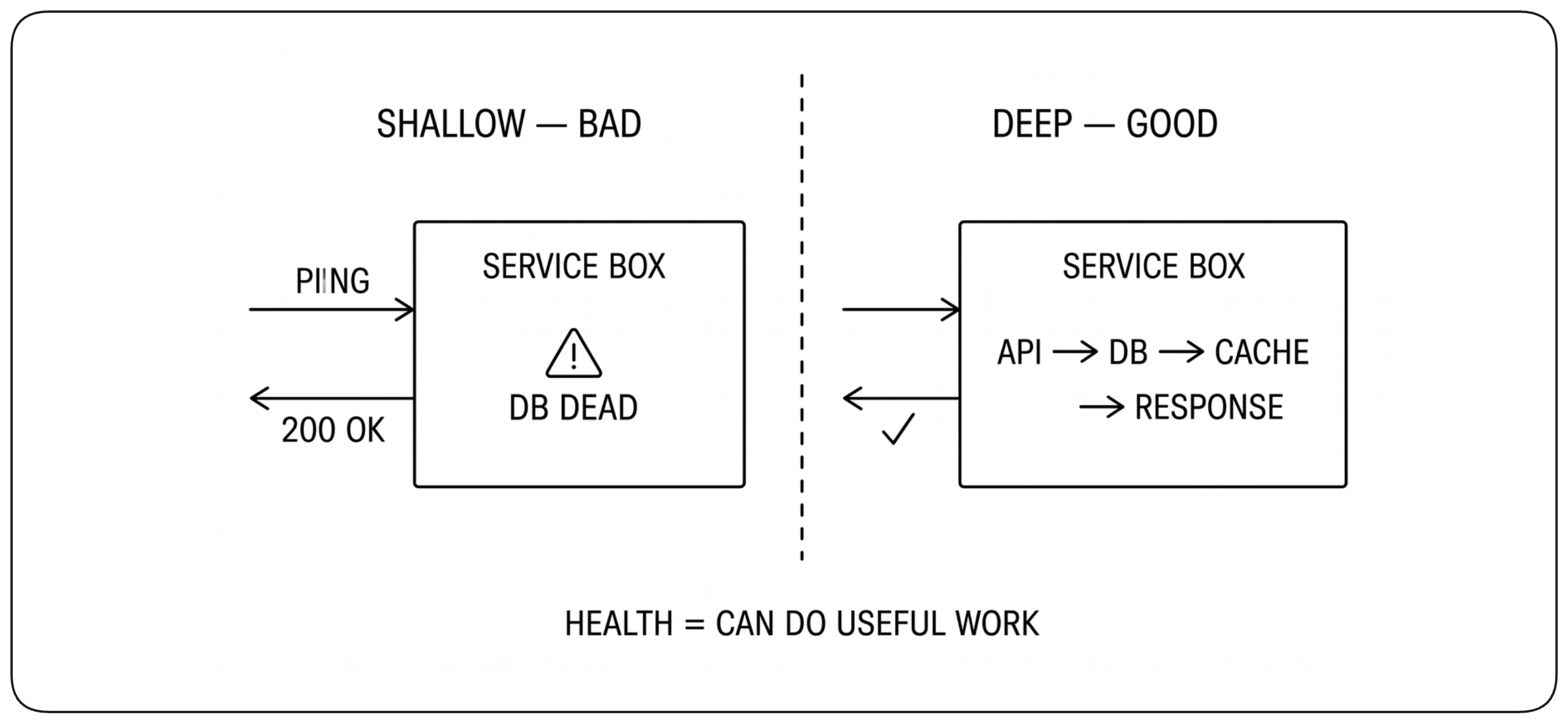
Failover starts by determining whether the active instance can still perform its role. A process may still be running while being unable to serve correctly, so a simple process check is not enough. !!The system needs a reliable health signal that detects real loss of service without reacting too aggressively to temporary problems.!! A weak signal delays recovery; an overly sensitive one can trigger unnecessary failovers.
Decide When to Fail Over [Failover Decision] {1}
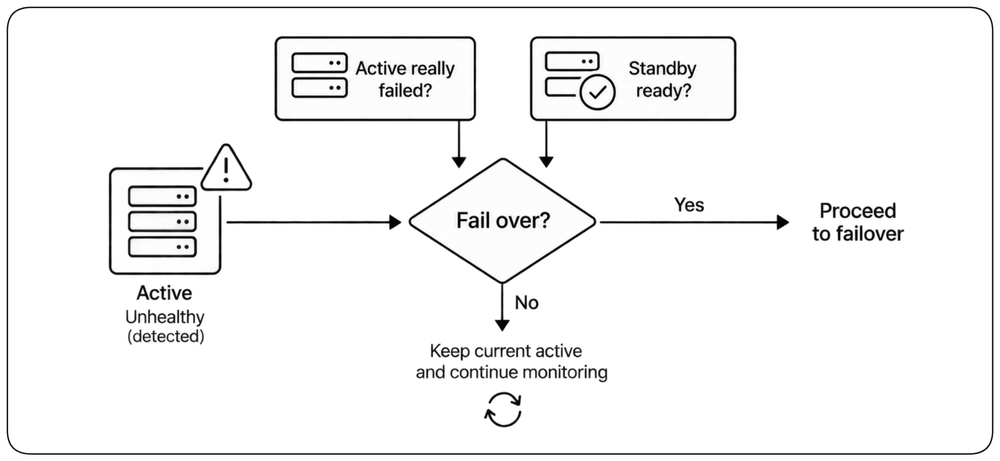
Detecting a problem does not automatically mean the system should switch to the standby. A transient failure may disappear, the standby may not be ready, or switching may create more instability than staying where it is. !!Fail over only when the active can no longer serve reliably and the standby is ready to take over; otherwise, a controlled degraded state may be safer than an uncertain transition.!! This prevents unstable or unnecessary failovers.
Automate Failover [Automated Failover] {1}
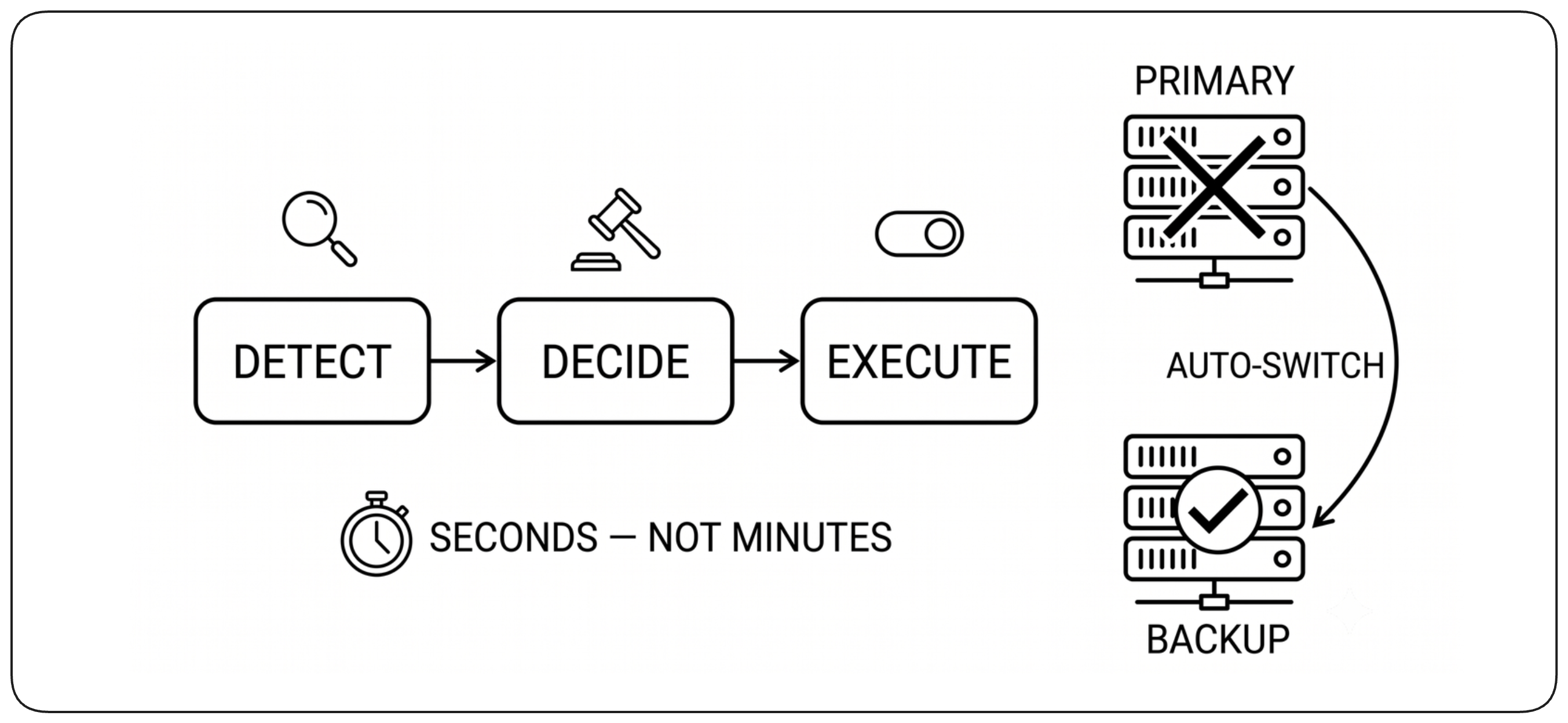
Once failover is justified, automation performs the transition: activate the standby if necessary and redirect traffic to it. !!Automation reduces the interval between confirmed failure and service restoration.!! The transition must complete quickly enough to meet the availability requirement, but correctness matters more than switching blindly fast.
Failover Mechanisms [Failover Mechanisms]
Failover requires a way to redirect service from the failed active instance to the standby. The mechanism changes where the logical service points without requiring clients to change how they address it. Depending on the architecture, this may mean moving a virtual IP, updating service discovery, or changing DNS.
Active-Active: All Instances Serve Traffic [Active-Active] {1}
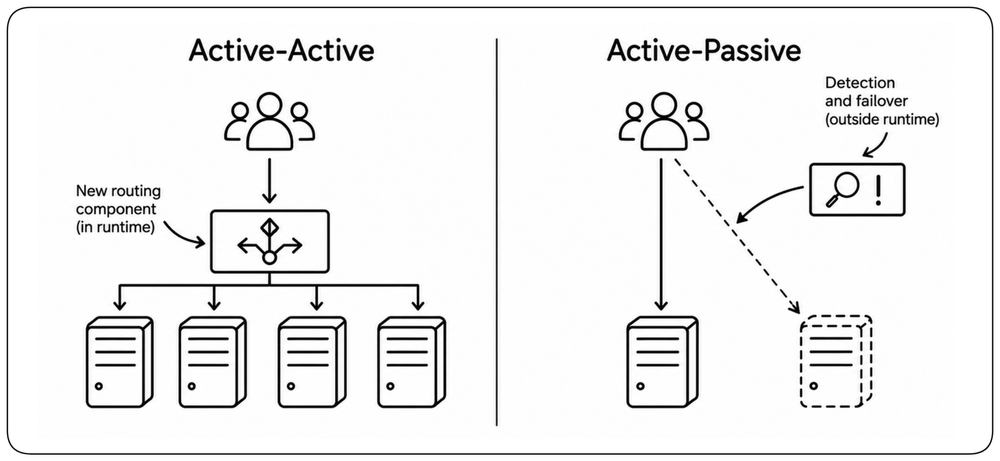
In an active-active model, multiple instances serve traffic simultaneously. !!Unlike active-passive, there is no standby waiting to be promoted: every instance is already serving.!! When one instance fails, traffic can move directly to the remaining active instances.
Make Active-Active Capacity Work [Active-Active Capacity]
Active-active redundancy keeps multiple instances serving at the same time. When capacity disappears, healthy instances continue serving, traffic is redistributed, and lost capacity can be replaced dynamically. Availability depends on keeping enough capacity available throughout that transition.
Active-Active vs Active-Passive: Where Complexity Lives [Complexity Tradeoff]
Active-active and active-passive place complexity in different parts of the architecture. Active-active continuously manages a pool of serving capacity, which can also absorb bursts and failures. Active-passive keeps normal operation simpler but may keep capacity idle until it is needed and depends on a reliable transition when the active instance fails. !!The choice is not about avoiding complexity, but deciding where to carry it and how that capacity should be used.!!
The Cloud Made Active-Active Natural [Cloud Natural] {1}
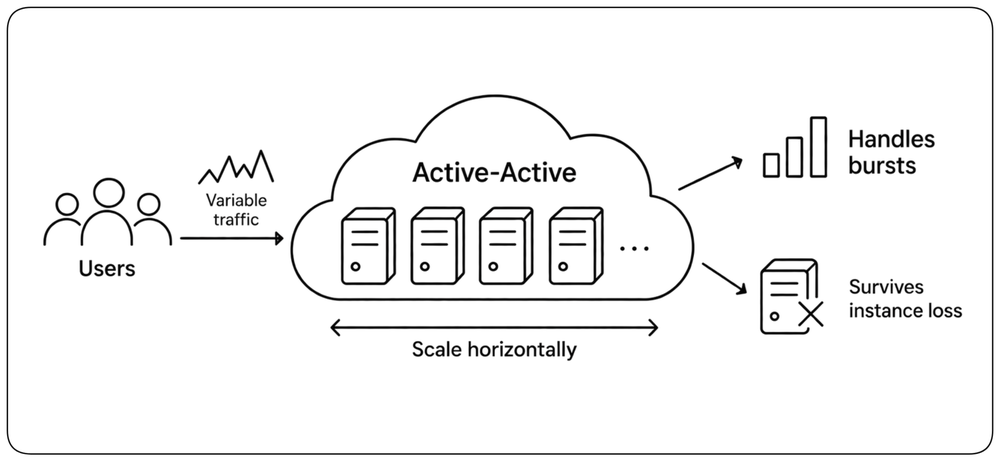
Modern cloud platforms made active-active a natural model for stateless serving capacity. The same set of instances can distribute normal traffic, absorb bursts, scale horizontally, and survive instance loss. !!High availability and scalability can therefore use the same architecture.!! Active-passive remains useful when multiple active instances are difficult, expensive, or unsafe.
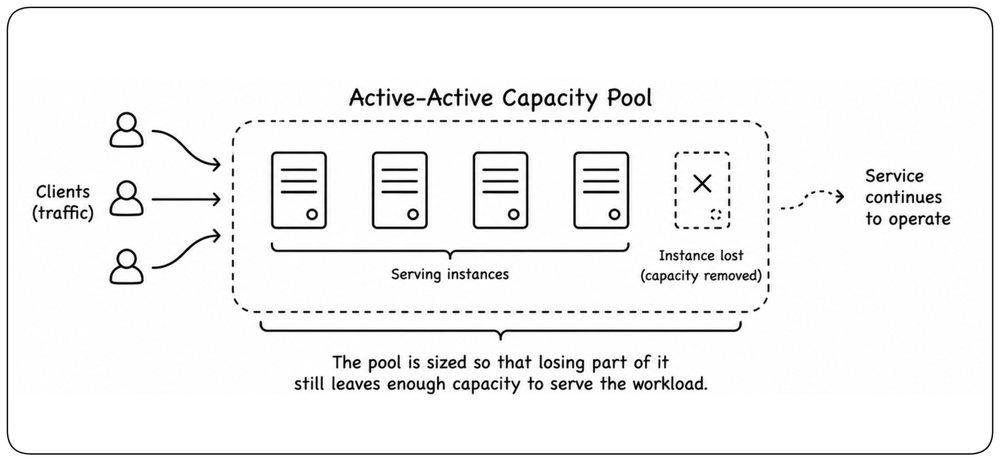
Treat Active-Active as a Capacity Pool [Capacity Pool] {1}
Active-active is best understood as a pool of serving capacity. The pool is sized so that losing part of it still leaves enough capacity to carry the required workload. !!A failure should remove capacity from the pool, not remove the service.!! If the surviving pool cannot safely serve every request, the system may need to protect critical capabilities by limiting or rejecting lower-priority work until capacity is restored.
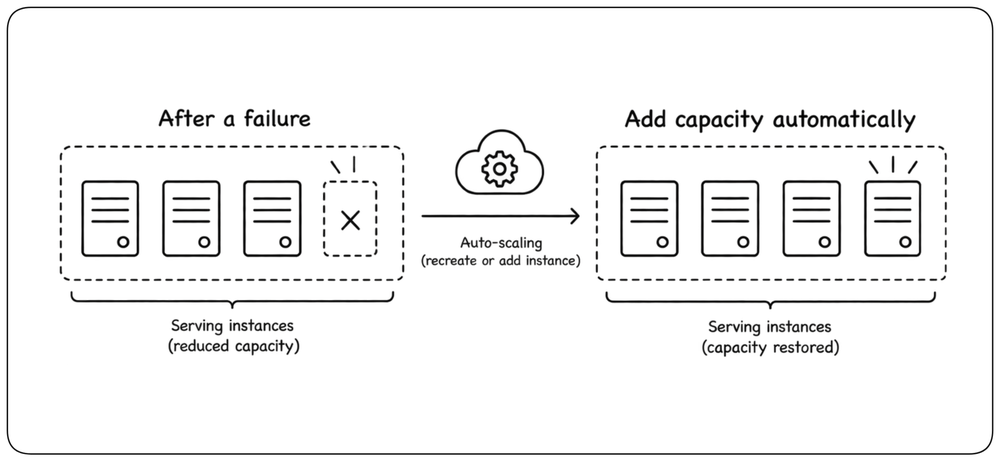
Replace Lost Capacity Dynamically [Dynamic Capacity]
After a failure has reduced the pool, some platforms can recreate or add serving capacity automatically to restore its headroom. Kubernetes, autoscaling systems, and elastic compute pools are common examples. !!Dynamic replacement can reduce permanently reserved spare capacity, but only when new capacity can be obtained quickly and reliably enough.!! Scarce hardware, quotas, or capacity that must be reserved in advance may still require static over-provisioning.
Design Data for Availability [Data Availability]
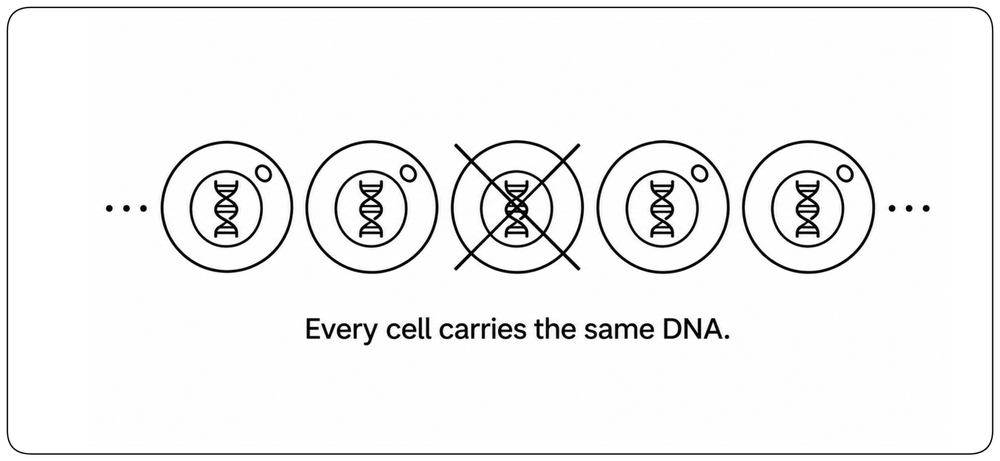
Availability of components that maintain state cannot be solved by redundancy alone. Adding another instance replaces lost capacity, but it does not replace the data the failed component held. The state must survive too — kept in independent copies so that a usable copy remains after failure.
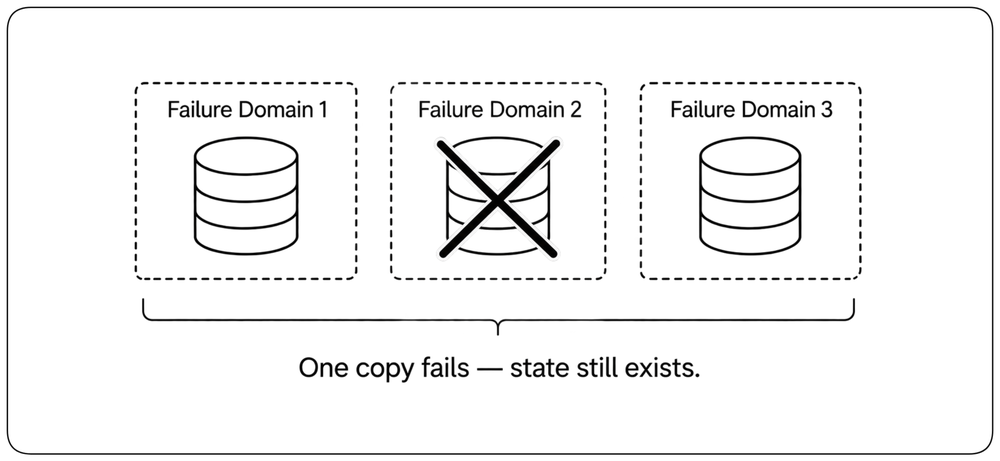
Keep More Than One Copy of State [Multiple State Copies] {1}
State cannot remain available if its only copy is lost. !!Keep multiple copies of state in independent failure domains so that losing one copy does not remove the data.!! Replication creates these replicas—additional copies of the same state—and gives the system something to continue from when a failure occurs.
Decide How Current the Surviving Copy Must Be [Copy Freshness] {1}
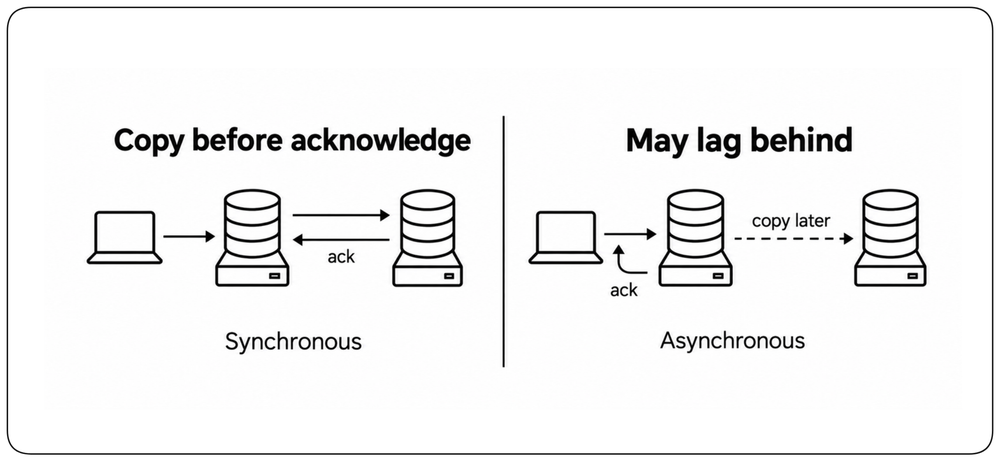
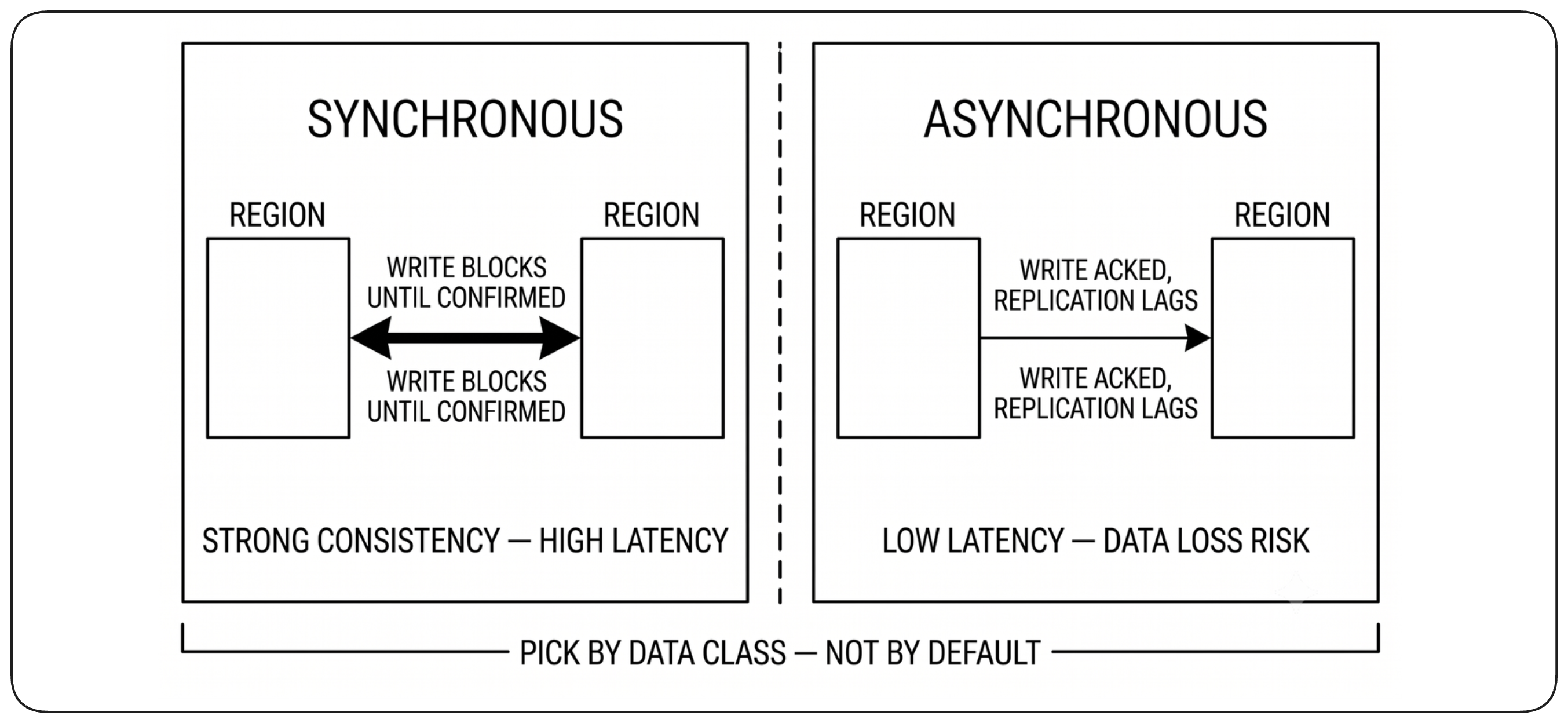
Ideally, the surviving copy would contain exactly the same state as the copy that was lost. In practice, keeping replicas perfectly synchronized has a cost. Synchronous replication reduces the risk of losing recent data, but adds latency and makes writes depend on another copy being reachable. Asynchronous replication allows writes to complete without waiting for another replica, but allows the surviving copy to lag behind. !!The design question is therefore: how different may the surviving copy be from the one that was lost?!!
Fail Over to a Usable Copy [Usable Copy Failover] {1}
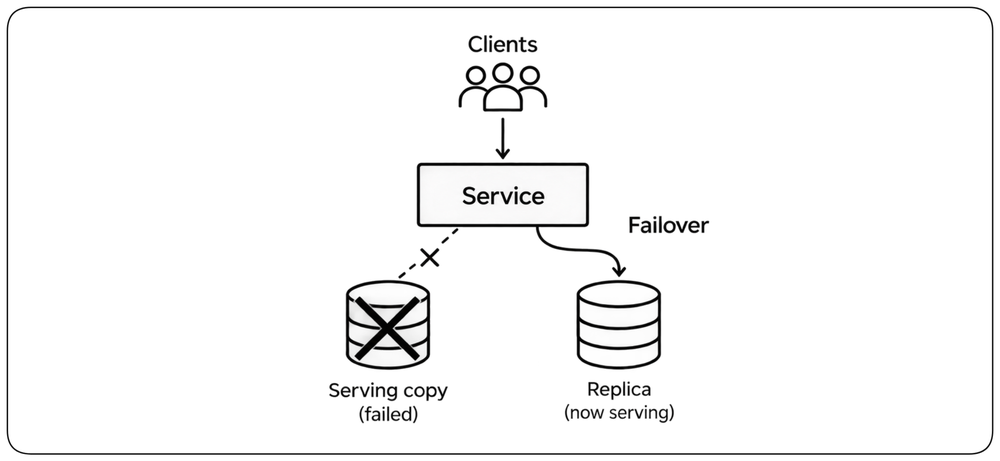
When the serving copy fails, the system must select another replica and redirect service to it. The chosen copy must contain a state the system is prepared to serve. With asynchronous replication, that copy may not hold the most recent writes, so failover can lose them. !!Replication keeps another copy available; failover makes that copy the one the service uses, following the same active-passive principle introduced earlier.!!
Write Models: Single-Writer vs Multi-Writer [Write Model] {1}
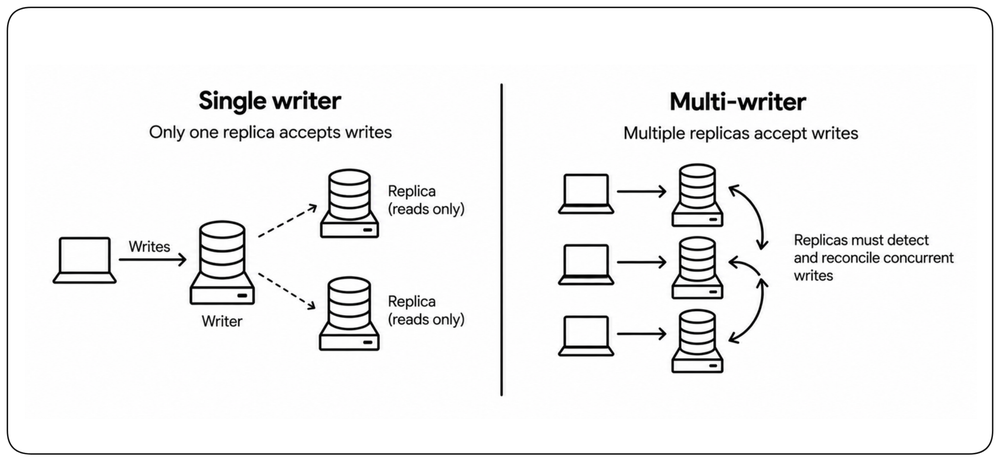
Replicated systems do not all accept writes in the same way. Some use a single writer at a time: only one replica or group is allowed to accept writes. Others allow multiple replicas to accept writes concurrently. Multi-writer systems must be designed to detect and reconcile writes made at the same time on different replicas.
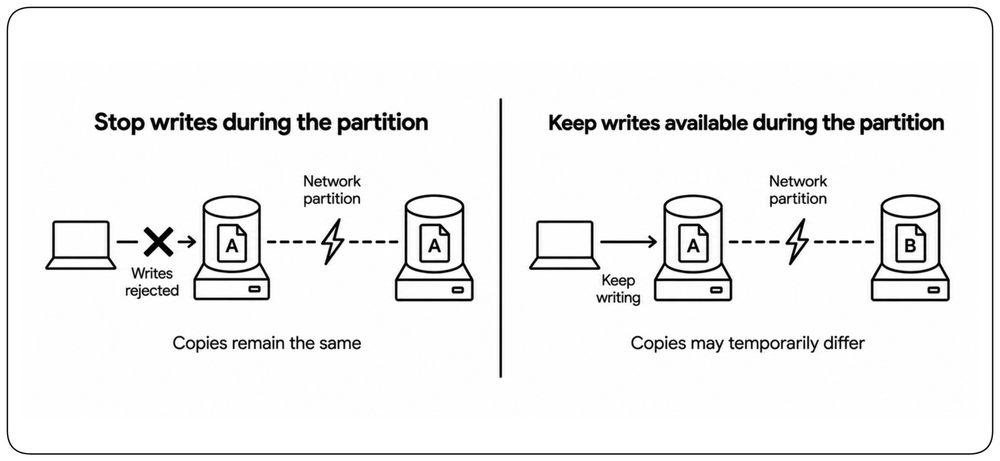
When Replicas Cannot Communicate [Network Partition] {1}
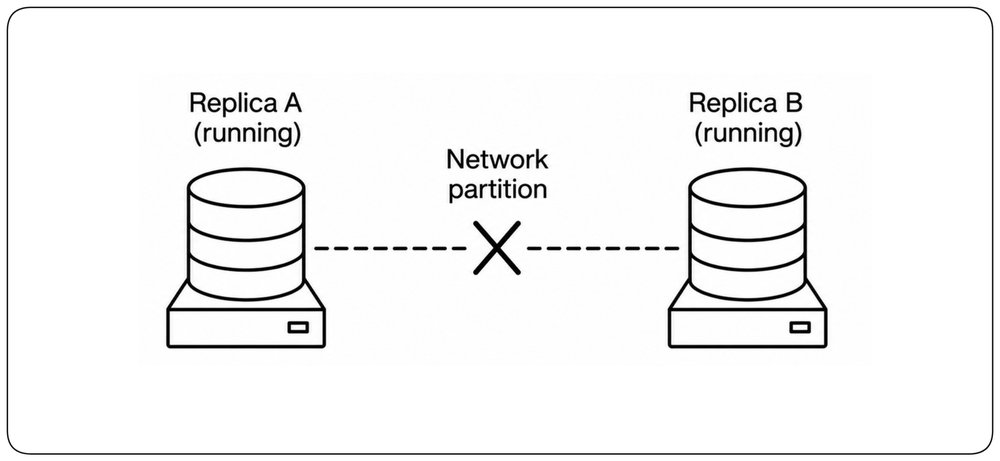
Replicas normally exchange information so that copies of the state can stay synchronized. A network failure can break that communication without stopping the replicas themselves. This is a network partition: each side is still running, but neither side can know what is happening on the other. !!The system must now decide what it can safely continue to do until communication is restored.!!
Decide What Remains Available During a Partition [Partition Choice] {1}
When replicas cannot communicate, the system must choose what to sacrifice. It can stop some operations to keep copies from diverging, or continue serving while accepting that copies may temporarily differ. !!Define explicitly which user capabilities remain available during a partition and how much temporary difference between copies is acceptable.!!
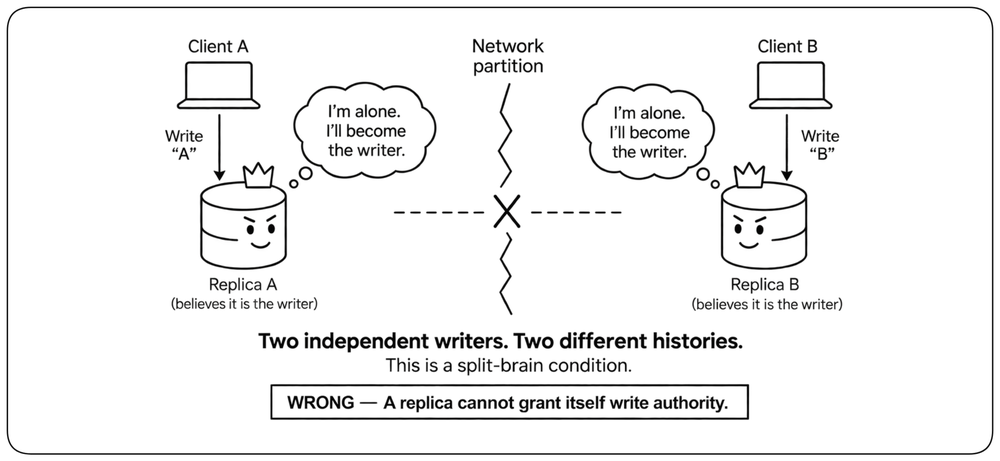
Single-Writer: Prevent Split-Brain Writes [Split Brain] {1}
In a single-writer design, a network partition creates a dangerous ambiguity: each separated group may believe it has authority to accept writes. If both continue independently, each side may accept different writes, creating two conflicting versions of the data. This is split-brain. !!A replica must not be able to decide on its own that it is the writer; write authority must be decided by the system.!!
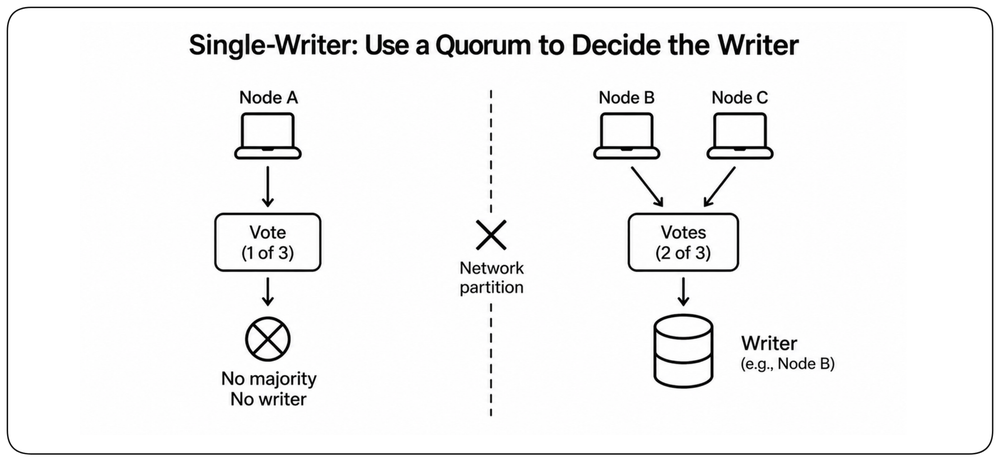
Single-Writer: Use a Quorum to Decide the Writer [Write Ownership] {1}
In a single-writer design, only one writer may have authority at a time. After a failure or network partition, a quorum can determine which side is allowed to establish or keep a writer. !!With three voting nodes, two votes form a majority: the side with two nodes can authorize a writer, while the isolated node cannot.!! This prevents a partition from creating two independent writers.
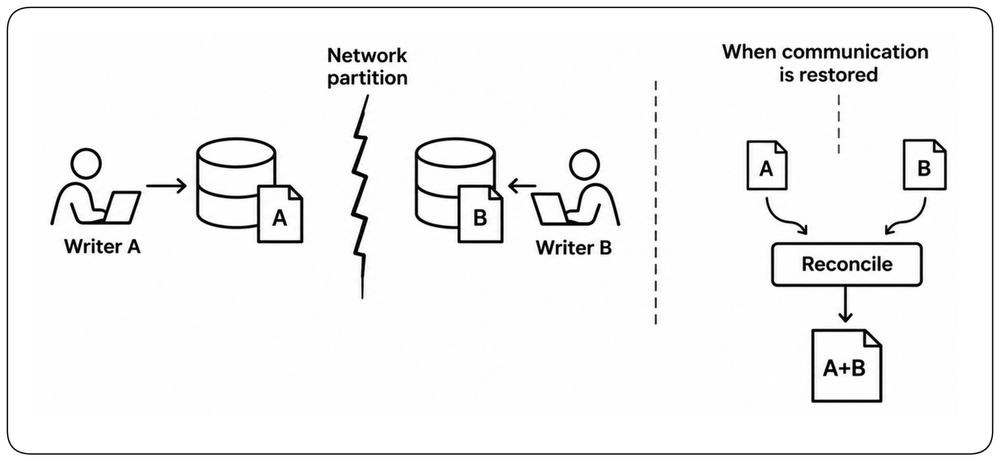
Multi-Writer: Reconcile Concurrent Writes [Concurrent Writes] {1}
In a multi-writer design, multiple replicas are intentionally allowed to accept writes independently. A network partition therefore does not create an invalid write authority by itself. However, the separated writers may update the same data differently. !!The design must include a defined mechanism to detect and reconcile concurrent writes when communication is restored.!!
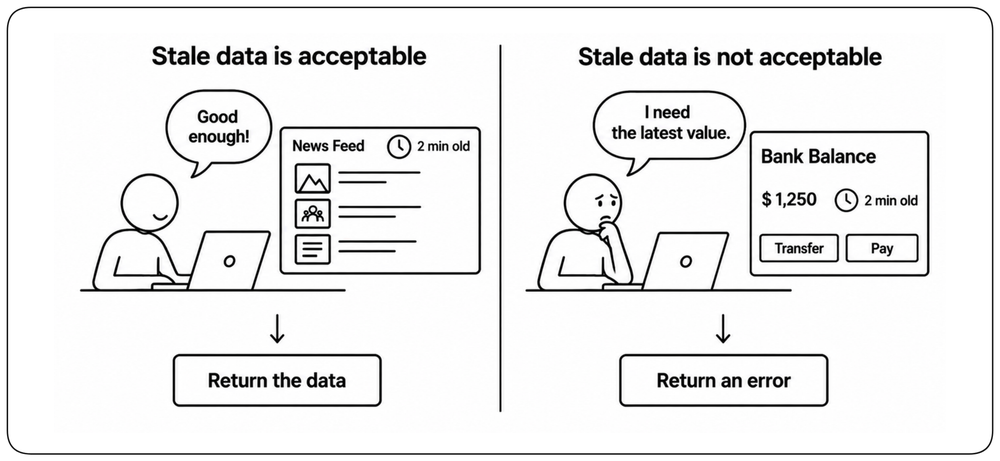
Define How Stale Reads May Be [Read Staleness] {1}
Replicas can keep reads available when the freshest copy cannot be reached. However, another replica may not yet contain the latest writes, so the data it returns can be stale. !!Define how stale a read may become before returning an error is preferable to returning outdated data.!! Different capabilities may make different choices.
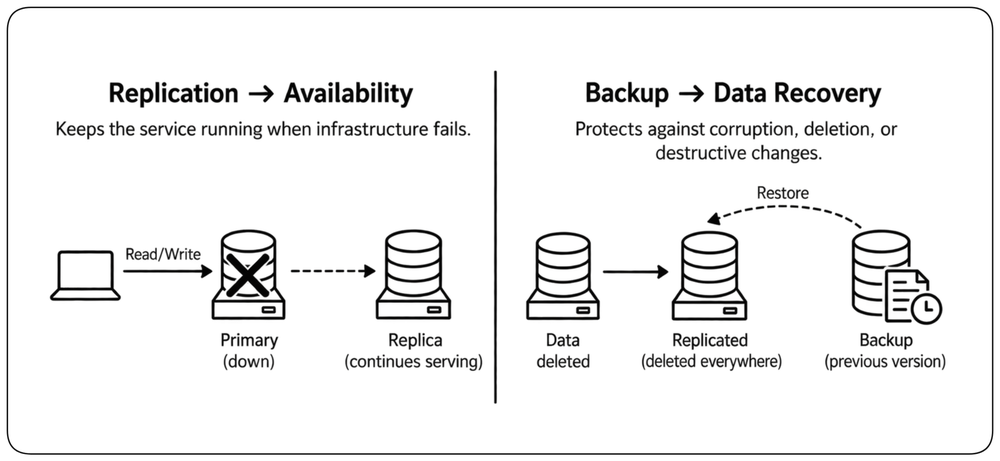
Separate Service Continuity from Data Recovery [Continuity vs Recovery]
Replication and recovery solve different problems. Replicas help the service continue when live infrastructure fails; backups and other independent recovery mechanisms protect against corruption, deletion, or destructive changes that can reach every live replica. Design separately for continuing service and for recovering lost or corrupted data.
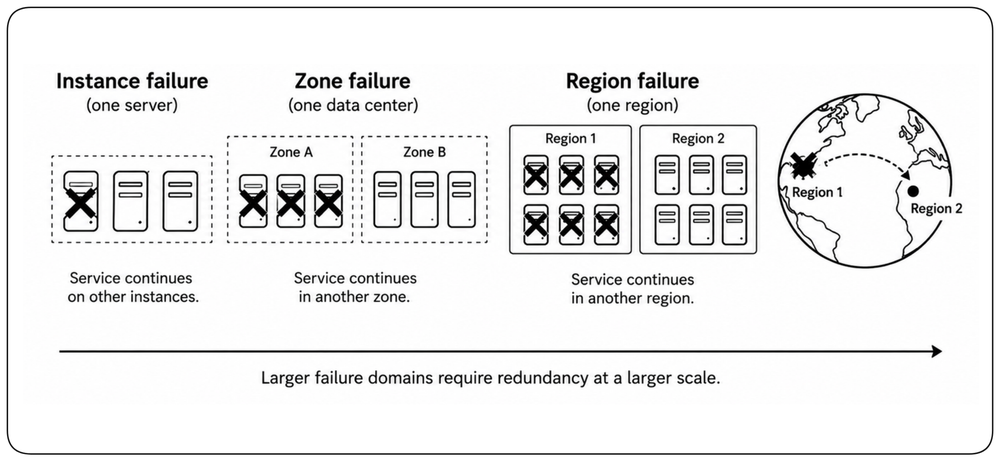
Survive Larger Failure Domains [Larger Failures]
A failure may affect more than a single instance: an entire zone or region can become unavailable. The larger the failure you want to survive, the farther your redundancy must extend. Redundancy across instances can survive an instance failure; redundancy across zones can survive a zone failure; redundancy across regions can survive a regional failure. !!For each failure domain the service must survive, enough compute, state, traffic paths, critical dependencies, and capacity must remain available outside it.!! Losing that failure domain should remove capacity, not the service.
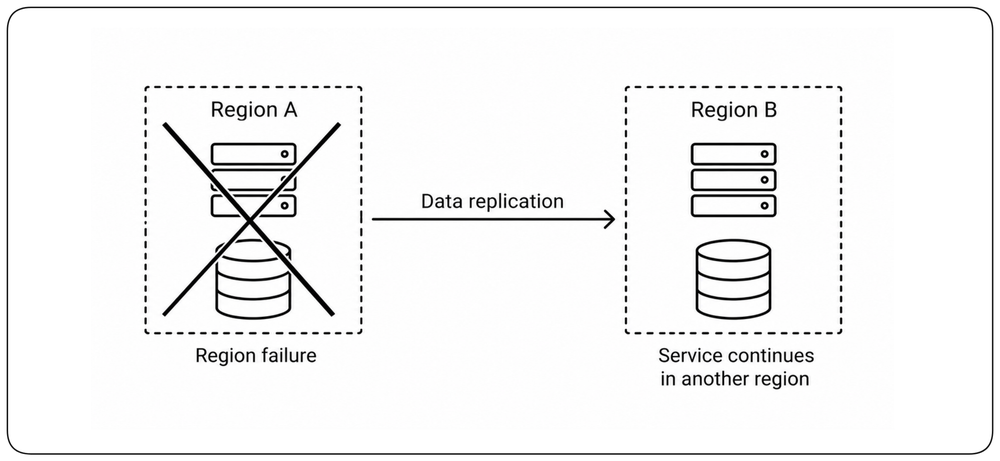
Protect Against Regional Failure [Regional Failure] {1}
A service that must survive a regional failure needs a complete serving path outside the failed region. !!Compute, state, traffic routing, critical dependencies, and sufficient capacity must remain available without that region.!! The surviving region must be able to provide the required capability independently, not merely contain another deployment of the service.
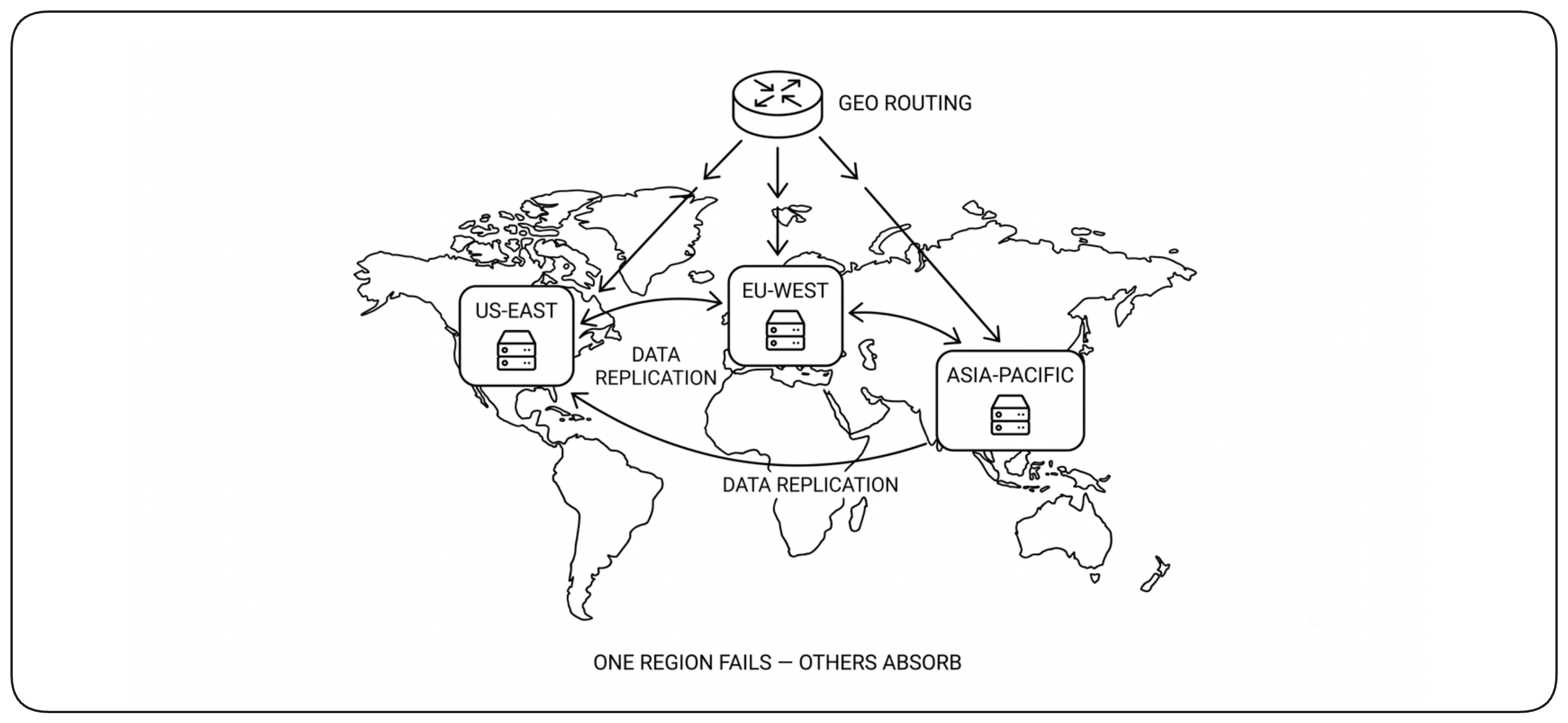
Data Is the Hard Part of Multi-Region Availability [Multi-Region Data]
Compute capacity can usually be recreated in another region, but data cannot simply be recreated after a regional failure without losing continuity. !!To survive a regional failure, a usable copy of the required data must already exist outside the failed region.!! Many managed databases provide multi-region replication and failover, but their guarantees differ. Understand those guarantees before relying on them for regional availability.
Choose a Cross-Region Replication Strategy [Cross-Region Replication]
Regional distance changes the replication tradeoff. Synchronous replication across regions adds wide-area latency to the write path, while asynchronous replication avoids that latency but increases the amount of recent acknowledged data that may be lost during regional failover. !!Choose the cross-region replication strategy from the latency the write path can tolerate and the amount of recent data the service can afford to lose when a region fails.!!
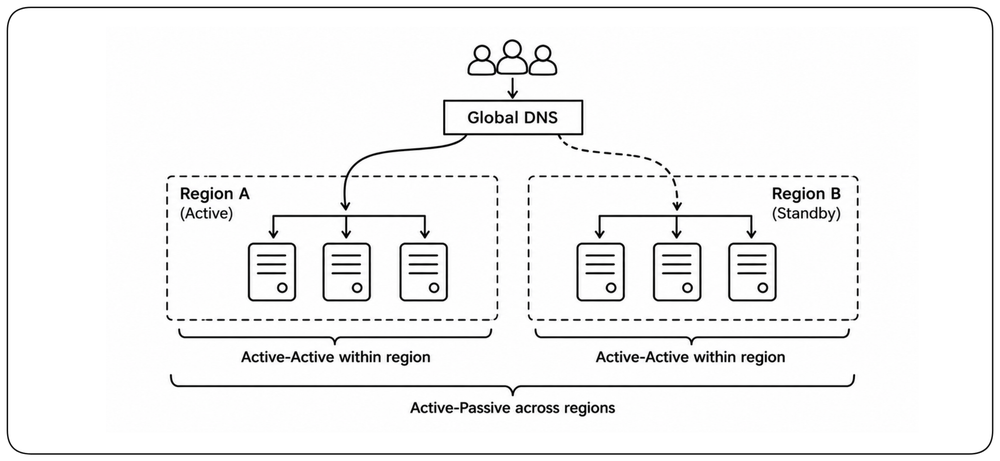
Choose Redundancy per Failure Domain [Combined Patterns]
Different failure domains can use different redundancy models. !!Choose the pattern that keeps the required capability available for each failure domain rather than forcing one model across the entire system.!! For example, a service may use active-active capacity across zones to survive local failures, while using active-passive failover across regions to survive the loss of an entire region.
Preserve Availability During Change [Availability During Change]
A system can become unavailable even when none of its infrastructure has failed. Deployments, configuration changes, schema migrations, and traffic shifts all modify a running system while users are still depending on it. !!Availability must therefore be preserved not only in the final state, but throughout the transition between states.!!
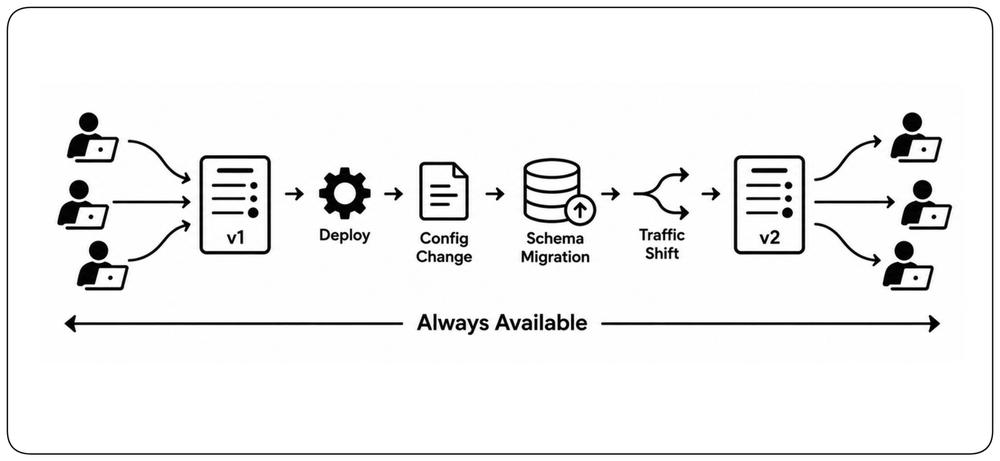
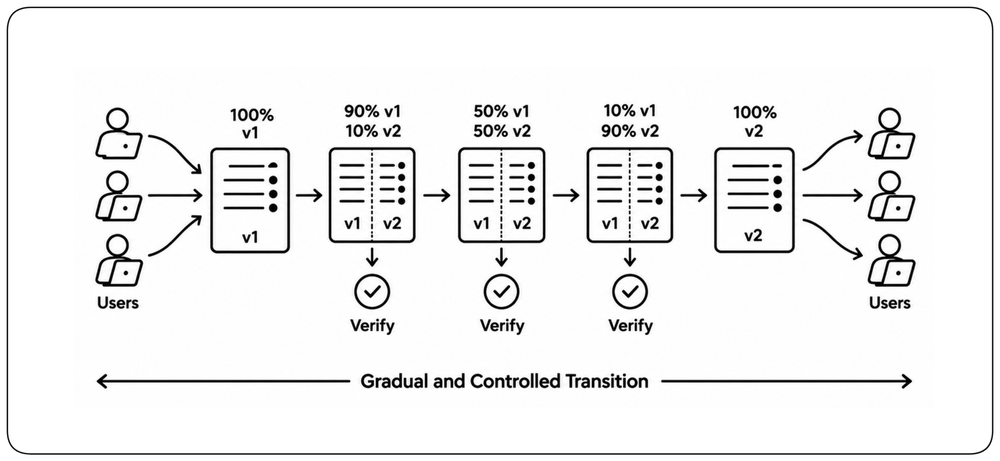
Control the Transition [Controlled Transition] {1}
A production change should move through controlled intermediate states rather than replace the entire running system at once. !!Expose the change gradually, verify the required user capabilities at each step, and stop progression before the availability requirement is breached.!! The architecture must provide the boundaries, health signals, and compatibility needed to make that control possible; detailed rollout techniques belong to release management.
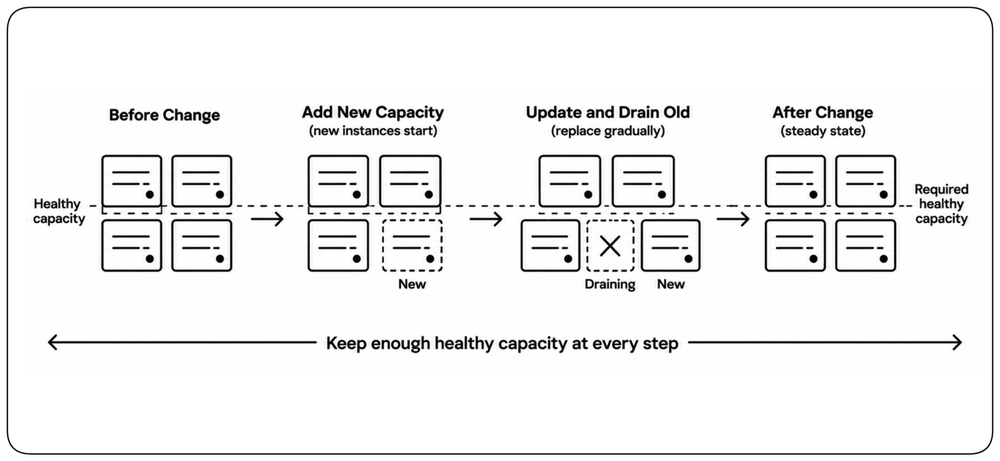
Keep Enough Capacity While the System Changes [Capacity During Change] {1}
Changes can temporarily reduce the healthy capacity available to serve traffic and absorb failures. !!Plan changes against the degraded topology: enough healthy capacity must remain available as new capacity is introduced and old capacity is removed.!! Rolling updates, blue-green deployments, and canary releases are different mechanisms for preserving that margin.
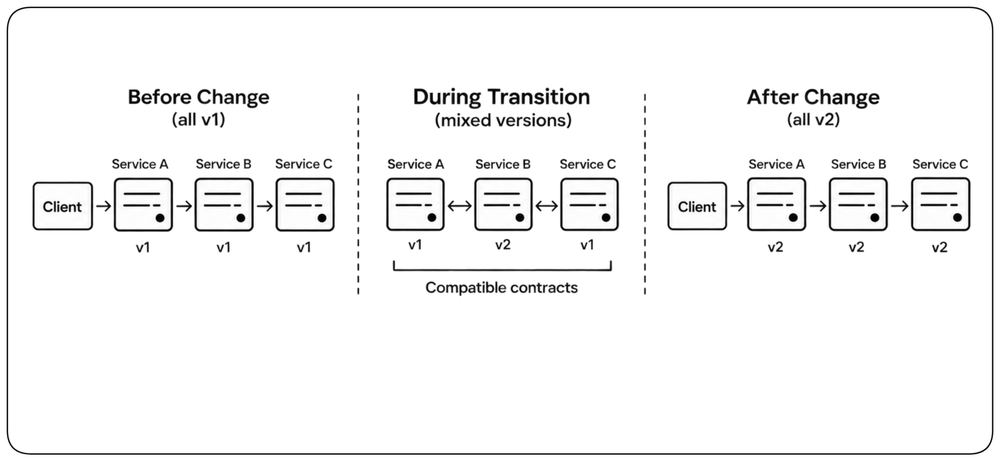
Keep Old and New Versions Compatible [Version Compatibility] {1}
Changes rarely reach every component at the same instant. During a transition, old and new versions may run side by side and communicate with each other. !!Design interfaces, protocols, and data contracts so that mixed versions can coexist safely for the duration of the change.!! A deployment becomes an availability risk when one version assumes that every other component has already changed.
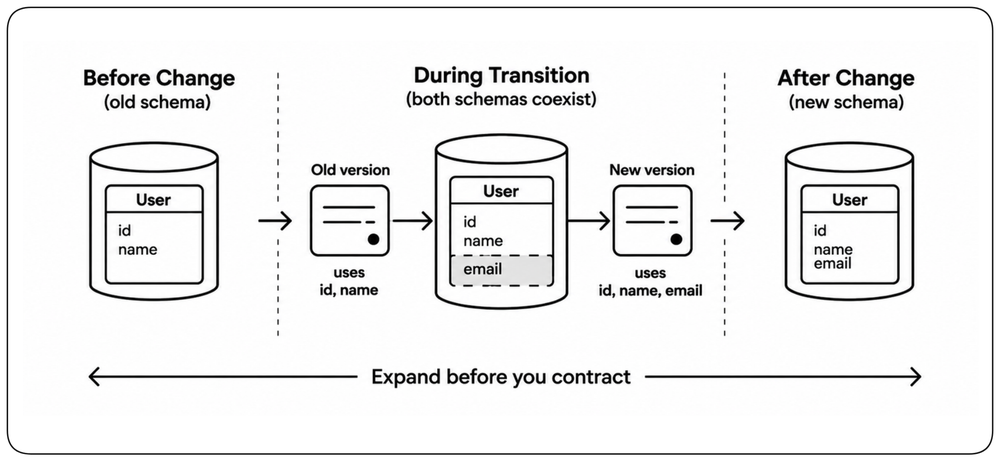
Make Data Changes Expand Before They Contract [Compatible Data Changes] {1}
Data changes are especially difficult because application versions and stored state evolve at different speeds. !!Add the new representation before removing the old one, and keep both usable until every dependent version has completed the transition and existing data has been migrated.!! Expand-contract migrations create this compatibility window and prevent schema evolution from forcing downtime.
Design a Safe Recovery Path [Change Recovery] {1}
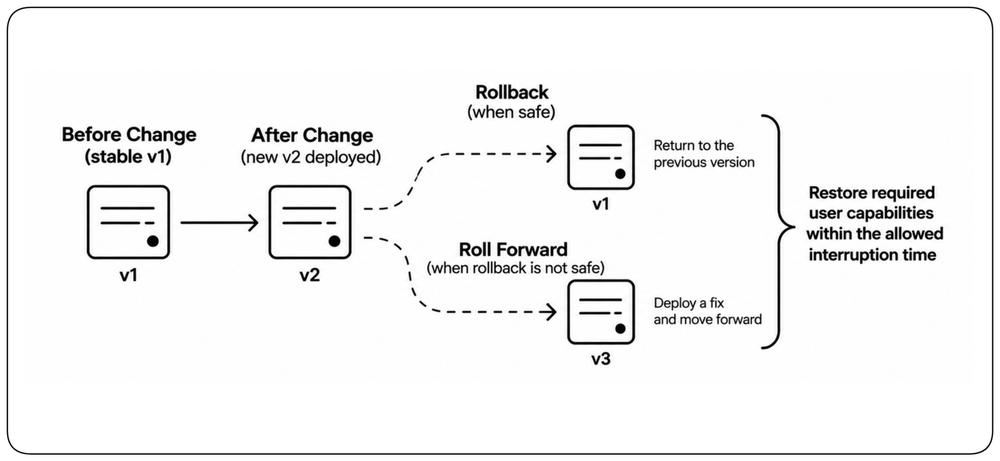
A change is not safe merely because it can be introduced gradually; the system must also have a defined recovery path when the new state proves unhealthy. !!Define the recovery path before the change, using rollback when reversal is safe and an explicit roll-forward path when data, configuration, or external side effects make rollback unsafe.!! Recovery must restore the required user capabilities within the interruption allowed by the availability requirement.
Learn More
Chapter: Design to Be Released, especially the section on Safe Change, which covers the deployment and release techniques used to introduce production changes safely.
Design AI Features for Availability [AI Availability]
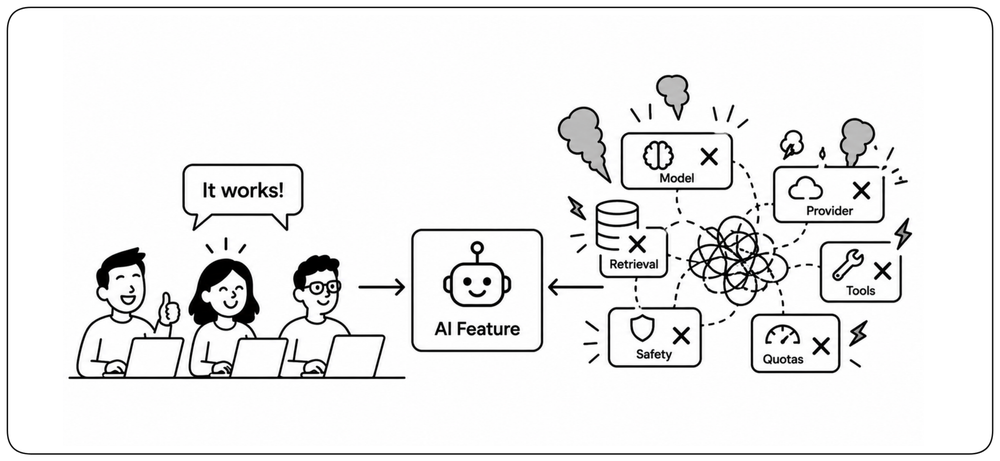
AI availability should be defined at the user-capability boundary, not at the model endpoint. A healthy model is useless when retrieval, tools, safety services, quotas, or provider capacity prevent the capability from completing. Conversely, the product may remain available even when the preferred model is not. !!Design the AI feature so that loss of one model, provider, or dependency does not automatically become loss of the user capability.!!
Model the Complete AI Inference Path [AI Inference Path] {1}
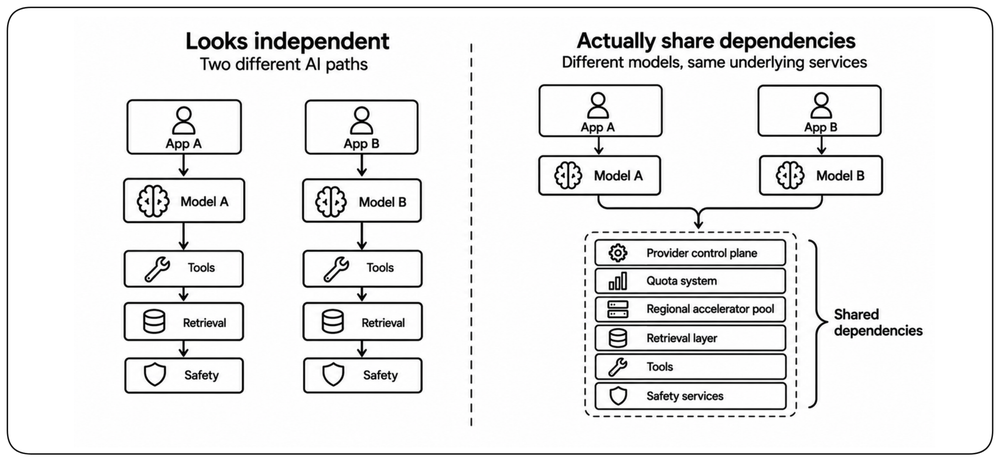
AI paths can appear redundant because they use different endpoints or model deployments while still depending on the same underlying services. An inference request may require model endpoints, retrieval stores, safety services, tools, regional accelerator pools, quota systems, and provider control planes. !!Two apparently independent AI paths are not independent if they share the same provider control plane, quota pool, region, retrieval layer, or critical tool.!! Map the complete path before treating an alternative as protection against failure.
Separate Product Availability from Model Availability [Product vs Model] {1}
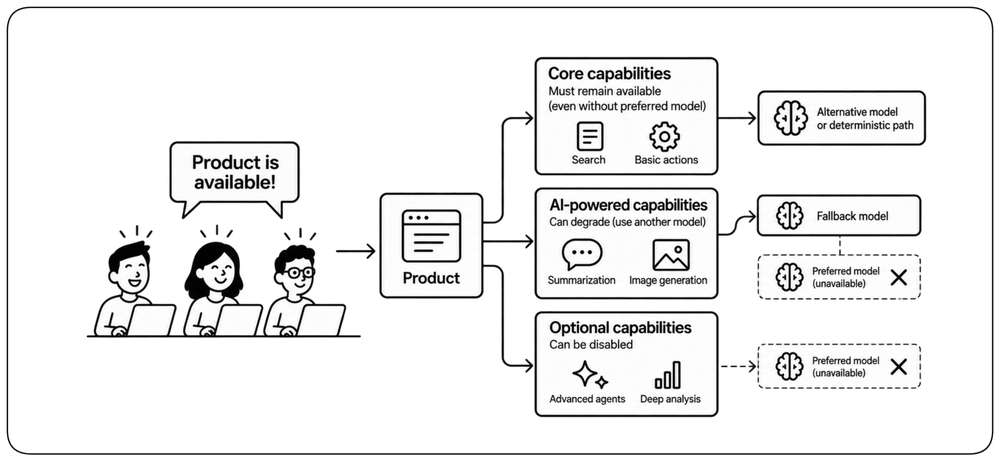
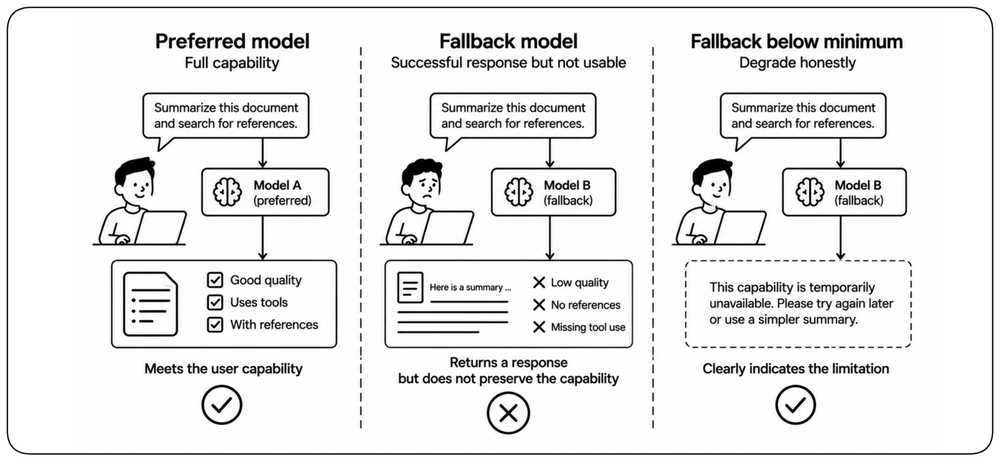
The preferred model is an implementation dependency, not necessarily the availability boundary of the product. Some capabilities may fall back to another model or to a simpler deterministic path when the preferred model is unavailable. This alternative path is the fallback. Optional capabilities may degrade while the core product continues serving. !!Define which user capabilities require AI, which can degrade, and which must remain available without the preferred model.!! This prevents one model deployment from becoming the implicit availability ceiling for the entire service.
Plan AI Capacity for the Degraded Topology [Inference Capacity] {1}
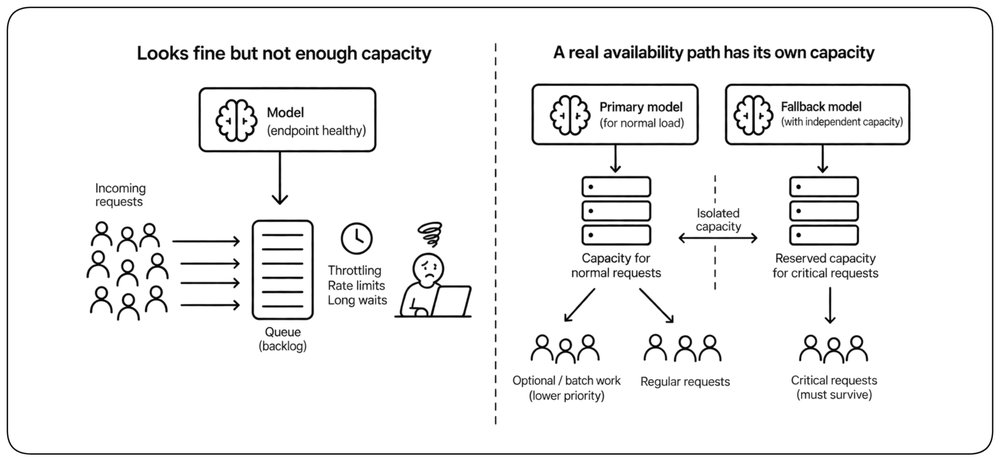
An inference endpoint can be healthy and still be unable to serve the required workload. Accelerator scarcity, token quotas, throttling, long-running requests, and dynamic provider allocation can all turn capacity into an availability constraint. !!A fallback path is not an availability path unless it has enough independent capacity to carry the workload that must survive.!! Capacity isolation and workload priorities keep optional or batch work from exhausting the paths required by critical requests.
A Fallback Must Still Be Usable [Usable AI Fallbacks] {1}
A fallback can return a successful response without preserving an available user capability. Models and providers may differ in output quality, latency, context limits, tool use, safety behavior, and protocol semantics. !!An AI fallback counts as available only when it preserves the minimum acceptable behavior of the user capability.!! Define that minimum explicitly and validate every fallback against it; otherwise degrade the capability honestly instead of returning an unusable or unsafe result.
Prove the Availability Architecture [Prove Availability]
Availability claims are architectural hypotheses until the system demonstrates them under the failures and transitions it promises to survive.
Test Every Availability Promise [Availability Tests] {1}
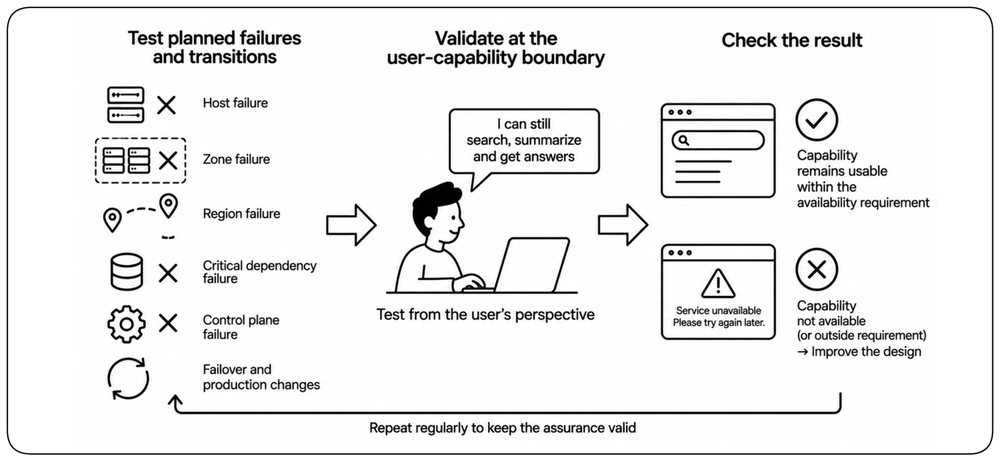
An availability design remains an architectural hypothesis until its promised failures and transitions are exercised. Test the loss of hosts, zones, regions, critical dependencies, and control planes, as well as the failovers and production changes the system claims to tolerate. !!Validate the result at the user-capability boundary, not only through component health.!! A test succeeds when the required capability remains usable within its availability requirement.
Test the Degraded Topology Under Load [Degraded Load] {1}
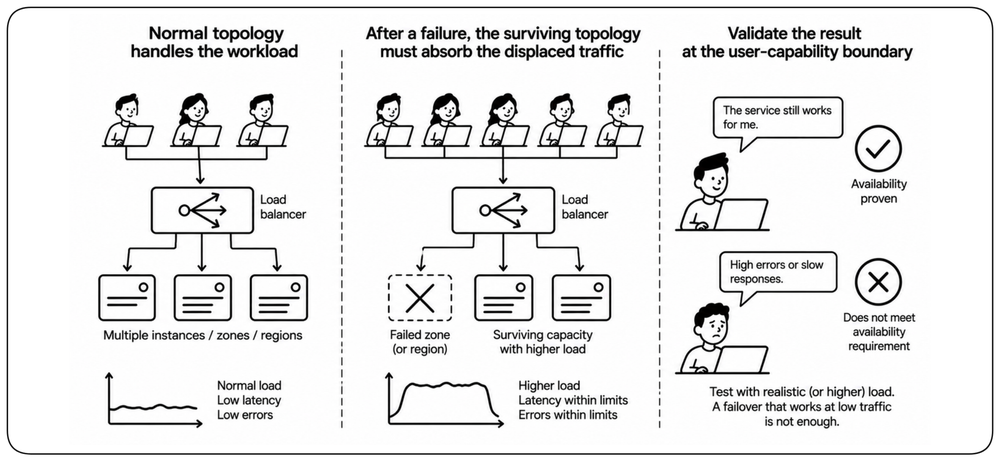
A system may fail over successfully at low traffic and collapse under its real workload. The surviving topology must absorb the displaced traffic while operating with fewer resources, tighter quotas, and less headroom. !!Availability is proven only when the degraded topology carries the required workload within its latency and error limits.!!
Test the Complete Recovery Path [Recovery Tests] {1}
Surviving the initial failure is only the first part of recovery. The system must restore capacity, reconcile state, rebalance traffic, and return to a stable topology without causing another outage. !!The test ends only when the system is stable again, within the permitted data-loss bound and without conflicting ownership.!! Detailed monitoring, alerting, incident response, and runbooks belong to operability.
Learn More
Chapter: Design for Operability.